
What is Proxmox? Proxmox is the company and product family behind Proxmox VE (Proxmox Virtual Environment), an open-source virtualization platform for running virtual machines and Linux containers on one or more physical servers. In virtualization discussions, “Proxmox” usually refers to Proxmox VE. It runs on a Debian-based host and combines KVM/QEMU, LXC, storage, networking, backup, firewall, clustering, and a web management interface in one product.
This guide explains what Proxmox VE is, what it’s used for, how its architecture fits together, whether it counts as a Type 1 hypervisor, and where to find deeper setup and design guidance.
Proxmox VE is a Debian-based virtualization platform that runs KVM/QEMU virtual machines and LXC containers, and can manage a standalone host or a multi-node cluster. Core features are not paywalled by software edition. Subscriptions provide the Enterprise Repository; Basic and higher tiers also include vendor support entitlements. Linux administration knowledge matters in production.
What Is Proxmox?
“Proxmox” is the name of the Austrian company Proxmox Server Solutions and of its product family. The virtualization platform is Proxmox VE, and in virtualization discussions “Proxmox” is shorthand for it. The company also develops separate products that share the name:
- Proxmox Backup Server – a dedicated backup server with deduplication and verification, often paired with Proxmox VE
- Proxmox Mail Gateway – an email security gateway, unrelated to virtualization
- Proxmox Datacenter Manager – central management across multiple Proxmox VE clusters and hosts
So the short answer to “what is Proxmox?” is: a virtualization platform called Proxmox VE, made by a company also called Proxmox. The rest of this article covers Proxmox VE.
What Is Proxmox VE?
Proxmox VE (Proxmox Virtual Environment) is an open-source virtualization management platform built on Debian GNU/Linux. It integrates two guest technologies – KVM/QEMU for full virtual machines and LXC for Linux system containers – under one browser-based web interface, with a CLI and REST API for the same operations. A single Proxmox VE installation is called a node, and nodes can run standalone or join a multi-node cluster.
The cluster filesystem (pmxcfs) keeps configuration – VM definitions, storage mappings, firewall rules – synchronized across every node in a cluster, using Corosync for the underlying communication. It synchronizes configuration and state, not guest disk data. That mechanism lets a multi-node Proxmox cluster present one consistent management view instead of several independently configured hosts.
At the time of writing, the current release is Proxmox VE 9.2 (May 2026), based on Debian 13.5 “Trixie” with Linux kernel 7.0, QEMU 11.0, and LXC 7.0. In August 2026, Proxmox released the first officially supported Arm64 edition of Proxmox VE 9.2. Version numbers will keep moving; the architecture (Debian base, KVM/QEMU, LXC, integrated management layer) is the durable part.
What Is Proxmox Used For?
Proxmox VE is commonly used to:
- Consolidate multiple physical servers into virtual machines on fewer hosts
- Run Windows and Linux virtual machines side by side on the same platform
- Run Linux system containers for lightweight, isolated services
- Build homelab and SMB virtualization hosts, from a single mini-PC to several rack servers
- Migrate selected workloads from VMware environments
- Run multi-node clusters for centralized management and live migration
- Restart protected guests on a surviving node automatically after a host failure, in a properly designed HA cluster
- Schedule native backups, or connect to Proxmox Backup Server for deduplicated, verified backups
- Use integrated storage, networking, and firewall features without separate licensing
A common answer to what is Proxmox used for is a single Proxmox server in a homelab or a small office, replacing either bare-metal services or an older hypervisor. Clusters, HA, and shared storage come later, when the workload justifies the extra design work.
Is Proxmox a Type 1 Hypervisor?
Proxmox VE is commonly described as a Type 1 or bare-metal hypervisor platform, since it installs directly on server hardware and uses KVM in the Linux kernel to run full virtual machines. Strictly speaking, Proxmox VE is broader than the hypervisor itself: it’s a virtualization management platform that combines KVM/QEMU for VMs, LXC for Linux containers, and integrated storage, networking, backup, firewall, and clustering around them.
The precise breakdown:
- KVM is the actual hypervisor layer – the part of the Linux kernel that runs virtual machines with hardware virtualization support.
- QEMU supplies the VM process and device model on top of KVM.
- LXC containers use OS-level virtualization and share the host kernel, so they don’t run through KVM and aren’t part of “the hypervisor” in the strict sense.
- Proxmox VE is the platform wrapping all of this: the web UI, CLI, API, and integrated services that make KVM/QEMU and LXC usable as one product rather than a collection of separate Linux tools.
For everyday infrastructure discussions, calling Proxmox VE a Type 1 hypervisor platform is reasonable. For troubleshooting or architecture work, the distinction matters because KVM, QEMU, LXC, and the Proxmox management layer are separate components.
What Is Proxmox Based On?
Proxmox VE is built on Debian GNU/Linux, using a Proxmox-maintained kernel on top of the standard Debian base. Virtualization comes from KVM (built into the Linux kernel) and QEMU (device emulation); containers come from LXC. Networking runs on the standard Linux networking stack – bridges, VLANs, and bonds – and storage uses Linux-native technologies such as LVM, ZFS, and Ceph, exposed through Proxmox’s own management layer.
The answer to what is Proxmox based on also explains why Linux skills transfer directly: package management, logs, networking files, and storage tools on a Proxmox host are the same ones a Debian administrator already knows.
Proxmox VE Architecture: KVM, LXC, Storage, and Management
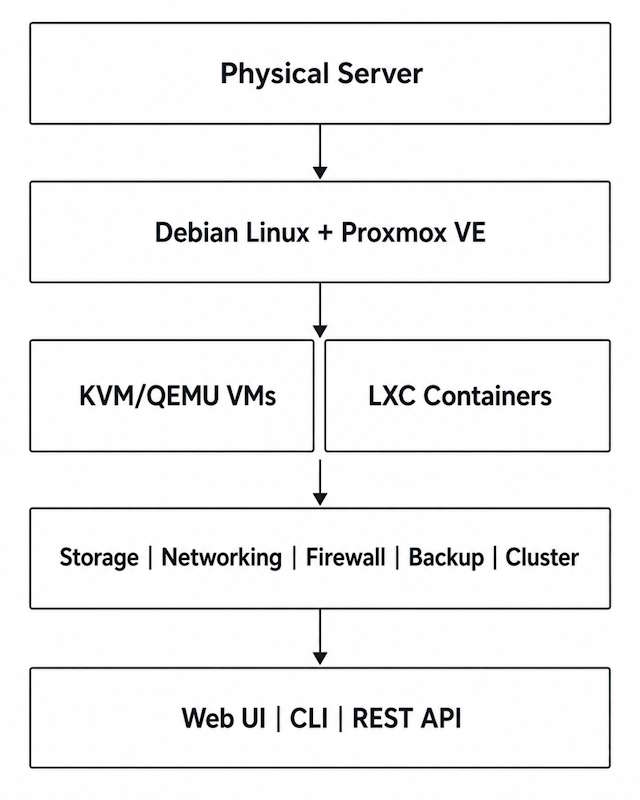
The architecture answers the second half of “what is Proxmox and how does it work?” From the bottom up, the Proxmox VE architecture has five layers: physical hardware, the Debian host with the Proxmox kernel, the two guest engines (KVM/QEMU and LXC), the Proxmox management layer, and the interfaces on top (web UI, CLI, REST API). Storage, networking, firewall, backup, and cluster services are managed by that same layer, so they behave as one system rather than separate tools.
KVM and QEMU for Virtual Machines
KVM is the Linux kernel’s built-in virtualization support, turning the kernel itself into a hypervisor. QEMU handles device emulation and the VM process model on top of it. Together, KVM/QEMU run full virtual machines with their own kernels, isolated from the host and from other VMs. On x86-64 hosts this covers common Windows and Linux guests. VirtIO paravirtualized drivers improve virtual disk and network performance over fully emulated devices and are standard practice for both Windows and Linux guests.
LXC for Linux Containers
LXC provides system containers that share the host’s Linux kernel rather than running their own. That makes them Linux-only, but with a generally lighter footprint than an equivalent VM for many workloads – the exact difference depends on what’s running inside. LXC is not Docker: LXC containers behave like lightweight Linux systems with their own init and services, while Docker is an application-container ecosystem. See Proxmox LXC vs VM for a detailed comparison of the two guest types.
Web UI, CLI, and API
The web interface runs on port 8006 by default. Most operations available there are also exposed through the CLI (qm for VMs, pct for containers) and the REST API (pvesh for direct access, or any HTTP client). That parity makes automation practical: most manual tasks in the UI have a scriptable equivalent.
What Is a Proxmox Node?
A node is a single physical or virtualized host running Proxmox VE. A standalone node manages itself. Multiple nodes can join a cluster and share configuration through the cluster filesystem, so VMs, storage definitions, and firewall rules stay consistent across every member. Each node still has its own CPU and RAM and connects to whatever storage and networks are configured for it, local or shared.
Single Proxmox Host vs Proxmox Cluster
| Standalone node | Cluster | |
|---|---|---|
| Management | One host | Multiple nodes under one cluster view |
| VMs / containers | Yes | Yes |
| Shared configuration | Not needed | Cluster configuration synchronized automatically |
| Live migration | Not applicable between hosts | Available when guest, storage, and device requirements permit |
| High availability | No multi-host HA | Available with proper quorum, storage, and capacity design |
| Best fit | Lab, small isolated host, simple workloads | Multi-host production, availability, operational scale |
A single node is a valid deployment for a homelab or a small isolated workload. Clustering becomes worthwhile once you need centralized management across hosts, live migration, or automated failover – see Proxmox HA Cluster and Proxmox HA Explained for the quorum, storage, and fencing design that makes HA work.
Proxmox VE Features and Capabilities
| Capability | What it means |
|---|---|
| Virtual machines | KVM/QEMU guests running full operating systems |
| Containers | LXC system containers sharing the host kernel |
| Storage | Local and shared storage backends – see Proxmox Storage |
| Networking | Linux bridges, VLANs, bonds, and SDN – see Proxmox Networking |
| Backup | Native vzdump, plus Proxmox Backup Server integration – see Proxmox Backup Strategy |
| Clustering | Multi-node management with synchronized configuration |
| Live migration | Move compatible running guests between cluster nodes |
| High availability | Restart protected guests on a surviving node after a host failure, in a valid HA design |
| Firewall | Policy layers at the datacenter, node, and guest level |
| API and automation | Full REST API, CLI tools, and third-party automation support |
A snapshot is not a backup. It’s a point-in-time reference on the same storage, useful for quick rollback but not a substitute for a real backup with independent retention.
Is Proxmox Free?
Proxmox VE is open-source software. Core virtualization, clustering, HA, live migration, storage, firewall, and API functionality are all available without buying a separate software edition. There is no feature-gated tier for core VE functionality.
Proxmox sells optional annual subscriptions priced per occupied CPU socket. They provide access to the Enterprise Repository – the more heavily tested package channel Proxmox recommends for production – and, starting from the Basic tier, vendor support ticket entitlements. The Community subscription includes Enterprise Repository access but not support tickets. Check the official pricing page for current rates.
Without a subscription, Proxmox VE can use the pve-no-subscription repository instead. It doesn’t need a subscription key, but Proxmox recommends the Enterprise Repository for production, since packages there get additional testing before release, per the Proxmox VE Administration Guide.
What Proxmox Is Not
Not Docker. LXC is a system-container technology – full Linux environments sharing the host kernel. Docker is an application-container ecosystem. Docker can run inside a Proxmox VM, and with extra configuration inside an LXC container, but Proxmox doesn’t manage Docker containers as a native guest type.
Not Kubernetes. Proxmox VE runs VMs and containers; it doesn’t orchestrate microservices. You can host Kubernetes nodes as VMs on Proxmox, but Proxmox sits below Kubernetes in the stack, not in place of it.
Not a drop-in VMware replacement. Proxmox has a built-in ESXi import wizard, but the platform model, networking, storage design, backup ecosystem, and automation tooling all differ from VMware. Treat a move as a planned project – see ESXi to Proxmox Migration if that’s the scenario.
Not “just KVM with a web UI.” Storage, networking, firewall, and cluster state are first-class, API-managed objects in Proxmox, not scripts layered on top of a bare hypervisor. That integration is a large part of what the platform provides.
Who Is Proxmox For?
Fit depends more on operational capability and certification requirements than on feature lists.
Good fit:
- Linux-capable infrastructure teams
- Homelabs and learning environments
- SMB and mid-market virtualization
- Teams wanting KVM and LXC with integrated management in one platform
- Teams comfortable validating their own hardware and owning architecture decisions
Less ideal fit:
- Environments where application or vendor certification mandates a different hypervisor
- Teams with no Linux operational capability and no plan to build it
- Environments deeply dependent on VMware-specific workflows and ecosystem tooling
Proxmox is often evaluated against VMware ESXi, Hyper-V, and XCP-ng. For the detailed tradeoffs, see Proxmox vs ESXi and Proxmox vs Hyper-V.
Proxmox Advantages and Limitations
| Advantages | Limitations / responsibilities |
|---|---|
| Open-source stack | Linux operations knowledge matters in production |
| KVM and LXC in one platform | Hardware validation is your responsibility |
| Integrated clustering, storage, networking, firewall | Architecture choices still require technical expertise |
| No feature-tier software edition for core VE capabilities | Enterprise ecosystem and vendor certification varies by product |
| Web UI, CLI, and REST API together | Storage and network misconfiguration can still cause outages |
| Optional paid support and repository access | Backup, monitoring, and lifecycle management still need deliberate design |
How to Get Started With Proxmox
- Check the installation and hardware requirements for your target host
- Install the current Proxmox VE ISO
- Complete post-install configuration – repositories, updates, basic hardening – before running production workloads
See How to Install Proxmox VE for the installation walkthrough and Things to Do After Installing Proxmox for the post-install steps. If you’re choosing hardware for a new build, Best Mini PC for Proxmox covers homelab-scale options.
FAQ
What is Proxmox?
Proxmox is a company and product family; in everyday use, “Proxmox” means Proxmox VE, an open-source virtualization platform that runs virtual machines and Linux containers on Debian-based hosts. It’s managed through a web interface, CLI, and REST API, as a standalone host or a multi-node cluster.
What is Proxmox VE?
Proxmox VE stands for Proxmox Virtual Environment – the virtualization platform itself. The company also makes Proxmox Backup Server, Proxmox Mail Gateway, and Proxmox Datacenter Manager, but “Proxmox” in casual conversation usually means Proxmox VE.
What is Proxmox used for?
Consolidating physical servers into VMs, running Linux containers, hosting mixed Windows/Linux infrastructure, building homelab or SMB virtualization hosts, and running multi-node clusters with live migration and high availability.
What is Proxmox based on?
Debian GNU/Linux, with KVM/QEMU for virtual machines and LXC for containers, on top of the standard Linux networking and storage stack.
Is Proxmox a Type 1 hypervisor?
It’s commonly described as one, because it installs directly on hardware and uses KVM. Strictly, KVM is the hypervisor layer and Proxmox VE is the management platform built around it, plus LXC, storage, networking, and clustering.
Is Proxmox free?
Yes. The core software is open-source with no feature-gated editions. Optional paid subscriptions add the Enterprise Repository and, from the Basic tier up, vendor support tickets.
Does Proxmox run Windows VMs?
Yes, through KVM/QEMU. VirtIO drivers are typically installed for better virtual disk and network performance.
Is Proxmox the same as Docker?
No. Proxmox natively manages LXC system containers and KVM virtual machines, not Docker containers. Docker can run inside a VM or, with extra configuration, inside an LXC container.
Do I need Linux experience for Proxmox?
Basic installation and VM creation work through the web UI without much Linux background. Production operations – troubleshooting, storage design, networking issues – benefit a lot from Linux administration skills.
Proxmox VE Series
28 articles – Installation · Storage · Networking · HA · Recovery