
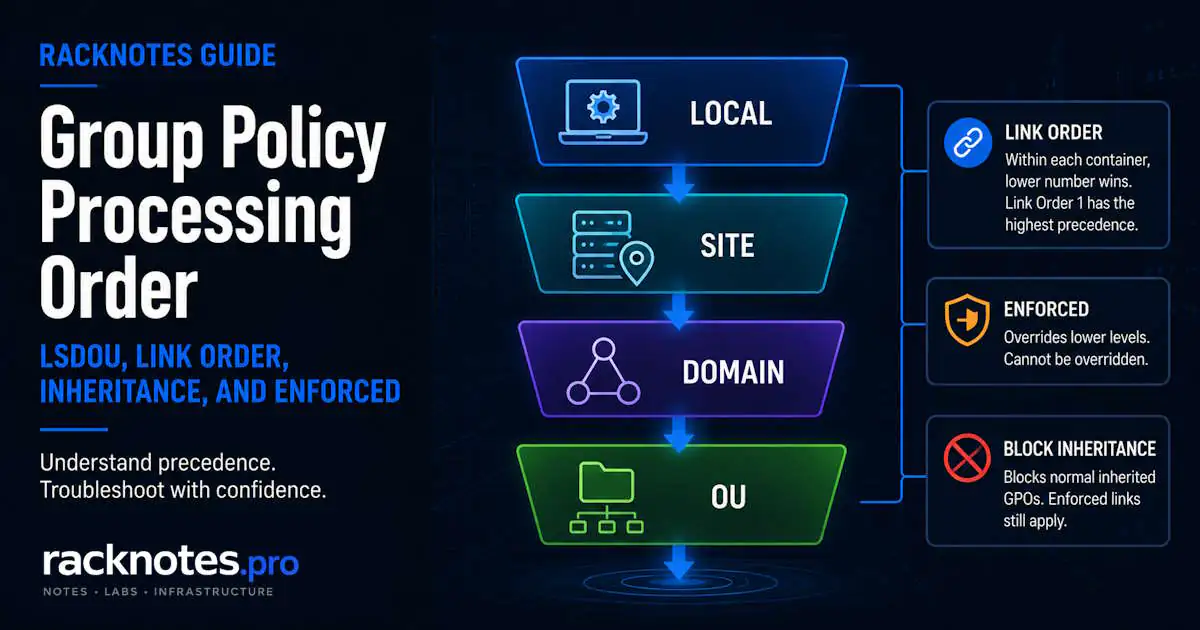
When two or more applicable GPOs configure the same setting, the result depends on the target’s LSDOU path, inheritance, Link Order, Enforced links, Block Inheritance, and any filtering that determines whether each GPO applies at all. Group policy precedence is the effective outcome of those rules working together, not a single numeric priority. Within one Site, Domain, or OU, the link with the lowest Link Order number has the highest precedence, but that rule only applies among links on the same container.
In short, Group Policy precedence works like this: Windows processes GPOs Local, Site, Domain, then OU (LSDOU), with parent OUs before child OUs. Within one Site, Domain, or OU, the lowest Link Order number has the highest precedence and normally wins a direct conflict there. Enforced links can prevent lower-level GPOs from overriding their settings, and Enforced inherited links survive Block Inheritance. None of these rules matter for a GPO that was never eligible to apply.
- Group policy precedence depends on LSDOU, Link Order, inheritance, Enforced links, Block Inheritance, and filtering working together, not any single rule in isolation.
- Processing order runs Local, Site, Domain, then OU, with parent OUs processed before child OUs.
- Within one container, the link with the lowest Link Order number has the highest precedence.
- Enforced is a property of the link, not the GPO object. It stops lower-level containers from overriding that link’s settings.
- Block Inheritance removes non-Enforced inherited links from a domain or OU. Enforced links survive it.
- Link status, GPO status, security filtering, and WMI filtering decide eligibility before precedence matters at all.
- Confirm the actual winner with Group Policy Results or
gpresult /h. Treatrsop.mscas incomplete.
This article covers precedence between GPOs that are already eligible to apply. Full security filtering troubleshooting and loopback-specific troubleshooting both have their own dedicated guides, referenced in context further down.
What Is Group Policy Precedence?
Group policy precedence is which applicable GPO wins when two or more configure the same setting. That is a narrower question than it sounds, because two things have to be true before precedence is even relevant.
First, the GPO has to be eligible. Scope, link status, GPO status, security filtering, and WMI filtering all decide whether a GPO enters the applicable list at all. Second, if more than one eligible GPO touches the same setting, precedence decides which value the client keeps.
Eligibility and precedence are separate checks, even though they are often treated as one problem. A GPO with the highest possible precedence, Enforced, Link Order 1, at the end of the LSDOU chain, still contributes nothing if it fails a WMI filter or the target lacks Apply Group Policy permission. Precedence only resolves conflicts among GPOs that already cleared eligibility, and a GPO excluded by filtering, permissions, or link state cannot win a precedence conflict regardless of where it sits in the chain.
For a typical registry-based Administrative Template setting, the higher-precedence GPO normally supplies the effective value when two applicable GPOs configure the same setting. Some client-side extensions and Group Policy Preferences merge, accumulate, or process items according to their own extension-specific rules, so not every policy area behaves as a simple last-write conflict. Confirm the actual applied result for that policy area instead of assuming every setting resolves the same way.
What Is the Group Policy Processing Order?
The Group Policy processing order is the baseline sequence Windows uses to build the applicable-GPO list before precedence resolves conflicts among applicable GPOs. Operators shorten it to LSDOU.
LSDOU Explained
Local, Site, Domain, then Organizational Unit. Parent OUs process before child OUs within that last stage. The default GPO hierarchy is Local, Site, Domain, then OU, with parent OUs processed before child OUs. Microsoft documents this as the baseline processing model for currently supported Windows Server versions.
Later processing in that chain normally means higher precedence for a conflicting setting. An OU-linked GPO usually beats a Domain GPO. A Domain GPO usually beats Local Group Policy. Enforced, Block Inheritance, filtering, or a policy-specific processing rule can all change that default result.
On client and member-server systems, Local itself is not one flat layer. Multiple Local GPOs can process as Local Computer Policy, then Administrators or Non-Administrators policy, then a user-specific local policy. Domain controllers do not support Multiple Local GPOs.
Parent OU vs Child OU
GPOs linked at a parent OU are inherited by child OUs by default, and the child OU’s own links process last. That is why a child-OU GPO normally wins a conflict against anything inherited from above. It is not because the child OU is “more specific.” It wins because it processes later in the sequence. Using specificity as shorthand can obscure the actual processing rule.
Local Group Policy vs Domain Group Policy
Local Group Policy sits at the start of the chain and has the lowest default precedence against any applicable domain-based GPO. A domain-linked GPO configuring the same setting normally wins, since it processes later. Local Group Policy still matters on machines with few or no applicable domain links, and it stays in effect for anything no domain GPO touches.
Computer vs User Group Policy Processing
Windows builds Computer Configuration and User Configuration as two separate lists, each running its own LSDOU path. Computer Configuration follows the computer’s own site, domain, and OU. User Configuration normally follows the user account’s domain and OU, using the site of the computer they signed into. Loopback processing is the documented exception, and it is covered further down.
Computer Configuration and User Configuration are processed as separate policy scopes, so their GPO links should not be treated as one combined Link Order list. Where equivalent computer-side and user-side policy settings can conflict, follow the behavior documented for that specific policy area. Microsoft notes that computer-related policy settings override user-related policy settings by default when both configure the same policy area.
Group Policy Link Order: Does Link Order 1 Have the Highest Precedence?
Yes. Within one Site, Domain, or OU, the GPO Link Order determines precedence among links attached to that same container, and the link with the lowest number has the highest precedence there.
Link Order numbering is easy to misread because Link Order 1 has the highest precedence but is processed last at that container. That is why it wins conflicts there.
OU=Workstations
Link Order 1: Security Baseline
Link Order 2: Browser Settings
Link Order 3: Legacy Exceptions
If all three configure the same registry-based setting and nothing else intervenes, Security Baseline has the highest precedence and normally wins. Legacy Exceptions loses that conflict despite having the highest Link Order number on the list.
Link Order numbers are not comparable across different containers. A Domain link at position 1 and a child-OU link at position 1 are not competing with each other; that comparison follows LSDOU and Enforced status instead. Renaming a GPO does not affect precedence. Deleting and relinking one can, since the new link may land at the bottom of the list, so verify the order after any relink.
How Group Policy Inheritance Affects Precedence
How GPO Inheritance Works
Inheritance determines which higher-level GPO links reach a child container under the normal hierarchy, before Link Order is evaluated among links attached to the same container. A GPO linked at a higher container applies to child objects unless eligibility rules or Block Inheritance stop it. Block Inheritance can remove normal inherited links, while Enforced links survive that block. Inheritance on its own does not create precedence: a grandparent-OU GPO loses to a normal child-OU GPO because the child-OU link processes later, not because the child OU outranks it organizationally.
A common failure pattern is an intermediate parent OU with Block Inheritance enabled somewhere in the path. Mapping only the immediate container can hide that condition, since the setting that disappeared may have been inherited from two or three levels up rather than from the container currently being checked.
What Does Block Inheritance Do?
Blocking inheritance on an OU prevents GPOs linked to higher sites, domains, and parent OUs from being inherited, unless those links are Enforced. Block Inheritance is a property of a domain or OU, not of any GPO or link, and it only affects inherited domain-based links. Local Group Policy is untouched by it.
Can You Block One Inherited GPO?
No. Block Inheritance removes every normal inherited link from higher containers at once. It has no per-GPO exclusion mode. If the actual goal is excluding one specific policy while keeping the rest inherited, that calls for security filtering or a change to that GPO’s own scope, not Block Inheritance.
What Does Enforced Mean in GPO?
Enforced is a property of the GPO link, not of the GPO object. The same GPO can be Enforced on one OU’s link and not Enforced on another’s. Enforced prevents lower-level containers from overriding conflicting settings coming from that link.
How Enforced Changes GPO Precedence
Enforced does not cancel Link Order. If two Enforced GPOs sit on the same container and configure the same setting, the one with the lower Link Order number still has the higher precedence and wins that specific conflict. Enforced changes which links can be overridden by lower containers, not how ties are settled among Enforced links sitting side by side.
Does an Enforced GPO Override Block Inheritance?
Yes. An Enforced inherited link stays applicable even through a domain or OU where Block Inheritance is turned on, while every other non-Enforced inherited GPO is excluded there.
An administrator enables Block Inheritance on a child OU to remove one unwanted Domain-level policy. The unwanted setting disappears, and the change is treated as complete. Other non-Enforced inherited GPOs disappear from that OU at the same time, including any inherited security baseline that depended on the same parent link and was never marked Enforced.
Enforced vs Link Enabled
| Setting | What it controls |
|---|---|
| Link Enabled | Whether that specific link participates at the Site, Domain, or OU at all |
| Enforced | Whether the link’s settings can be overridden by lower-level containers, and whether the link survives Block Inheritance |
If a specific link is disabled, that link does not participate at that container even if it is marked Enforced. The same GPO can still apply through another enabled link elsewhere.
Enforced vs Block Inheritance
| Scope | Effect | |
|---|---|---|
| Enforced | The GPO link | Prevents lower containers from overriding that link’s settings |
| Block Inheritance | A domain or OU | Removes non-Enforced inherited links at that container |
Enforced and Block Inheritance are set on different objects entirely, which is why an Enforced parent link keeps applying through a child OU where Block Inheritance is active while everything else inherited from above is excluded there.
When Should You Enforce a GPO?
Use Enforced when a setting genuinely must not be overridden anywhere below its link. Security baselines and compliance-driven configuration are common examples. Avoid using it by default on every new GPO. Each Enforced link adds an exception to the normal precedence path, and indiscriminate use makes later troubleshooting harder.
Which GPO Wins? Worked Precedence Examples
Consider one Administrative Template setting configured differently by three GPOs across four group policy precedence scenarios:
- Domain Baseline, linked at the domain: setting Disabled
- Parent OU Policy, linked at the parent OU: setting Enabled
- Child OU Exception, linked directly to the child OU: setting Disabled
All three GPOs are enabled, pass filtering, and contain the relevant User or Computer half in every scenario below.
| Scenario | Winning GPO | Why |
|---|---|---|
| Normal processing, no Enforced, no Block Inheritance | Child OU Exception | The child OU processes after the parent OU and domain |
| Domain Baseline marked Enforced | Domain Baseline | Its setting cannot be overridden by lower-level containers |
| Block Inheritance on the child OU, no Enforced links | Child OU Exception | Domain Baseline and Parent OU Policy are excluded as inherited links; the direct child-OU link stays |
| Block Inheritance on the child OU, Domain Baseline Enforced | Domain Baseline | Parent OU Policy is excluded, but the Enforced Domain Baseline still applies and outranks the direct link |
The effective value is identical in two of the four rows, but a different GPO is responsible in each case. Confirm the winning GPO directly rather than checking only the configured value on the endpoint. Two setups that look the same today can behave differently after a later change to Enforced status.
What Can Prevent a GPO from Applying Before Precedence Matters?
A GPO has to clear four checks before precedence is relevant at all: the enabled state of the specific link, GPO Status, security permissions, and any WMI filter.
Link Enabled affects only that one link; the GPO object can still apply through another enabled link elsewhere. GPO Status is broader: disabling User or Computer Configuration there removes that half everywhere the GPO is linked, not just at one container.
Security filtering requires Read and Apply Group Policy permissions on the applying principal. For user-side policy, the computer account also needs Read access after the MS16-072 behavior change, and an explicit Deny always overrides an otherwise valid Allow. The full failure-mode breakdown, including Denied (Security) and Unknown Reason results, lives in the dedicated GPO security filtering guide.
A WMI filter is evaluated once on the destination computer, even for a GPO that only contains User Configuration settings. A false result excludes the whole GPO for that computer, not individual settings inside it. A GPO can sit Enforced, Link Order 1, at the top of the LSDOU chain, and still do nothing if this one check fails. Group policy precedence matters only after applicability is established; a GPO excluded by filtering, permissions, or link state cannot win a precedence conflict no matter how favorable its position in the chain looks on paper.
Group Policy Loopback Processing and Precedence
Loopback is the one part of Group Policy processing order that changes based on the computer’s location instead of the user’s own. Normal User Configuration follows the user’s AD location. Loopback lets User Configuration follow the computer’s GPO path instead, or in addition to it, depending on Merge or Replace mode.
Loopback failures rarely look like a normal precedence problem. The GPO may apply from a different location’s link tree, so the endpoint can show unexpected settings appearing or expected settings missing rather than an obvious policy-processing failure. The full Merge-vs-Replace breakdown, including its own permission model, is covered in Group Policy loopback processing.
How to Find the Winning GPO
Static configuration shows the theoretical result. Group Policy Results shows what a computer or user actually received. Check both before touching a live link.
$targetOu = 'OU=Helpdesk,OU=Support,DC=ad,DC=example,DC=com'
$inheritance = Get-GPInheritance -Target $targetOu

$inheritance |
  Select-Object ContainerName, GpoInheritanceBlocked

$inheritance.GpoLinks |
  Format-Table DisplayName, Enabled, Enforced, Order, Target -AutoSize

$inheritance.InheritedGpoLinks |
  Format-Table DisplayName, Enabled, Enforced, Order, Target -AutoSize
GpoLinks includes direct links, disabled ones included. InheritedGpoLinks lists the enabled links that survive inheritance rules, already ordered by effective precedence. Neither collection evaluates security tokens, WMI results, Local GPOs, or client-side extension behavior. Get-GPInheritance is read-only and, without -Server, contacts the PDC Emulator by default. Target a specific DC during a replication-sensitive incident to see what that DC currently knows.
This is a troubleshooting sequence, not a literal trace of Windows’ internal engine:
- Is the GPO linked anywhere in the target’s site, domain, or OU path?
- Is that specific link enabled?
- Is the relevant half enabled in GPO Status?
- Does the principal have Read and Apply Group Policy permissions?
- Does the WMI filter, if any, evaluate true?
- Does Block Inheritance strip a non-Enforced inherited link?
- Does an Enforced higher-level link keep priority?
- Among same-container links, which has the lowest Link Order number?
- Across containers, apply the effective LSDOU order.
- Does the client-side extension use overwrite, merge, or a policy-specific rule?
- Confirm the actual winner in Group Policy Results or
gpresult.
Run gpresult /h C:\Temp\gpresult.html /f from an elevated shell. It does not create a missing folder, so create the destination first. Target the affected account, not the one used for elevation: gpresult /user CONTOSO\jdoe /scope user /h C:\Temp\jdoe-gpresult.html /f. Do not confuse /user, which selects the reported account, with /u, which supplies remote credentials and cannot be combined with /h. Full syntax is in the gpresult command guide.
Treat rsop.msc as a supplementary, incomplete view; it does not surface every modern Group Policy setting. Group Policy Modeling is a simulation, useful for change planning rather than proof of the current endpoint state, since it does not evaluate Local GPOs. If Group Policy Results comes back missing or stale, move to the Microsoft-Windows-GroupPolicy/Operational log and correlate the Activity ID; that path is covered in the full Group Policy troubleshooting workflow.
How to Change GPO Precedence Safely
Change group policy precedence one variable at a time and confirm the result before moving to the next. Adjusting Link Order, Enforced, and Block Inheritance together makes it difficult to identify which change caused which effect. Change Link Order only when the conflict is among links on the same container; a Link Order change on the wrong container does nothing to a cross-container conflict. Use Enforced only when lower-level override genuinely has to be prevented, not as a default setting on every new baseline GPO. Block Inheritance is never a substitute for excluding a single GPO.
Record the current state with Group Policy Results before changing anything. Make one change at a time. Combining a Link Order move with a new Enforced flag makes the next gpresult comparison harder to interpret because more than one variable changed between the two reports. Refresh policy, allow for AD and SYSVOL replication to the DC the client will actually use, then re-run Group Policy Results and confirm that the winning GPO matches intent, not merely that the endpoint shows the expected value.
Group Policy Precedence Checklist
- Confirm the current effective result with Group Policy Results or
gpresult /hbefore making any change. - Map every GPO in the LSDOU chain for the affected object, not just the one about to be edited.
- Check Enforced status on every link in that chain.
- Check Block Inheritance on every container in that chain.
- Note the current Link Order before reordering anything.
- Make one change at a time.
- Refresh, wait for replication, and re-confirm the winning GPO after the change.
- Document why Enforced or Block Inheritance was touched, if either was.
FAQ
What is Group Policy precedence?
Which applicable GPO wins when two or more configure the same setting. The result depends on the target’s LSDOU path, inheritance, Link Order, Enforced links, Block Inheritance, and any filtering that determines whether each GPO applies, not on a single fixed rule.
What is the correct order of Group Policy processing?
Local, Site, Domain, then Organizational Unit, shortened to LSDOU, with parent OUs processed before child OUs. Windows builds separate Computer Configuration and User Configuration lists through this same baseline sequence.
Is GPO Link Order 1 the highest precedence?
Yes, among links on the same Site, Domain, or OU. Link Order 1 has the highest precedence and is processed last at that container. Link Order numbers are never comparable across different containers.
What does Enforced mean in GPO?
Enforced is a property of a GPO link that prevents lower-level containers from overriding that link’s conflicting settings. It applies to the link, not to the GPO object, so the same GPO can be Enforced on one link and not on another.
Does an Enforced GPO override Block Inheritance?
Yes. An Enforced inherited link stays applicable through a domain or OU with Block Inheritance turned on, while every other non-Enforced inherited GPO is excluded there.
Can I block inheritance for only one GPO?
No. Block Inheritance removes all non-Enforced inherited links from a domain or OU at once. To exclude a single GPO while keeping the rest inherited, use security filtering or change that GPO’s own scope instead.
How do I find which GPO won?
Run Group Policy Results in GPMC or gpresult /h against the target user or computer. Treat rsop.msc as a supplementary view only, since it does not display every modern setting.
Official Microsoft References
Group Policy Troubleshooting Series
8 articles – Workflow · Precedence · GPResult · GPUpdate · Filtering · Loopback · Events