
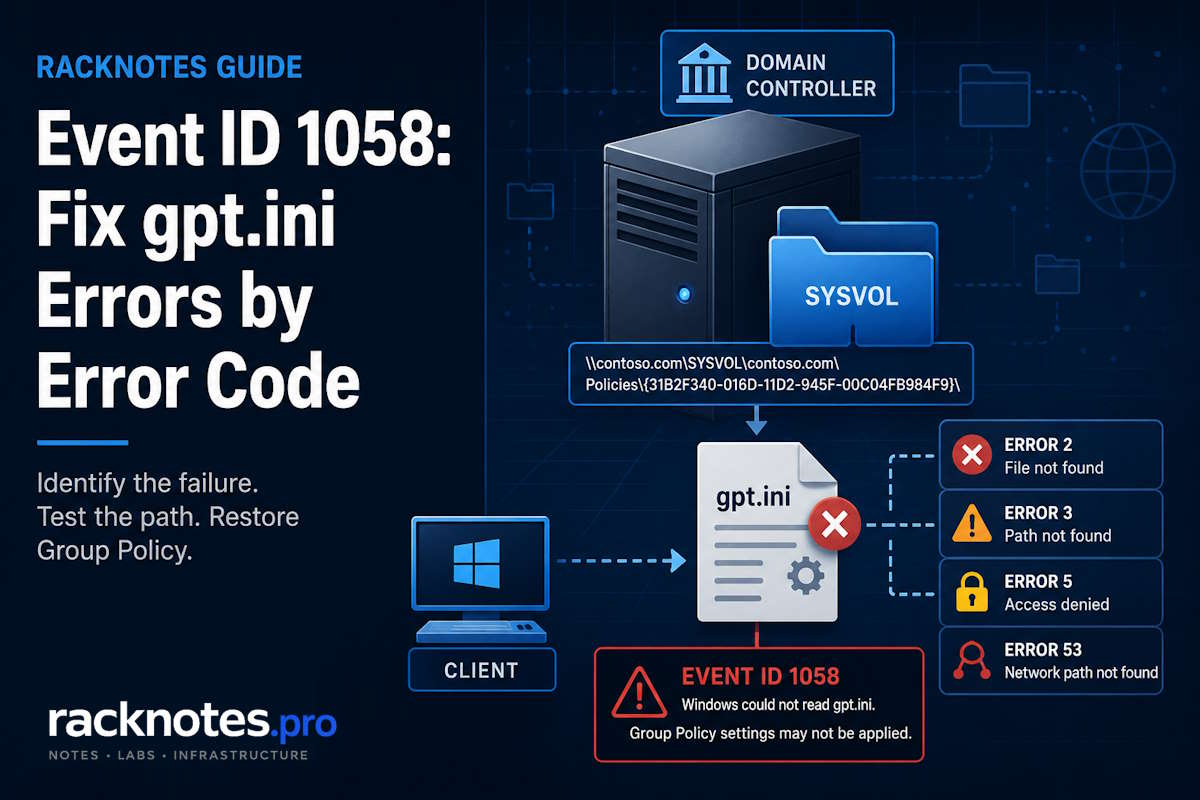
Group Policy Event ID 1058 tells you one thing precisely: the Group Policy client could not read the policy file named in the event. That file is gpt.ini, the small text file at the root of every GPO folder in SYSVOL. The event names a specific GPO, a specific domain controller path, and a specific error code, and most of the diagnostic work is deciding why that read failed – not assuming the GPO itself is broken.
The named GPO may be healthy but unreachable. It may be missing on one DC and present on another. It may be genuinely damaged or deleted. Those are different problems with different fixes, and the event’s own error code points you at the right branch. Start there, not with a guess about DNS or permissions.
- Event ID 1058 means Windows could not read
gpt.inifor the GPO named in the event. The GPO may be healthy, missing, inaccessible, or inconsistent on the DC that handled the request. - Read three things off the event before doing anything else: the DC name, the full path, and the ErrorCode on the Details tab. The code narrows the failed operation – it does not prove the root cause.
- Errors 2 and 3 point at the file or path; error 5 points at access; error 53 points at the network path. Test the exact DC-specific path from the event, then compare the same path on another DC.
- The GPO GUID identifies the policy file that failed during this processing attempt. Do not assume the GPO itself is damaged until you test the exact path and compare the same folder across domain controllers.
- Keep DNS, permissions, connectivity, and SYSVOL replication as hypotheses. If
gpt.iniis present on one DC but missing or stale on another, the problem has moved into SYSVOL replication troubleshooting.
What Group Policy Event ID 1058 actually means
The modern event comes from the source Microsoft-Windows-GroupPolicy and is written to the System log. The text reads along these lines:
The processing of Group Policy failed. Windows attempted to read the file
\\contoso.com\SysVol\contoso.com\Policies\{31B2F340-016D-11D2-945F-00C04FB984F9}\gpt.ini
from a domain controller and was not successful. Group Policy settings may not
be applied until this event is resolved.
What is gpt.ini? It is a small text file in the root of each GPO’s Group Policy Template folder in SYSVOL. The gpt.ini file location follows the pattern \\<domain>\SYSVOL\<domain>\Policies\{GPO-GUID}\gpt.ini, and it stores the file-side version number of that GPO.
The Group Policy client reads gpt.ini from the policy file share because it contains file-side version information for the GPO. Windows uses GPO version information and cached processing state to determine whether policy content changed and which extensions need processing – the mechanics are documented in Microsoft’s Group Policy protocol specification. If the client cannot open that file, processing for that GPO stops and 1058 is logged. Everything after that is figuring out which link in the chain broke: name resolution, the network path, the SMB session, the share, the folder, the file, or the permissions on it.
A useful distinction up front: the GPO named in the event is the file read that failed, not automatic proof that the GPO object is corrupt. The GUID identifies the GPO whose gpt.ini read failed in that processing instance. If the underlying problem affects SYSVOL or the client-to-DC path, other GPOs may fail as well. Confirm whether the named folder is actually missing or inaccessible before changing or recreating that GPO. If policy is silently not taking effect without this event, that is a different investigation – GPO not applying covers scope, filtering, and link problems.
Capture the DC, path, GUID, and ErrorCode
Before touching anything, pull four values off the Group Policy Event ID 1058 entry on the affected machine: the domain controller named in the path, the complete UNC path to gpt.ini, the GPO GUID, and the ErrorCode with its ErrorDescription from the Details tab.
The ErrorCode is a Win32 result code for the failed file operation. Ignore the SupportInfo1 and SupportInfo2 fields – they are undocumented internal diagnostic values, not the Win32 error, and reading them as a cause is a dead end.
While you are in Event Viewer, note whether this is computer-side or user-side processing, and whether Event ID 1030 appears nearby. Event ID 1030 is a broader Group Policy retrieval failure. It may appear with Group Policy Event ID 1058 when the file-read problem prevents Windows from retrieving or processing policy data. Resolve the underlying retrieval failure and then confirm whether both events stop recurring. On a domain controller, a persistent failure may recur at the DC’s Group Policy refresh interval, so a repeating pair is expected until the read works again.
Capture evidence you can compare later instead of working off a screenshot. Export the System log, the Group Policy Operational log, and a policy report, and record the Activity ID and the reproduction timestamp:
wevtutil.exe export-log System "%TEMP%\System.evtx" /overwrite:true
wevtutil.exe export-log Microsoft-Windows-GroupPolicy/Operational "%TEMP%\GroupPolicy.evtx" /overwrite:true
gpresult /h "%TEMP%\GPResult.htm" /f
Reading the resulting report is its own skill – the GPResult command guide covers what each section of that HTML output actually tells you.
Test the exact gpt.ini path from the event
This is the single most useful test for Group Policy Event ID 1058, and the order matters. Microsoft’s Group Policy troubleshooting guidance builds the path around the specific DC the client contacted, not the domain name:
\\dc01.contoso.com\SYSVOL\contoso.com\Policies\{GPO-GUID}\gpt.iniTest that exact DC-specific path first. Then test the domain-based path (\\contoso.com\SYSVOL\...), which goes through the DFS namespace and the DC locator. Then test the same GPO path against a second DC. The domain path is useful, but on its own it hides which DC actually answered – and that is exactly what you need to know.
The three results together tell you where to look:
| Exact DC path | Domain path | Another DC | Likely direction |
|---|---|---|---|
| Fails | Fails | Works | Problem isolated to the named DC |
| Works | Fails | Works | DFS namespace / DC referral or client DNS path |
| Fails | Fails | Fails | Broader client connectivity or authentication, or a multi-DC problem |
| GPO folder missing on one DC | – | Present elsewhere | SYSVOL replication or content inconsistency |
| GPO folder missing everywhere | – | – | Validate the AD object, deletion history, backup, and GPO integrity |
Microsoft recommends testing with the credentials that failed. For user-side processing, use the affected domain user. For computer-side processing, the read runs as SYSTEM under the machine account context – an administrator’s successful UNC test does not prove the computer account can read the same path, so do not treat your own admin session as a substitute for the failing identity.
One GPO, one DC, or every DC?
The path matrix already started answering this, and it is worth settling before diving into any single branch. The scope decides whether you are looking at a content problem, a replication problem, or a reachability problem.
If the GPO folder is missing on one DC and present on another, you have a SYSVOL content or replication inconsistency on the affected DC. If it is missing on every DC, the GPO object itself is in question: check whether it still exists in AD, whether it was recently deleted, and whether you have a GPMC backup. If the folder is present everywhere but the client still cannot read it, the problem is on the path between the client and the DC – DNS, connectivity, or authentication. Settling this first prevents the classic detour of tuning DNS on a client while one DC quietly holds a stale SYSVOL copy.
Read the error code as a branch, not a verdict
Each Win32 code in a Group Policy Event ID 1058 entry narrows the failed operation. None of them, on its own, proves the root cause. The code definitions come from Microsoft’s system error code reference; the interpretation still needs the path test above.
- ERROR_FILE_NOT_FOUND means Windows did not find the requested
gpt.inifile at the path it attempted to access. - Confirm the exact DC-specific folder on the DC named in the event.
- Compare the same folder on another DC before deciding whether the file is missing, the content is inconsistent, or the request reached an unexpected location.
- ERROR_PATH_NOT_FOUND means Windows could not find part of the requested path. This does not prove that name resolution succeeded or that the DFS path fully resolved.
- Walk the path one level at a time: does the SYSVOL share respond, then the domain folder, then Policies, then the GPO GUID folder, then the file?
- The first level that fails narrows the investigation. Use the error code, the named DC, the comparison with another DC, and the failing identity to distinguish a missing share or folder from connectivity, authentication, or replication.
- ERROR_ACCESS_DENIED means the file operation was refused. Investigate the failing user or computer identity, authentication, secure channel, SMB session, and effective permissions before modifying the GPO or SYSVOL ACLs.
- Useful checks along the way:
nltest /sc_verify:contoso.comfor the secure channel, andw32tm /query /statusfor time skew, since Kerberos rejects authentication when clocks drift too far apart. - Only after the identity and path are confirmed, compare permissions against a healthy GPO and review the GPO’s Delegation tab. Do not recursively reset SYSVOL ACLs or apply a generic ACL template to the share.
- ERROR_BAD_NETPATH is the network-path branch, and it is broader than DNS.
- DNS and DC discovery are the early checks:
ipconfig /all(is the configured DNS an internal AD DNS server?),nltest /dsgetdc:contoso.com, andnslookup -type=SRV _ldap._tcp.dc._msdcs.contoso.com. - Then verify reachability and SMB. From an elevated PowerShell session:
Test-NetConnection dc01.contoso.com -Port 445. Also check the SYSVOL share itself, routing or VPN reachability, and the host firewall.
Codes outside these four turn up occasionally. A GPO Event ID 1058 with one of the less common codes points at the network or share layer rather than the policy itself, and the safe next step is the same in each case: confirm exactly where the failure happens before changing anything.
| Error code | System message | Safe next step |
|---|---|---|
| 58 | The specified server cannot perform the requested operation | Review the exact target, SMB client and server event logs, server health, and any protocol or signing errors recorded on both sides |
| 65 | Network access is denied | Determine whether denial occurs during authentication, share access, or filesystem access |
| 67 | The network name cannot be found | Confirm that the named server exposes SYSVOL and NETLOGON, then test the exact shares |
Check DNS and reachability without assuming DNS
DNS is a frequent contributor to error 53, but it is a hypothesis to confirm, not a foregone conclusion. The only question this section answers: can this client resolve and reach the DC and path named in the Group Policy Event ID 1058 entry?
Domain members should use DNS resolvers that can answer for the AD-integrated namespace and its service records – in most environments, internal AD DNS servers. A public resolver assigned directly to a domain member does not host the private AD zone or its _ldap._tcp SRV records.
ipconfig /all
nltest /dsgetdc:contoso.com
nslookup -type=SRV _ldap._tcp.dc._msdcs.contoso.com
Test-NetConnection dc01.contoso.com -Port 445
If discovery and TCP 445 succeed, retest the exact gpt.ini path from the event. If they fail, the fix belongs to the client’s DNS, routing, or firewall path rather than the GPO.
A split-tunnel VPN client can log Event ID 1058 when its DNS path cannot resolve the private AD namespace or its routing policy cannot reach the selected DC. In that scenario the event points to gpt.ini, but the corrective action belongs to the VPN’s DNS and reachability configuration rather than the GPO or the domain controller.
When the evidence points to SYSVOL replication
AD replication and SYSVOL replication are separate systems. AD replication moves the Group Policy Container (the AD half of a GPO). SYSVOL replication – DFS Replication in domains that completed migration – moves the Group Policy Template files, including gpt.ini.
The trap: a clean repadmin /replsummary confirms only AD DS replication. It does not confirm that SYSVOL files replicated. Two quick checks frame the question:
repadmin /replsummary
dfsrmig /getglobalstate
If gpt.ini or the GPO folder is present on one DC but missing or stale on another, Group Policy Event ID 1058 has moved beyond client-side path troubleshooting into SYSVOL replication. Check the DFS Replication event log on the affected DC and continue with the SYSVOL replication troubleshooting guide. That guide covers DFSR health, replication events, and when non-authoritative or authoritative SYSVOL recovery is justified. Do not start either recovery procedure from an Event 1058 ticket.
gpt.ini missing
If gpt.ini is missing, resist the urge to hand-craft one. Manually recreating the file can mask a replication failure, create a version inconsistency, repair one DC while leaving replication broken, and propagate the wrong copy.
- Determine whether the file is missing on one DC or on every DC.
- Compare the GPO’s AD object with its SYSVOL folder.
- Missing on one DC only: treat it as a SYSVOL replication issue and use the handoff above.
- Missing everywhere: validate whether the GPO still exists in AD, check deletion history, and restore from a known-good GPMC backup when the content is genuinely gone.
If dfsrmig /getglobalstate shows the domain still on FRS or partway through migration, treat that as a separate SYSVOL migration project. Microsoft’s FRS-to-DFSR migration guide is the reference.
Do not enable SMBv1 as a workaround
Modern Windows and Windows Server do not install SMBv1 by default. SYSVOL access should use the SMB versions supported by the domain controllers and clients. Enabling SMBv1 on domain controllers is not a fix for Group Policy Event ID 1058.
Final thoughts
Group Policy Event ID 1058 rewards discipline over instinct. The event hands you a DC, a path, and an error code, and those values plus the DC-specific UNC test provide the evidence needed to choose between connectivity, authentication, and missing-content checks.
Use this order: read the error code, test the exact DC-specific path, test the domain path, compare the same GPO on another DC, and branch by evidence. Hand off to SYSVOL replication troubleshooting only when the content differs between DCs.
For the diagnostic workflow across every Group Policy failure, not just this one, the Group Policy troubleshooting guide covers the tools and log sequence. When the refresh command itself fails rather than the file read, gpupdate /force not working owns that path.
FAQ
Does Group Policy Event ID 1058 mean the GPO named in the event is broken?
Not necessarily. Event ID 1058 identifies the GPO file that Windows could not read during that processing attempt. The GPO may be healthy but inaccessible, inconsistent on one DC, or genuinely missing. Test the exact path and compare the folder across domain controllers before assigning the cause.
What is the difference between Event ID 1058 and 1030?
Event ID 1058 identifies a failure to read a Group Policy file from SYSVOL. Event ID 1030 reports a broader failure to retrieve new Group Policy settings. A GPO Event ID 1058 and a 1030 can appear together, but use the event details and Activity ID to confirm they belong to the same processing attempt.
Where do I find the error code for Group Policy Event ID 1058?
Open the event in Event Viewer and switch to the Details tab. The ErrorCode field holds the Win32 result (2, 3, 5, 53, and others) with an ErrorDescription next to it. Ignore the SupportInfo fields – they are undocumented internal values, not the error code.
Why does error code 53 keep pointing back to DNS?
Because a client that cannot resolve its domain to a domain controller cannot build the path to SYSVOL, and the read fails with a network-path error. But 53 is broader than DNS – it also covers TCP 445 being blocked, VPN or routing reachability, the SYSVOL share, and server availability. Confirm DNS with nltest /dsgetdc and an SRV lookup rather than assuming.
What is gpt.ini in Group Policy?
gpt.ini is the small file at the root of a GPO’s SYSVOL folder that stores file-side version information. Group Policy Event ID 1058 appears when Windows cannot read that file from the DC and path named in the event.
What should I do if gpt.ini is missing?
Check whether it is missing on one DC or every DC. A difference on one DC only points toward SYSVOL replication. Missing everywhere requires validating the GPO object, deletion history, and backup rather than manually recreating the file.
Group Policy Troubleshooting Series
8 articles – Workflow · Precedence · GPResult · GPUpdate · Filtering · Loopback · Events