
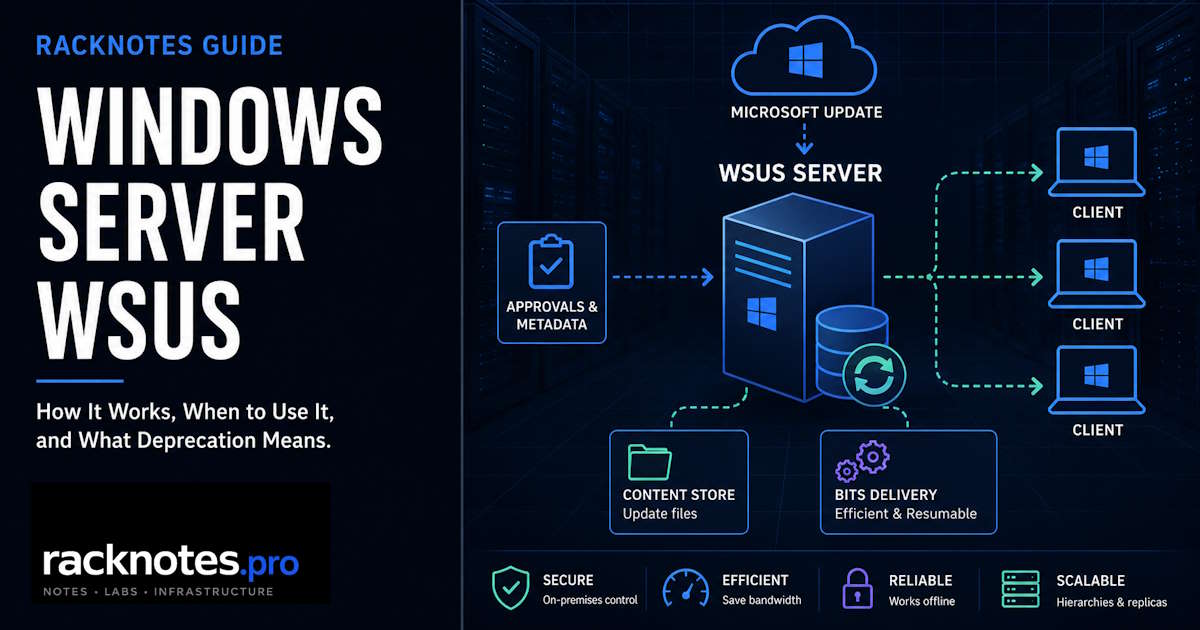
This article covers what WSUS is, how it works, its deprecation status, when it still makes sense, and alternatives at the decision level. It does not cover installation steps – those are in How to Install WSUS on Windows Server.
What is WSUS? Windows Server Update Services (WSUS) is Microsoft’s on-premises Windows Server role for centrally approving and distributing Microsoft updates to managed devices. Instead of every client pulling updates directly from Microsoft, clients connect to your WSUS server, which handles the download once and distributes it locally.
WSUS was deprecated in September 2024, meaning Microsoft is no longer developing new capabilities. The role remains included in Windows Server 2025 and supported for production use, and Microsoft has no current plans to remove it from in-market Windows Server releases. A common misunderstanding after the deprecation announcement was that WSUS had already been removed or fully replaced by Windows Update client policies. Neither is true.
- Deprecated means Microsoft is no longer developing new WSUS capabilities or accepting feature requests. Existing functionality remains supported for production use, and updates continue to publish through the WSUS channel as part of the lifecycle of the Windows Server release hosting it.
- WSUS has no separately announced end-of-life date. Deprecation, Windows Server 2025’s own product lifecycle (through November 2034), and “no current plans to remove it” are three different things – don’t conflate them into an invented WSUS EOL date.
- WSUS remains available on supported Windows Server releases, including Windows Server 2025. Microsoft has not announced a mandatory migration deadline.
- Windows Update client policies do not provide general Windows Server patch management or a WSUS-style local repository. They are not a direct on-premises replacement for WSUS.
- Cloud update-management platforms cannot operate as the update-management plane for a fully disconnected network. They require access to their cloud control plane and related service endpoints.
- WSUS continues to receive security servicing. Microsoft released an out-of-band update for CVE-2025-59287 on October 23, 2025, and CISA added the vulnerability to its Known Exploited Vulnerabilities catalog on October 24 after confirming active exploitation.
Last technically reviewed: August 2026
What Is WSUS and What Is It Used For?
What is WSUS used for, beyond the one-line definition? It’s the on-premises broker between Microsoft Update and every managed endpoint: Group Policy points clients at it, IIS serves the console and web services, and SUSDB tracks what’s approved for whom.
SUSDB and Update Metadata
The role has two storage layers. The database (SUSDB) holds update metadata – titles, descriptions, classifications, applicability rules, and approval state – and is hosted on Windows Internal Database (WID) or SQL Server.
Content Storage
The content store holds the actual update payloads on a local WSUS volume. In specialized shared-database/NLB designs, multiple WSUS front ends can use shared content storage, but that’s not the normal single-server setup. Local update-file storage is also optional: WSUS can retain metadata and approvals while clients download approved payloads directly from Microsoft Update instead, provided those clients have the required connectivity and policy configuration. This split matters for air-gapped and bandwidth-limited environments, where local content storage removes the dependency on direct internet access per endpoint.
IIS and WSUS Web Services
IIS hosts the WSUS Administration website on HTTP port 8530 and HTTPS port 8531. The WSUS console and administrative API use ApiRemoting30. Windows Update Agent scans use services such as ClientWebService and SimpleAuthWebService, while reporting, server synchronization, content delivery, and self-update use separate WSUS endpoints.
The WSUS Service coordinates core server-side operations and works with these web services and SUSDB. BITS is part of the Windows update-transfer stack and has traditionally provided resilient background transfer, resume behavior, and bandwidth throttling for WSUS and Windows Update downloads. On current Windows clients, the exact delivery path can also involve newer Windows Update and Delivery Optimization components, depending on policy and content type.
Client Policy and Reporting
Client computers are directed to the WSUS server through Group Policy (Specify intranet Microsoft update service location). See How to Configure WSUS with Group Policy, Computer Groups, and Approval Rules for the full client policy and computer group configuration. Clients connect on port 8530 or 8531, report update state, and scan against the approvals and metadata held by WSUS.
If only one or a small number of clients stop reporting while other clients remain healthy, start with the client-side detection and reporting path – see WSUS Client Not Reporting for the full diagnostic workflow. Widespread reporting failures across many clients point more toward IIS, SUSDB, or connectivity problems on the server side.
How WSUS Works
Strip away the components and configuration options, and WSUS runs the same five-step cycle on every deployment:
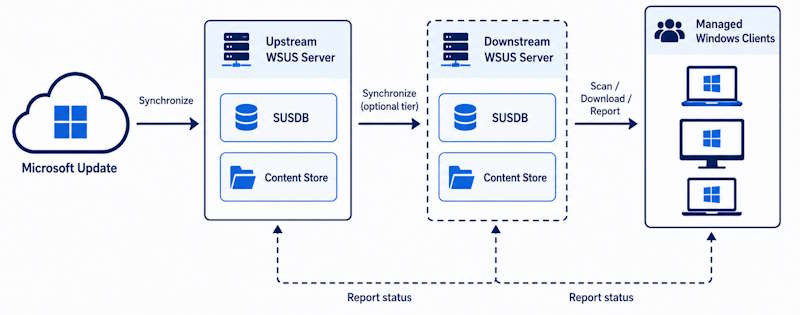
- Synchronize – WSUS retrieves update metadata from Microsoft Update or, in a hierarchy, from an upstream WSUS server.
- Select and approve – administrators choose products, classifications, computer groups, and approval state for each update.
- Scan – managed devices scan against the WSUS metadata and determine which approved updates apply to them.
- Download – approved payloads come from the local WSUS content store, or directly from Microsoft Update if local content storage isn’t used.
- Install and report – clients install approved updates and report status back to WSUS for visibility and compliance tracking.
SUSDB, content storage, IIS web services, and GPO targeting are the machinery behind those five steps.
Upstream and Downstream WSUS
A standalone WSUS server syncs directly from Microsoft Update. In larger environments, you can build a hierarchy in which a top-level server synchronizes from Microsoft Update and downstream servers synchronize from it. When update files are stored locally, a downstream server at each branch or region downloads the required content once from its upstream server and serves it to local clients, replacing repeated per-endpoint WAN downloads with roughly one transfer per downstream server or site. Microsoft recommends hierarchies no deeper than three levels.
If synchronization between tiers fails – SSL errors, proxy issues, firewall blocks, or upstream server problems – see WSUS Sync Failed for the diagnostic workflow.
Autonomous vs Replica Mode
The mode determines how administration works in a hierarchy. Autonomous (the default) means each downstream server shares update metadata from its upstream but maintains its own approvals, computer groups, and settings. Each location’s admin can approve and target independently – a practical default for many SMB and distributed environments, where sites may have different patching cadences or testing requirements.
Replica mode means the upstream server shares update metadata, approval status, and computer groups with downstream replica servers, which are not administered independently for those centralized decisions. This fits centralized shops where a single approval covers all sites.
Disconnected WSUS / Air-Gapped Networks
On an internet-connected WSUS server, you synchronize and download the required updates, export the update metadata with wsusutil, and separately copy the WSUS content files. You then physically transfer both the metadata package and update binaries to the isolated network, import the metadata, and place the content in the disconnected server’s content store. The disconnected server can then approve and distribute those updates without outbound internet access. Full reference: Windows Server WSUS disconnected-network import/export.
Is WSUS End of Life or Just Deprecated?
WSUS is deprecated, but Microsoft has not announced a standalone WSUS end-of-life date or a mandatory migration deadline. Deprecated and discontinued are not the same thing, and conflating either with the host OS lifecycle creates unnecessary confusion.
Microsoft no longer develops new WSUS features, but the role remains available in Windows Server 2025, continues to be supported for production use, and still receives update metadata through the WSUS channel as part of the lifecycle of the Windows Server release it runs on.
Microsoft’s September 2024 deprecation announcement states: “we are no longer investing in new capabilities, nor are we accepting new feature requests for WSUS. However, we are preserving current functionality and will continue to publish updates through the WSUS channel.” The announcement also explicitly states: “we have no current plans of removing WSUS from in-market versions of Windows Server (including Windows Server 2025).”
What this means for operators:
- Existing WSUS deployments keep working. No forced migration date.
- Security servicing and production support continue, while new capabilities are no longer being developed.
- Microsoft has not announced whether WSUS will be included in a Windows Server release after Windows Server 2025. Treat its presence beyond the current release as an open roadmap question rather than an assumed commitment.
Windows Server 2025 itself is supported under Microsoft’s Fixed Lifecycle Policy through November 14, 2034, with Mainstream Support ending November 13, 2029 and Extended Support ending November 14, 2034. That date belongs to Windows Server 2025’s own product lifecycle, not to a separately announced WSUS end-of-life date – Microsoft has not published a WSUS-specific EOL date distinct from the host OS it runs on.
When WSUS Still Makes Sense in 2026
Deprecation does not change the operational math. WSUS remains a reasonable choice when any of these conditions apply.
Air-gapped or disconnected networks. This includes regulated environments, OT/SCADA networks, and government systems. For fully disconnected Microsoft environments, WSUS is the established Microsoft-supported offline update-distribution workflow, either directly or as part of Microsoft Configuration Manager. Cloud update-management platforms require access to their cloud control plane and related service endpoints, which a fully disconnected network by definition cannot provide.
Bandwidth-constrained sites. Branch offices on limited WAN links. When BranchCache is supported and correctly configured, it can reduce repeated WAN downloads by allowing endpoints at a site to reuse cached update content. Combined with a local WSUS content store and BITS throttling, this keeps update traffic from competing with production workloads.
No Entra ID or Intune licensing. The WSUS role does not require a separate product license beyond an appropriately licensed Windows Server deployment, although Windows Server licensing, CAL requirements where applicable, infrastructure, storage, and operational costs still apply. In a purely on-premises environment running Active Directory without Microsoft 365, it is often the option with the lowest additional licensing cost. The cloud alternatives generally require their own licensing, supported subscriptions, Azure connectivity, or usage-based charges.
Granular, manual approval control. WSUS lets you approve individual KBs per computer group, stage rollouts, and hold specific updates indefinitely. Cloud alternatives automate approval workflows by design and offer less direct manual KB-level control.
You already run Microsoft Configuration Manager. The Software Update Point (SUP) role must be created on a server where WSUS is already installed. Configuration Manager uses WSUS services for update-metadata synchronization and client applicability scans, while Configuration Manager controls deployments, content distribution, compliance, and reporting. Microsoft confirmed that WSUS deprecation does not affect existing Configuration Manager software-update capabilities.
Decision Matrix
| Environment | Recommended direction | Why | Main limitation |
|---|---|---|---|
| Air-gapped or disconnected | Keep WSUS | Established Microsoft-supported offline update workflow | Manual metadata and content transfer; ongoing SUSDB maintenance |
| On-premises AD, limited cloud licensing | Keep and maintain WSUS | No separate product license required beyond Windows Server | Infrastructure and operational overhead; no confirmed roadmap past WS 2025 |
| Internet-connected Windows 10/11 fleet | Evaluate Windows Update client policies or Autopatch | Cloud orchestration and deployment rings without a local repository | No WSUS-style local content store; Windows Server excluded |
| Azure or Arc-connected server estate | Evaluate Azure Update Manager | Central server patch orchestration with Arc integration | Requires Arc connectivity; may still orchestrate over existing WSUS source |
| ConfigMgr Software Updates | Continue using SUP/WSUS and maintain the underlying components | SUP depends on WSUS; deprecation does not remove this dependency | SUSDB and IIS still require active maintenance |
| Mixed OS and third-party patching | Evaluate a broader endpoint-management platform | Native WSUS sync is Microsoft-Update-centered; third-party updates need local publishing, signing, and extra tooling | Licensing and integration complexity varies by platform |
When to Move Away from WSUS
WSUS is not the right answer once an environment has moved to Entra-joined, internet-connected clients, already holds the licensing that unlocks cloud alternatives, and wants managed rather than manual patching.
Windows 10/11 clients that are Entra-joined or hybrid-joined and internet-connected are generally better served by Windows Update client policies or Windows Autopatch. They may no longer require a WSUS content repository, though bandwidth planning can still call for Delivery Optimization or Microsoft Connected Cache.
Server estates with outbound Azure connectivity and Azure Arc agents can use Azure Update Manager for server patching instead of WSUS – though AUM is an orchestration layer and does not always replace WSUS as a content source. In some designs it coordinates patching while endpoints still pull updates from their configured Windows Update Agent source.
Plan the transition around your next operating-system, endpoint-management, or infrastructure refresh cycle. Client fleets may be ready to move sooner than disconnected server estates or ConfigMgr environments, so treat migration as separate workstreams rather than one fixed deadline.
What Is Replacing WSUS? Alternatives Compared
Microsoft does not offer one direct replacement for every WSUS use case. Windows Autopatch and Intune target managed Windows clients, Azure Update Manager targets server orchestration, and Configuration Manager still relies on WSUS components for Software Update Point functionality. These alternatives cover different scopes; none replaces everything WSUS does.
Connectivity requirement, in one place: WSUS can operate in disconnected environments through metadata and content transfer. Intune, Autopatch, Windows Update client policies, and Azure Update Manager all depend on cloud connectivity and supported service endpoints – none of them are designed for a fully air-gapped network.
Windows Update Client Policies (formerly Windows Update for Business)
Windows Update client policies are built into Windows 10/11 and configured through Group Policy or MDM, providing deferral rings for quality and feature updates. They do not provide a WSUS-style, administrator-managed local update repository – devices normally use Microsoft’s cloud update service, though Delivery Optimization can reduce repeated internet downloads through peer-to-peer distribution or Microsoft Connected Cache. Windows Update client policies do not deliver Windows Server feature updates, and update reporting through this mechanism is not currently compatible with Windows Server.
Microsoft Intune
Microsoft Intune is a cloud MDM/EMM platform for endpoint management, including policy, compliance, app deployment, and update management for Windows, macOS, iOS, and Android. It requires Entra ID-enrolled devices and Intune licensing. Update management is built primarily for Windows 10/11 client devices, not general Windows Server patch management, and requires internet connectivity.
Windows Autopatch
Windows Autopatch provides cloud-based update orchestration for eligible managed Windows client devices, Microsoft 365 Apps, Microsoft Edge, Teams, drivers, and firmware. It requires supported licensing, Intune management or supported ConfigMgr co-management, Entra registration or join, internet connectivity, and corporate-owned devices – verify the current prerequisite matrix before planning a migration, since Microsoft changes licensing and feature entitlements over time. It is designed for Windows client devices, not general Windows Server patch management.
Azure Update Manager
Azure Update Manager provides cloud-based patch orchestration for Azure VMs and, via Azure Arc, on-premises and multi-cloud servers. It supports current Windows Server releases and certain legacy Server 2012/2012 R2 ESU scenarios through Azure Arc – verify the current support matrix for each OS and deployment type. On-premises servers need Azure Arc with outbound internet to Azure.
Azure Update Manager charges qualifying Azure Arc-enabled servers on a monthly, daily-prorated basis, with exemptions for certain Azure, Azure Local, Defender for Servers, and ESU scenarios. At the time of this review, Microsoft’s published pricing was approximately $5 per server for 31 managed days – verify current regional pricing and exemptions before budgeting.
Important nuance: AUM can orchestrate patching while a Windows machine still uses WSUS as its configured update source. It is not always a content-source replacement for WSUS – in some designs it is an orchestration layer over the existing Windows Update Agent configuration.
Microsoft Configuration Manager with Software Update Point
Configuration Manager provides full endpoint management, including deployment, imaging, inventory, compliance, and patching. The Software Update Point role is installed on a site system server that already has WSUS. WSUS supplies update-metadata synchronization and scan services; Configuration Manager handles update selection, deployments, content distribution, compliance, and reporting. It is appropriate for large or complex on-premises and hybrid estates. Full prerequisites cover site system requirements and WSUS version compatibility.
| Tool | Windows clients | Windows servers | Disconnected | Local repository |
|---|---|---|---|---|
| WSUS | Yes | Yes | Yes | Yes |
| Windows Update client policies | Windows 10/11 | Not a general Server solution | No | No – Delivery Optimization/Connected Cache can reduce downloads |
| Microsoft Intune | Primarily Windows client | Not general Server management | No | No – Delivery Optimization can be used |
| Windows Autopatch | Eligible managed clients | No general Server support | No | No – Delivery Optimization can be used |
| Azure Update Manager | No general client management | Yes | No | No – orchestrates the machine’s configured source |
| ConfigMgr SUP | Yes | Yes | Yes | Yes |
For supported-server prerequisites, storage sizing, WID vs. SQL, and role installation, see How to Install WSUS on Windows Server.
WSUS Operational Overhead
Much of WSUS’s long-term operational debt accumulates in routine maintenance, storage, and IIS health.
SUSDB Maintenance
A SUSDB that never gets cleaned up grows slowly at first, then starts degrading console responsiveness and sync times as superseded updates and stale revisions pile up. Left unmanaged long enough, maintenance becomes a bigger project than it needed to be.
Maintenance isn’t one universal “decline everything, run cleanup, reindex” sequence. It requires database health work, superseded-update decline, and cleanup sequencing that respects hierarchy direction (cleanup runs bottom-up from downstream tiers, scripted decline runs top-down from the upstream server). See WSUS Maintenance for the full sequence, scripts, backup procedure, and WID vs. SQL Server specifics.
Content-Store Growth
Content storage can grow from tens to hundreds of gigabytes depending on selected products, languages, classifications, express content, and cleanup frequency. Driver synchronization can increase storage requirements dramatically – Microsoft originally planned to deprecate WSUS driver synchronization in April 2025 but reversed that decision before the planned date, so driver synchronization remains available. Even so, don’t enable the Drivers classification without a defined operational need, since it can significantly increase metadata, synchronization time, and storage usage.
If content downloads stall, fail, or never complete despite a healthy sync, treat that as a separate failure mode from synchronization itself – see WSUS Not Downloading Updates for the diagnostic path.
IIS WsusPool Tuning
The WsusPool application pool has conservative default memory limits. When it hits those limits, it recycles, dropping its metadata cache and causing HTTP 503 errors. In larger deployments, those defaults can be too conservative. Review Microsoft’s current WSUS best practices guidance for memory, queue length, idle timeout, and recycling settings, then size them for available RAM and client count. See WSUS Console Slow or Crashing for the full tuning procedure and staged SUSDB recovery sequence.
ConfigMgr Maintenance Responsibilities
The ConfigMgr blind spot. Configuration Manager administrators who deploy a SUP and then ignore the underlying WSUS and SUSDB maintenance are building toward a maintenance failure. Configuration Manager can automate parts of WSUS cleanup, but database backup, health monitoring, reindexing, and statistics maintenance still need an explicit operational plan. Do not use the WSUS Administration Console to change settings that Configuration Manager owns. Client scan failures that appear to be Configuration Manager problems are frequently caused by the underlying WSUS database or IIS configuration.
WSUS Security Risks
WSUS occupies a highly trusted position in the update path. A compromised server can disrupt approvals, interfere with update delivery, expose administrative data, and provide a valuable pivot point into the environment. Deployments that use local or third-party publishing extend that trust further, because managed endpoints may accept packages signed with the organization’s trusted publishing certificate.
The vulnerability – unsafe deserialization in WSUS reporting web services – affected Windows Server 2012 through 2025 with the WSUS role enabled. October Patch Tuesday’s initial fix was incomplete. Microsoft shipped version-specific out-of-band updates on October 23, 2025. CISA added the vulnerability to the Known Exploited Vulnerabilities catalog on October 24, 2025, with active exploitation confirmed the same day.
- Verify that the October 23, 2025 OOB fix or a later superseding update is installed for the applicable Windows Server build
- Confirm WSUS is not exposed to the public internet – restrict ports 8530 and 8531 to approved, managed networks
- Review IIS bindings and firewall rules against the current configuration
- Confirm SUSDB and WSUS configuration backups are current before making any remediation changes
- Review trusted publishing certificates where third-party or local publishing is used
Windows Server 2025 security hardening changes can affect legacy WSUS SelfUpdate scenarios used by older clients. If the environment still services Windows Server 2012 or 2012 R2 ESU systems, verify Microsoft’s current SelfUpdate and WSUS hardening guidance before applying server changes. Hierarchical upstream/downstream sync is unaffected.
Frequently Asked Questions About WSUS
Is WSUS end of life or just deprecated?
Deprecated, not end of life. Microsoft stopped developing new WSUS features in September 2024, but hasn’t announced a standalone WSUS end-of-life date or a mandatory migration deadline. The role remains supported for production use on Windows Server 2025. Don’t confuse Windows Server 2025’s own lifecycle date (2034) with a WSUS-specific EOL; Microsoft hasn’t published one.
Does Windows Update for Business or Autopatch replace WSUS on-premises?
No. Windows Update client policies (formerly WUfB) and Windows Autopatch target managed Windows client devices, not general Windows Server patch management. Neither delivers Windows Server feature updates, provides a local update repository, or works without internet connectivity. They serve a different scope entirely.
Do I need to migrate away from WSUS immediately?
No. There is no migration deadline. Existing deployments continue to work and receive security patches. Plan the transition around your next infrastructure refresh cycle rather than deprecation pressure.
Does WSUS deprecation break Configuration Manager Software Updates?
No. Microsoft has confirmed that WSUS deprecation does not remove or disable Configuration Manager Software Update Point functionality. The SUP role still depends on WSUS services for update metadata synchronization and client applicability scans, so the underlying WSUS and SUSDB components must continue to be installed, patched, and maintained.
Can WSUS operate in an air-gapped network?
Yes – this is one of its strongest remaining use cases. Metadata and content transfer via wsusutil export/import lets a disconnected server approve and distribute updates with no outbound internet access, which cloud-based alternatives cannot replicate by design.
Can WSUS scale to a large environment?
Microsoft’s WSUS planning guidance commonly uses approximately 30,000 clients per server as a planning reference, but this isn’t a universal capacity guarantee. Actual scale depends on hardware, selected products and classifications, scan frequency, database health, IIS configuration, hierarchy design, and whether WSUS is used as a Configuration Manager SUP – ConfigMgr environments with a properly maintained SUP can exceed those numbers.
What is the real risk of running WSUS in 2026?
Operational risk comes mainly from deferred maintenance – neglected SUSDB, uncontrolled disk growth, and untended IIS settings. Security risk comes from CVE-2025-59287 and similar vulnerabilities that make an exposed or unpatched WSUS server a high-value target. Both are manageable. The strategic risk is that WSUS has no confirmed future beyond Windows Server 2025, so long-term infrastructure planning should account for an eventual migration path.
Official Microsoft Sources
- Windows Server Update Services overview and deprecation status
- Plan your WSUS deployment
- Microsoft deprecation announcement (September 2024)
- Windows Server 2025 lifecycle dates
- Deprecated features in Windows Server
- CVE-2025-59287 security advisory
- CISA KEV addition for CVE-2025-59287
- WSUS hardening changes in Windows Server 2025
- Microsoft reversal of planned WSUS driver synchronization deprecation
- Azure Update Manager FAQ and pricing
- Windows Autopatch prerequisites
- Delivery Optimization overview
- Windows Server WSUS disconnected-network import/export
- Configuration Manager software-update prerequisites and WSUS requirements
- WSUS and Configuration Manager SUP maintenance guidance
WSUS on Windows Server
Installation & Configuration · Maintenance · Sync Failures · Content Download · Client Reporting · Console Recovery