
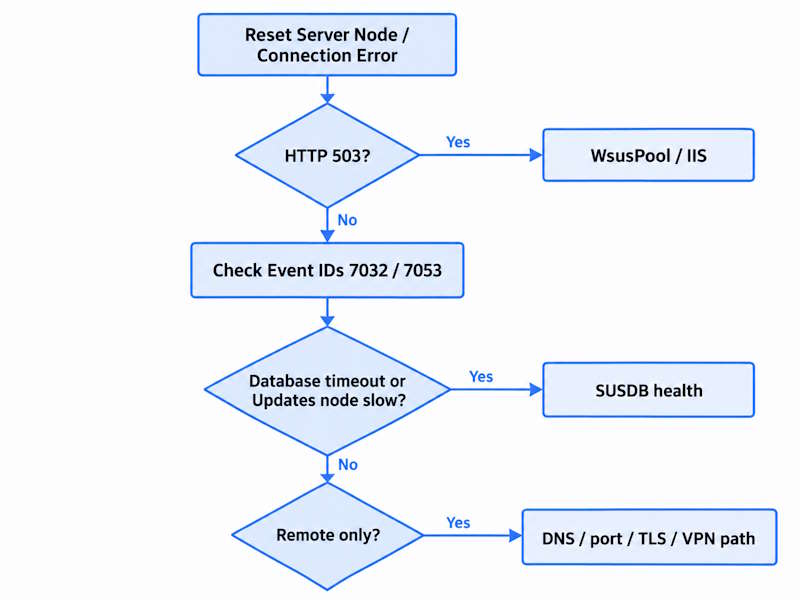
- Reset Server Node or Connection Error: start with WsusPool state and recycling, then check IIS and the Application event log.
- HTTP 503 Service Unavailable: verify WsusPool is running and not recycling, then check its private-memory and queue settings.
- Console opens but the Updates node hangs: check SUSDB health and the superseded/declined/obsolete update backlog.
- Only the remote console fails: check DNS, port, TLS, and the network path first – but that alone does not prove the server side is healthy.
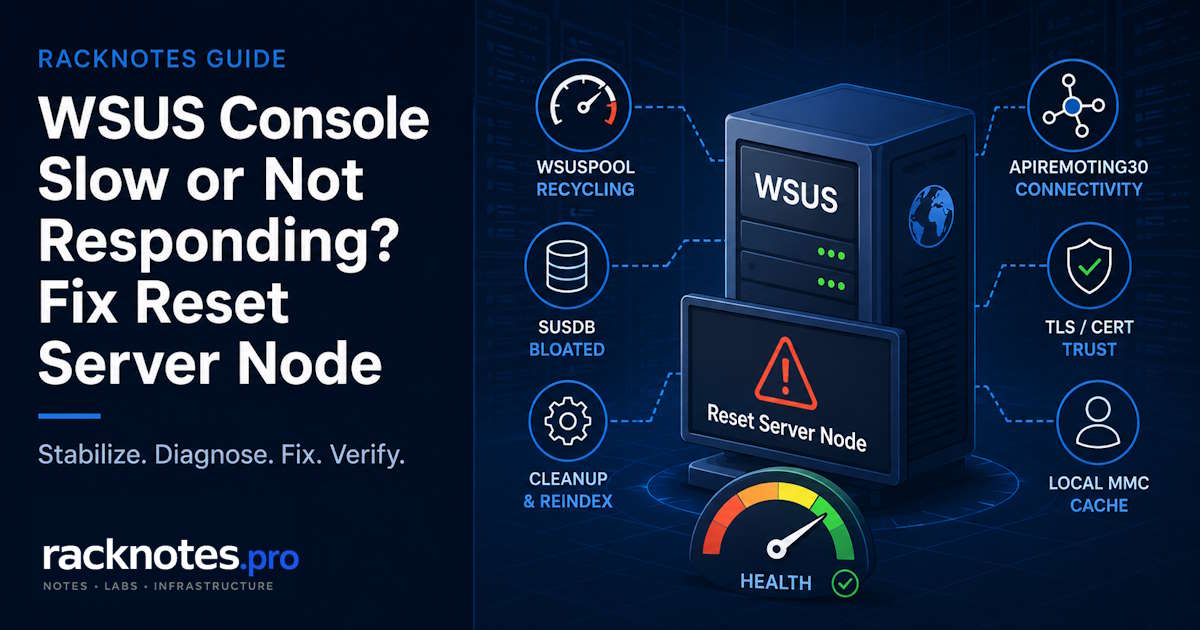
WSUS “Reset Server Node” appears when the WSUS Administration Console hits an error it cannot recover from normally. It can accompany a lost remote-API connection, a WsusPool/IIS failure, a SUSDB timeout, or a local MMC console problem – so the message is a symptom rather than a diagnosis, and clicking through it again is not a reliable fix. A slow, crashing, or disconnected console can come from any of those layers, or from the network path the console uses when connecting remotely. Many write-ups jump straight to “run the cleanup wizard,” which works often enough to be dangerous advice – on a server that has never been cleaned, the cleanup wizard is often the first thing to time out.
This article follows the problem in the order an operator needs: match the symptom to the failing layer, stabilize console access, diagnose the cause, apply the fix without making it worse, and confirm it held. The full monthly maintenance cadence, the canonical reindex script, and WID/SQL connection details live in WSUS Maintenance; this one handles the acute case, where the console is already in trouble and you need a path back in.
This article covers the console and administration layer: the WSUS console itself is slow, hanging, crashing, or showing Reset Server Node. If WSUS cannot synchronize metadata with Microsoft Update or an upstream server, that is a different failure stage, covered in WSUS Sync Failed. If metadata is current but update files are not reaching clients, see WSUS Server Not Downloading Updates. If the server is healthy and synchronizing but clients are missing from the console, that is covered in WSUS Client Not Reporting.
WSUS Reset Server Node: What the Error Usually Means
Reset Server Node is a console symptom, not a root cause. Clicking it can restore a connection that was going to recover on its own, but it does not fix whatever knocked the connection out, and it can return within minutes on a server with an underlying problem.
The message can point to several different layers, and more than one can be true at once on a server that has not been touched in a long time:
- WsusPool stopped, recycling, or hitting a memory limit
- An IIS or WSUS Administration website / ApiRemoting30 problem
- SUSDB under query or metadata-cache pressure
- A local console/MMC cache issue
- A remote network or TLS path problem
Match what is happening to the table below before changing anything. Applying a fix that does not match the symptom is how operators lose time reindexing SUSDB while the real fault – IIS authentication, for example – stays untouched.
| Symptom | Most likely layer | First check |
|---|---|---|
| Console drops to Reset Server Node, or clients see HTTP 503 | IIS / WsusPool | Pool state in IIS Manager, recycle history, memory limits |
| Event ID 7032 appears | Console-to-server API connectivity problem | IIS / WSUS Administration state, WsusPool, and the network path if remote |
| Event ID 7053 appears while browsing | Generic console exception, classify by inner exception | Application Event Log detail (see the Event 7053 triage below) |
| Console opens, but the Updates node specifically hangs | SUSDB / update metadata | Active, superseded, and declined update counts; index health |
| Fast locally, slow or failing only from a remote workstation | Network/TLS path to ApiRemoting30, does not rule out WsusPool/SUSDB | DNS resolution, WSUS port, certificate trust, VPN/proxy behavior |
More than one of these can be true at the same time on a server that has not been maintained in a year. A bloated SUSDB increases query and metadata-cache pressure, which can expose the default WsusPool recycling limits, so a recycling pool and a slow Updates node often show up together on the same neglected server. They are related, but they are not the same fault, and each still needs its own check.
Fix WSUS Connection Error and Reset Server Node
Start here if the console is currently unusable. The goal is to restore access first, not to treat that restoration as the underlying repair.
- Check the WsusPool application pool state in IIS Manager – a stopped or repeatedly recycling pool is a strong early signal.
- Check the WSUS Administration site in IIS and confirm it is running and bound correctly.
- Review the Application event log for WSUS events and read the inner exception rather than the wrapper message alone.
- Confirm the WSUS Service itself is running.
- Retry the console only after you have identified the most likely failed layer.
A restart of WsusPool or the WSUS Service can be a reasonable stabilization step here. It is not the fix if the underlying condition – a memory limit, a fragmented SUSDB, a bad IIS setting – is still there; it will resurface.
WSUS 503 Service Unavailable: Check WsusPool First
HTTP 503 from the WSUS Administration site most often traces back to WsusPool being stopped, recycling, or refusing new requests – but that is a starting hypothesis, not a guaranteed cause. Check pool state directly before assuming private-memory exhaustion is the answer.
WSUS Setup configures a default 1,843,200 KB (roughly 1.8 GB) Private Memory Limit on WsusPool. On a database that has grown past what that limit comfortably handles, the pool can recycle mid-operation and the console – or a client – loses its connection with an HTTP 503.
Microsoft’s current WSUS best practices guidance recommends the following baseline for WsusPool:
| Setting | Default | Microsoft’s current recommendation |
|---|---|---|
| Private Memory Limit (KB) | 1,843,200 | 0 (unlimited) |
| Virtual Memory Limit (KB) | 0 | 0 (verify it is already disabled) |
| Queue Length | 1,000 | 2,000 |
| Idle Time-out | 20 minutes | 0 (disabled) |
| Ping Enabled | True | False |
| Regular Time Interval (periodic recycle) | 1,740 minutes | 0 (disabled) |
WSUS Private Memory Limit
Run this in an elevated Windows PowerShell session on the WSUS server. Note the current values before changing anything, in case you need to roll back.
Import-Module WebAdministration
Set-ItemProperty IIS:\AppPools\WsusPool -Name recycling.periodicRestart.privateMemory -Value 0
Set-ItemProperty IIS:\AppPools\WsusPool -Name recycling.periodicRestart.memory -Value 0
Set-ItemProperty IIS:\AppPools\WsusPool -Name queueLength -Value 2000
Set-ItemProperty IIS:\AppPools\WsusPool -Name processModel.idleTimeout -Value "00:00:00"
Set-ItemProperty IIS:\AppPools\WsusPool -Name processModel.pingingEnabled -Value $false
Set-ItemProperty IIS:\AppPools\WsusPool -Name recycling.periodicRestart.time -Value "00:00:00"
Restart-WebAppPool WsusPool
Confirm the change actually took:
Get-ItemProperty IIS:\AppPools\WsusPool |
    Select-Object Name, queueLength,
        @{Name='IdleTimeout';Expression={$_.processModel.idleTimeout}},
        @{Name='PingEnabled';Expression={$_.processModel.pingingEnabled}},
        @{Name='PrivateMemoryKB';Expression={$_.recycling.periodicRestart.privateMemory}},
        @{Name='VirtualMemoryKB';Expression={$_.recycling.periodicRestart.memory}},
        @{Name='RecycleInterval';Expression={$_.recycling.periodicRestart.time}}
Setting Private Memory Limit to unlimited is the documented Microsoft recommendation, but it is not free on a co-located server. Microsoft documents WSUS’s metadata cache as memory-intensive; in large environments the cache alone can require substantial RAM. Check available RAM and working set before applying this on anything that is not a dedicated WSUS server, and keep watching it for a few days afterward. This IIS tuning is not a permanent fix for a neglected SUSDB. If the pool keeps hitting its limit because the database has grown unchecked, the maintenance sequence below still applies. The tuning buys stability, not a cure.
Event ID 7032: WSUS Administration Console Connection Error
Event ID 7032 means the WSUS Administration Console was unable to connect to the WSUS server through the remote API. It confirms the failed console-to-server communication, but not the root cause: the failure can still be WsusPool/IIS, the WSUS service, SQL/SUSDB, or the remote network/SSL path.
- Confirm the console-to-server API connection is failing rather than merely responding slowly.
- Inspect the IIS / WSUS Administration site state alongside the WsusPool checks above.
- Correlate the timing with any HTTP status codes and WsusPool recycling events.
- If the console is remote, check the server name, port, and SSL/certificate path before assuming a server-side cause.
Event ID 7053: Read the Inner Exception Before Fixing It
Event ID 7053 is a generic WSUS console exception wrapper, not a single root cause. Microsoft documents it both for a corrupted local MMC cache and, separately, for incorrect IIS authentication settings on the WSUS Administration website. Read the inner exception first.
- If the console receives HTML instead of the expected XML, or IIS logs show HTTP 500 for ApiRemoting30, inspect the WSUS Administration IIS configuration and authentication settings first. HTTP 500 alone is not enough to pin down the exact cause.
- If you see a
SocketExceptionor a “host not found” style error, check DNS and the server name before anything else. - If you see a
SqlExceptionor a timeout, move to the SUSDB diagnosis below. - If the inner exception is
System.Xml.XmlException, note which node triggers it. A crash limited to Computers may indicate a malformed reported value; do not clear the MMC cache until that signature is ruled out. - Only if none of the above match – the console simply crashes while browsing with no service, network, or database signature in the exception – reset the local cache: close all open MMC/WSUS console windows, stop the WSUS Service, rename
%AppData%\Microsoft\MMC\wsustowsus_bak(rename rather than delete to keep a rollback option), then start the WSUS Service and reopen the console. Microsoft documents this cache-corruption fix directly.
WSUS Console Slow or Crashing Only on the Updates Node
When only the Updates node hangs, SUSDB metadata volume and index health are the leading suspects. If the view still opens, set Approval to “Any except Declined,” add the Supersedence column, and sort by it for a quick check. If the node cannot render at all, skip the console entirely and run the SUSDB update-count query below; it reports live, superseded, declined, and obsolete-update counts directly against the database, without depending on the MMC view that is hanging.
USE SUSDB;

DECLARE @numberOfMatch INT;
DECLARE @tmpTable TABLE (
    name VARCHAR(25)
);

INSERT INTO @tmpTable
EXEC spGetObsoleteUpdatesToCleanup;

SELECT @numberOfMatch = @@ROWCOUNT;

SELECT
    (SELECT COUNT(*) FROM vwMinimalUpdate) AS [Total Updates],
    (SELECT COUNT(*) FROM vwMinimalUpdate WHERE Declined = 0) AS [Live Updates],
    (SELECT COUNT(*) FROM vwMinimalUpdate WHERE IsSuperseded = 1) AS [Superseded],
    (SELECT COUNT(*) FROM vwMinimalUpdate
        WHERE IsSuperseded = 1 AND Declined = 0) AS [Superseded but not declined],
    (SELECT COUNT(*) FROM vwMinimalUpdate WHERE Declined = 1) AS [Declined],
    (SELECT COUNT(*) FROM vwMinimalUpdate
        WHERE IsSuperseded = 1 AND Declined = 1) AS [Superseded & Declined],
    (SELECT COUNT(*) FROM @tmpTable) AS [Obsolete Updates Needed to be cleaned];
Run it through SSMS or sqlcmd against WID or SQL Server, whichever backend this server uses. Microsoft’s guidance treats maintenance as warranted once the last three result columns reach more than a few hundred; use that as a maintenance signal, not as a universal performance guarantee.
Recover a Neglected SUSDB Without Making the Console Problem Worse
The Server Cleanup Wizard runs several database-intensive operations. On a SUSDB that is bloated or missing its recommended indexes, those operations can time out before completing. Some progress may persist between runs, which is why Microsoft recommends repeating the same narrow pass rather than running every option at once on the first attempt.
The recovery sequence below assumes a standalone WSUS server. If this server is a Configuration Manager software update point, an upstream/downstream WSUS server, or a replica, stop here and follow the hierarchy ordering in WSUS Maintenance instead. Do not run the standalone decline sequence independently on a replica server.
A server that has been neglected for a long time needs a staged recovery sequence rather than the full routine-maintenance workflow, because running the complete cleanup against a badly bloated database is often what triggers the timeout in the first place. This is the minimum sequence to get a database-blocked console usable again – not the full maintenance workflow:
- Pause scheduled synchronization and back up SUSDB. Synchronization running during cleanup can cause already-completed work to be lost, and you want a clean rollback point before long-running operations. Restore the schedule only after validation.
- Reindex SUSDB, update statistics, and verify the Microsoft-recommended custom indexes exist. A fragmented or under-indexed SUSDB is what makes cleanup operations slow enough to time out in the first place.
- Run the first cleanup pass with only “Unused updates and update revisions” selected. This is the narrow option Microsoft recommends starting with on a standalone WSUS server that has never been cleaned.
- Repeat that same narrow pass if it times out. Some progress persists between runs, which is often what allows the rest of cleanup to proceed on a neglected database.
- Once the console and database are stable, validate (below), then move to the full maintenance workflow.
For supersedence exclusion logic, the complete decline workflow, every Cleanup Wizard option, WID/SQL connection instructions, and hierarchy order, use WSUS Maintenance – this page stops at getting the console usable again, not running the full recurring cleanup cadence.
In production environments, a pattern that surfaces repeatedly is an operator running the full Cleanup Wizard cold on a server that has been ignored for a long time, watching it time out, and concluding WSUS itself is broken – when the actual issue is that the database needed indexing and a narrower first pass before the rest of cleanup could finish at all. Reindexing and starting with the single “unused updates” option is often the step that allows the rest to complete, not a reinstall.
If maintenance still cannot complete after reindexing, staged cleanup, and the documented SQL alternative, rebuilding SUSDB is the documented last-resort recovery path, used only once those paths are exhausted. Moving from WID to SQL Server should be evaluated separately for scale and operational requirements; it is not a direct repair for an unhealthy database. See Windows Server Storage Troubleshooting if disk pressure from SUSDB growth is part of what you are seeing.
WSUS Console Works Locally but Fails Remotely
Check the network and TLS path first: name resolution, the configured WSUS port (typically 8530 for HTTP or 8531 for HTTPS), certificate trust if SSL is configured, and VPN or proxy behavior. But do not treat a remote-only failure as proof that WsusPool and SUSDB are healthy – the remote console still depends on both through the ApiRemoting30 web service it talks to, and a marginal server-side timeout that is tolerable on the LAN can become a hard failure once VPN latency is added on top of it.
Why operators get this wrong: it is tempting to read “fine at the office, broken over VPN” as proof the server side is fine, when added latency is often just exposing a problem that was already borderline.
Confirm the Fix
Do not call this fixed because the console opened once.
- Open the WSUS nodes you normally use day to day, including Reports only if reporting prerequisites are installed and reports are part of your workflow. Note how long each takes to render and compare it to the server’s own pre-maintenance baseline, not an external number.
- Confirm WsusPool remains started and is not repeatedly recycling outside whatever interval you intentionally configured.
- Confirm clients are no longer receiving HTTP 503 responses, and that Reset Server Node is not reappearing.
- Re-run the SUSDB update-count query from earlier rather than eyeballing the console.
Superseded but not declinedandObsolete Updates Needed to be cleanedshould trend downward over the maintenance pass. The totalDeclinedcount normally rises immediately after the decline step; it may fall only after a later cleanup or delete pass removes them. Do not expect that number to drop after a single cleanup run. - Run
wsusutil.exe checkhealth, then review the Application log for events from Windows Server Update Services, as an additional validation layer. - Restore the synchronization schedule only after these checks pass.
Prevent the Problem From Returning
A console that becomes slow after months of neglect is likely to become slow again. Prevention depends on scheduled maintenance, not occasional manual checks.
- Hand the ongoing cadence to a monthly maintenance routine; see WSUS Maintenance for the full reindex and cleanup schedule, plus WID/SQL specifics and hierarchy ordering.
- Scope WSUS to only the products and classifications you actually deploy – an unnecessarily broad sync target is one of the fastest ways to regrow a bloated database.
- Keep an eye on SUSDB growth and WsusPool memory behavior between maintenance windows, not just when something breaks.
- Document which backend you are running, WID or SQL Server, and roughly how large it has grown.
- If your console is administered remotely on a regular basis, periodically confirm the network and TLS path is still healthy before it becomes the thing you are troubleshooting under pressure.
FAQ
What does Reset Server Node mean in WSUS?
Reset Server Node means the WSUS Administration Console hit an error it could not recover from normally. The message is a symptom rather than a root cause; common causes include a stopped or recycling WsusPool, an IIS/API problem, SUSDB pressure, a local MMC issue, or a remote connectivity failure.
Why does WSUS keep showing Connection Error?
If Connection Error appears once, check WsusPool state first and restore access before treating the problem as fixed. If it keeps recurring after WsusPool looks healthy, move to Event ID 7032 or 7053 in the Application log and correlate with SUSDB and network checks. A connection error that returns repeatedly usually means the underlying cause was reset, not fixed.
How do I fix WSUS 503 Service Unavailable?
Check whether WsusPool is stopped or recycling, then review its private-memory and IIS settings. If the pool repeatedly fails under load, also inspect SUSDB health rather than treating an IIS restart as the permanent fix.
What should the WSUS private memory limit be?
Microsoft’s current guidance recommends 0 (unlimited) rather than the default ~1.8 GB, provided the server has RAM to support it. On a server that also runs other workloads, monitor available RAM after the change instead of applying it blindly.
What is WSUS Event ID 7032?
It indicates the console lost its API connection to the WSUS server. It confirms a connectivity failure between console and server but does not by itself identify whether IIS, WsusPool, the network, or SSL is the cause – check those in order rather than assuming one.
What causes WSUS Event ID 7053?
7053 is a generic console exception wrapper, not a single cause. Read the inner exception: an HTTP 500 or XML mismatch points to IIS/authentication, a SocketException points to DNS, a SqlException points to SUSDB, and if the inner exception does not identify an IIS, network, or database failure, resetting the local MMC cache becomes a reasonable next test.
Why is the WSUS console slow even after restarting IIS?
Restarting IIS or WsusPool addresses a stuck pool, not a bloated or fragmented SUSDB. If the console is still slow specifically on the Updates node, or generally sluggish everywhere, the next check is SUSDB health and the superseded/obsolete update backlog, not another IIS restart.
Final Thoughts
The key distinction throughout is stabilization versus repair. Resetting the pool, tuning WsusPool memory, or clearing the MMC cache can resolve a WSUS Reset Server Node error quickly when the symptom matches – but a server that has been neglected for a long time still needs the slower, staged SUSDB sequence regardless of how fast the console comes back. Match the symptom to the layer before reaching for a fix, and let WSUS Maintenance carry the ongoing cadence from here.
WSUS on Windows Server
Installation & Configuration · Maintenance · Sync Failures · Content Download · Client Reporting · Console Recovery