
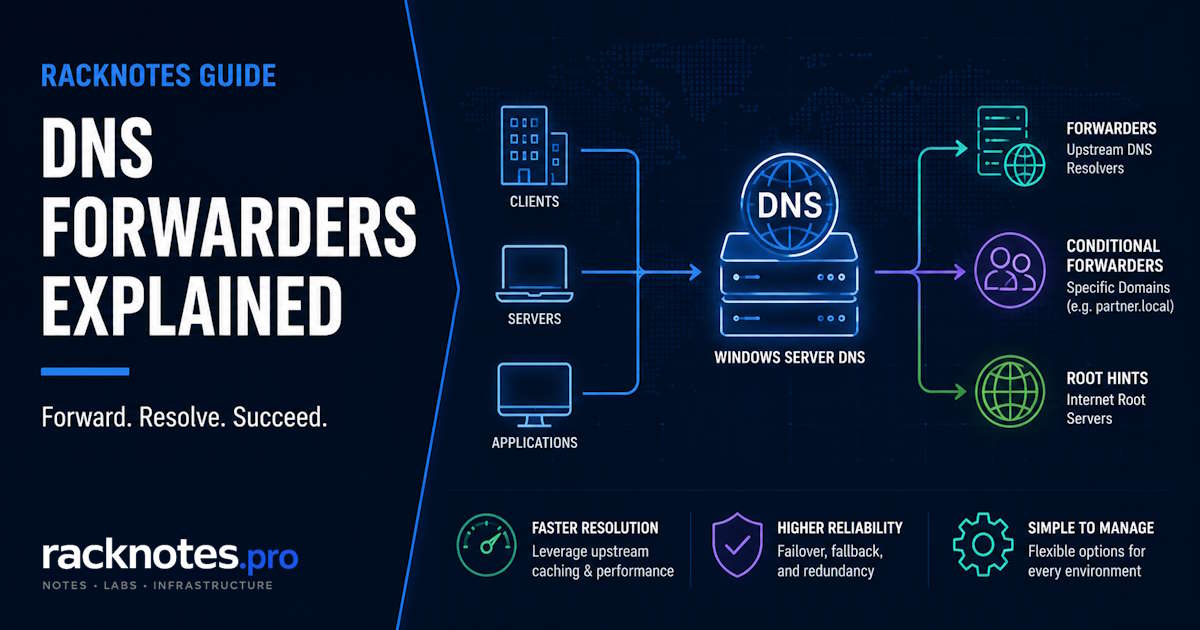
Use server-level forwarders when unresolved queries should go to one or more approved recursive DNS services. Keep or disable root-hints fallback deliberately according to security, egress, privacy, and availability requirements. Use a conditional forwarder when one namespace must be sent to specific DNS servers. Use a stub zone when the DNS server should learn and refresh the remote zone’s authoritative NS set instead of forwarding every query to a fixed list.
Before changing anything, record the current forwarder order, timeout, root-hints setting, conditional-forwarder recursion setting, replication scope, and the network paths for both UDP and TCP 53. A successful lookup alone doesn’t prove which path actually answered it.
This article covers Windows Server DNS forwarders configuration: general forwarders, root hints, conditional forwarders, and stub zones at the DNS Server role level, plus the Azure hybrid forwarding pattern at an architecture level. For DNS failures caused by Active Directory replication or DC locator issues, see Active Directory DNS Problems. For client-side DNS resolver settings, see Windows Server Network Troubleshooting. For packet capture, cache corruption, and server recursion failure triage, see Windows Server DNS Troubleshooting. For ForestDnsZones versus DomainDnsZones replication design, see Windows Server DNS Replication Scope.
| Requirement | Correct mechanism |
|---|---|
| Send all unresolved external queries to approved recursive resolvers | General forwarders |
| Resolve recursively without a forwarder | Root hints |
| Send one namespace to fixed DNS server IPs | Conditional forwarder |
| Track the remote zone’s authoritative NS set | Stub zone |
| Resolve Azure Private DNS from on-premises | Conditional forwarder to an Azure DNS Private Resolver inbound endpoint or an Azure-hosted DNS forwarder |
| Stop fallback after a conditional forwarder fails | Conditional forwarder with recursion disabled |
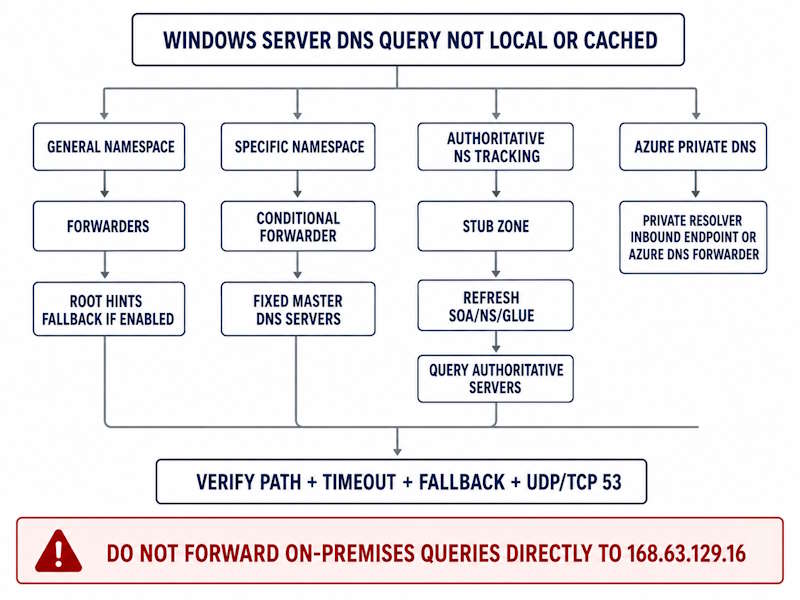
Windows Server DNS Forwarders vs Root Hints
A forwarder is a specific upstream DNS server the role sends unresolved queries to, after checking local zones and cache. Root hints are the hardcoded internet root server clusters, used for standard iterative recursion starting from the top of the DNS hierarchy.
Forwarders are a common enterprise default because they centralize recursive DNS through approved resolvers and benefit from that resolver’s own cache. Root-hints recursion is also a supported design – Windows DNS can operate without any forwarder configured and use root hints for all external recursion. The correct choice depends on egress policy, privacy, filtering, DNSSEC validation, monitoring, and failure requirements, not a universal rule.
Root hints can be the primary recursion mechanism when no forwarder is configured, or a fallback when configured forwarders fail and UseRootHint is enabled – the “Use root hints if no forwarders are available” checkbox on the Forwarders tab controls exactly this. If fallback is disabled and every forwarder fails, uncached names outside local, delegated, conditional-forwarder, or hosted zones can’t be resolved through the general recursion path – internal AD-integrated zones keep working, external resolution doesn’t, and the first symptom is usually “the internet is down” reports rather than a DNS alert.
A single forwarder IP – often the ISP’s resolver – gets configured, root-hints fallback is left disabled, and nobody revisits the Forwarders tab for months, sometimes inherited from a previous administrator’s single-ISP decision that outlived its original reasoning. When that forwarder becomes unreachable, external resolution fails while internal zones look completely healthy.
The security implication runs both ways. With fallback enabled, the server must reach internet authoritative DNS infrastructure directly, outbound UDP/TCP 53 needs to support full recursion, and centralized filtering or logging at the forwarder can be bypassed the moment it fails over. With fallback disabled, availability depends entirely on the forwarder path, and external resolution fails closed when every approved resolver is down. Treat this as a deliberate availability-versus-control decision, not a default to leave unexamined.
Dynamic Forwarder Ordering and Timeout Behavior
Per Microsoft’s DNS forwarding reference, Windows Server maintains a dynamic forwarder list, separate from the static configured order, that resets back to the configured order roughly every 15 minutes. A response over one second is considered slow; a forwarder is allowed two consecutive slow responses, and on the third it’s moved to the end of the dynamic list. Starting with Windows Server 2022, if no forwarder responds at all, the server keeps using only the first entry on the dynamic list until the DNS Server service restarts, instead of continuing to cycle through the full list – configured order still matters even with dynamic reordering enabled. Reordering itself can be disabled with Set-DnsServerForwarder -EnableReordering $false where a fixed, predictable order is required instead.
Windows doesn’t continuously health-check every forwarder outside of live query behavior – monitor each configured resolver separately from the DNS service, and alert on latency, timeout, and failed synthetic lookups rather than assuming the dynamic list alone will surface a failing one. Don’t tune forwarder order in isolation from ForwardingTimeout, RecursionTimeout, the number of configured forwarders, and network latency – with three or more forwarders, the overall recursion timeout can expire before every server gets a useful attempt.
Get-DnsServerForwarder | Select-Object IPAddress, UseRootHint, Timeout, EnableReorderingWindows Server DNS Conditional Forwarders
A conditional forwarder routes queries for one specific domain suffix to designated master servers, without touching general forwarder configuration. Typical use cases: partner-domain resolution between two organizations, resolving an Azure-hosted private zone from a connected on-premises network, or a temporary path during a phased migration.
Add-DnsServerConditionalForwarderZone `
    -Name 'partner.contoso.com' `
    -MasterServers 10.20.0.5, 10.20.0.6 `
    -ReplicationScope 'Forest' `
    -PassThru
Omit -ReplicationScope for a local, registry-stored forwarder; use Domain, Forest, Legacy, or Custom intentionally when it should be AD-integrated – see the DNS Replication Scope guide linked in the scope note above for when each scope actually applies. Specify multiple master servers when the remote side has more than one, and document who owns the remote endpoints before pointing production traffic at them.
A conditional forwarder’s fallback behavior is a separate, often-missed setting: it can attempt normal recursion after every master server fails, or fail closed for that namespace specifically.
Set-DnsServerConditionalForwarderZone `
    -Name 'partner.contoso.com' `
    -UseRecursion $false `
    -PassThru
Disable recursion when the namespace must never fall through to general forwarders or public DNS. Leave it enabled only when fallback resolution is intentional and safe for that specific namespace. A per-zone timeout is also configurable, but don’t tune it in isolation from the overall recursion timeout and master-server count:
Set-DnsServerConditionalForwarderZone -Name 'partner.contoso.com' -ForwarderTimeout 3 -PassThruStub Zones vs Conditional Forwarders
These solve related problems through genuinely different mechanisms, not two flavors of the same thing. A conditional forwarder stores fixed master-server IP addresses and sends matching queries recursively to those servers – it needs no zone-transfer access, and it can fail closed or fall back through recursion depending on UseRecursion. A stub zone instead stores the target zone’s SOA, NS, and necessary glue records, refreshes that delegation-like data from a master server via periodic transfer, then queries whichever authoritative servers the stub data currently lists – it depends on direct reachability to that authoritative NS set and requires initial and ongoing transfer access.
| Factor | Conditional Forwarder | Stub Zone |
|---|---|---|
| Stored data | Fixed master-server IPs | SOA, NS, and glue records |
| Query destination | Configured master servers | Authoritative servers learned from stub data |
| Needs transfer access | No | Yes, for stub-zone refresh |
| Tracks NS changes | No | Yes |
| Fallback control | UseRecursion | Normal authoritative lookup behavior |
| Best fit | Fixed resolver endpoints | Dynamic authoritative NS topology |
| Azure Private Resolver | Appropriate | Not appropriate – it’s recursive, not authoritative |
In practice, conditional forwarders cover most SMB and homelab needs, since the remote server’s IP rarely changes without notice and stub-zone transfer overhead isn’t worth it for a single partner link. Stub zones earn their complexity when a different team manages the remote environment and might restructure it without coordinating, or the integration is expected to run for years. Both can be AD-integrated, tying replication to whichever scope the zone is stored under.
Windows Server DNS Forwarders for Azure Hybrid Environments
168.63.129.16 is Azure’s special platform virtual IP, reachable from inside Azure virtual networks – it is not a general-purpose address an on-premises DNS server can forward to directly. Microsoft’s current hybrid guidance routes on-premises DNS through one of two patterns instead:
Preferred: on-premises DNS -> Azure DNS Private Resolver inbound endpoint -> Azure Private DNS / Azure DNS

VM-based: on-premises DNS -> DNS forwarder VM in Azure -> 168.63.129.16 -> Azure Private DNS / Azure DNS
The Azure-side resolver or forwarder VM reaches Azure-provided DNS on your behalf – the on-premises conditional forwarder points at that inbound endpoint or VM, never directly at the platform IP. See Microsoft’s Azure DNS Private Resolver architecture reference for the current deployment pattern.
For Azure Private Endpoints, the correct namespace to forward is often the service’s public zone (for example database.windows.net), not the private-link-prefixed zone alone – the exact zone depends on the specific Azure service architecture, so check the Private Endpoint DNS integration guidance for the service in question rather than assuming one universal example applies.
Security, Privacy, and Provider Selection
Forwarding to any third-party resolver means every external name your environment resolves passes through that resolver’s infrastructure – acceptable for most homelab and SMB setups, worth a closer look under compliance obligations. Query logs sent externally can reveal which services an organization talks to, which some compliance frameworks treat as sensitive metadata; this is part of why some organizations require all external DNS to route through an internally managed or contracted resolver with a signed data processing agreement. A DNS-filtering resolver (blocking known-malicious domains at resolution) adds a control independent of endpoint security, at the cost of the same logging-visibility question plus the operational risk of false positives on legitimate domains.
Provider latency and “privacy-focused” marketing claims vary by location and change over time – evaluate candidates against criteria instead of picking a name from habit:
| Criterion | Questions to answer |
|---|---|
| Availability | Are multiple resolver IPs and independent paths available? |
| Governance | Is the resolver approved by security and compliance? |
| Privacy | What query data is logged, retained, and processed? |
| DNSSEC | Does it validate, and does that match local policy? |
| Filtering | Does it block threats, categories, or newly registered domains? |
| Consistency | Will all configured forwarders return the same policy-driven answers? |
| Network path | Are UDP/TCP 53 or encrypted DNS paths supported? |
| Failure mode | Should the server fall back to root hints, or fail closed? |
Use resolvers governed under one documented policy, or deliberately designed mixed resolvers only after validating that they produce consistent filtering, DNSSEC, and policy behavior – don’t mix unrelated public providers as a default just because it’s a common suggestion; inconsistent policy between them can produce confusing, hard-to-diagnose behavior. Also restrict which client networks can recurse through this server at all, never expose an open recursive resolver to the internet, and restrict outbound client DNS so the approved internal path can’t be bypassed. Windows Server 2025 adds DNS server encryption protocol configuration in the DnsServer module – don’t assume a traditional forwarder IP automatically gets encrypted upstream transport; document whether recursion uses classic DNS or an explicitly configured encrypted protocol.
DNSSEC and Forwarders
A Windows recursive or forwarding DNS server can perform its own DNSSEC validation when it’s DNSSEC-aware, receives the required DNSSEC records, has a trust anchor for the relevant chain, and local policy requires it. An upstream forwarder’s own validation policy doesn’t automatically satisfy local Windows DNSSEC validation, local trust-anchor requirements, client NRPT requirements, or organizational proof that validation actually occurred. Determine which component is actually responsible for validation in your design; when local validation is required, configure and verify Windows DNSSEC trust anchors and test signed, invalid-signature, and unsigned domains through the real forwarding path – not just the forwarder’s marketing claim.
Verify Windows Server DNS Forwarders: Prove the Path, Not Just the Answer
A successful Resolve-DnsName against your own server proves it returned an answer – it doesn’t prove which forwarder answered, whether root hints were used, whether the answer came from cache, or whether DNSSEC validation actually happened. Capture the configuration first:
Get-DnsServerForwarder
Get-DnsServerRecursion
Get-DnsServerZone | Where-Object ZoneType -in 'Forwarder','Stub'
Test general forwarding with a name unlikely to be cached, clearing only the local server’s cache in a controlled window – not a production cache casually:
Clear-DnsServerCache -Force
Resolve-DnsName -Name 'www.microsoft.com' -Server 10.0.0.10 -DnsOnly
Test the conditional namespace specifically, then confirm authoritative reachability with a real query, not just a port check:
Resolve-DnsName -Name 'host.partner.contoso.com' -Server 10.0.0.10 -DnsOnly
Test-NetConnection -ComputerName 10.20.0.5 -Port 53
Test-NetConnection checks TCP only – pair it with an actual DNS query to confirm UDP/TCP resolution behavior, not connectivity alone. Permit the DNS server to query the target resolver or authoritative server over both UDP and TCP 53, with return traffic allowed statefully – TCP 53 specifically matters for large responses, truncation fallback, DNSSEC, and zone-transfer-related operations, and stub-zone refresh needs to reach the authoritative servers directly. Don’t open broad unsolicited inbound DNS from unrelated networks while doing this.
There’s no current Get-DnsServerConditionalForwarderZone cmdlet in the DnsServer module – use this instead:
Get-DnsServerZone | Where-Object ZoneType -eq 'Forwarder'
Get-DnsServerZone -Name 'partner.contoso.com'
For stub zones, confirm the SOA, NS records, glue, and refresh timestamp:
Get-DnsServerZone | Where-Object ZoneType -eq 'Stub'
Get-DnsServerResourceRecord -ZoneName 'partner.contoso.com'
dnscmd /enumzones still works as a legacy fallback, but the PowerShell cmdlets above are the primary path. For capturing evidence beyond this, use DNS Server analytical logging during a controlled window, or a DNS-filtered packet capture, then disable verbose diagnostics once the test is done – see the DNS Troubleshooting guide linked in the scope note for the full triage workflow, and Windows Server DNS Event IDs Explained for the event reference. Repeated log entries pointing at the same forwarder IP are usually the first sign a provider has gone unreliable, often before any client-side complaint arrives.
Windows Server DNS Forwarders: Decision Matrix
| Requirement | Mechanism | Critical validation |
|---|---|---|
| Centralized internet recursion | General forwarders | Order, timeout, health, fallback |
| Direct internet recursion | Root hints | UDP/TCP 53 egress and recursion policy |
| Fixed partner/trust namespace | Conditional forwarder | Exact suffix, multiple masters, UseRecursion |
| Changing authoritative NS topology | Stub zone | Transfer permission and NS reachability |
| Azure private DNS from on-premises | Conditional forwarder to Private Resolver inbound endpoint or Azure DNS forwarder | Private connectivity and correct service namespace |
| Fail closed for a private namespace | Conditional forwarder with recursion disabled | Confirm no public fallback |
| AD-wide configuration | AD-integrated conditional forwarder/stub | Correct replication scope |
Final Thoughts
Most Windows Server DNS forwarders decisions are simpler than they look. Two or three forwarders from a governed set of providers, ordered by measured latency, with root-hints fallback set deliberately rather than left however a previous admin configured it, covers the vast majority of homelab and SMB cases without any conditional forwarders or stub zones. Those mechanisms earn their place once a specific external zone, partner domain, or Azure Private DNS integration needs its own resolution path – and the Azure path specifically needs a Private Resolver inbound endpoint or forwarder VM, never a direct conditional forwarder to 168.63.129.16.
FAQ
What’s the difference between a forwarder and a conditional forwarder?
A regular forwarder handles all unresolved queries that don’t match a local zone. A conditional forwarder only intercepts queries for one specific domain suffix – everything else still goes to the general forwarders or root hints.
Should I use root hints instead of forwarders?
It depends on your egress, filtering, and monitoring requirements – both are supported designs. Forwarders centralize recursion through approved, cacheable resolvers; root hints work without one but add recursive latency and bypass centralized filtering during any forwarder failure that triggers fallback.
How do I resolve Azure Private DNS zones from on-premises?
Point a conditional forwarder at an Azure DNS Private Resolver inbound endpoint, or a DNS forwarder VM deployed inside the Azure VNet – never directly at 168.63.129.16, which is only reachable from inside Azure. Confirm the correct namespace for the specific Azure service before assuming one zone example applies everywhere.
Why isn’t my conditional forwarder resolving anything?
Check the master-server IPs are reachable over both UDP and TCP 53, the domain suffix matches exactly what’s being queried, and UseRecursion is set the way you intend – a namespace configured to fail closed will not fall back to general forwarders even if the master servers are briefly unreachable.
Do I need a stub zone if a conditional forwarder is already working?
Not unless the remote zone’s NS records change periodically or you need automatic tracking of the remote authoritative server set. If the remote infrastructure is stable, a conditional forwarder is simpler and doesn’t need transfer access.
Does Windows Server DNS forwarders order still matter with dynamic reordering enabled?
Yes. The dynamic list resets to the configured static order roughly every 15 minutes, and on Windows Server 2022+, total forwarder failure locks the server onto a single dynamic-list entry until the DNS service restarts. Configured order is still the foundation the dynamic behavior builds on.
Official Microsoft Sources
- DNS Forwarding in Windows Server
- Forwarder and conditional-forwarder timeout behavior
- Add-DnsServerConditionalForwarderZone
- DNS zone and stub-zone management
- Troubleshoot forwarder-related failures
- Azure DNS Private Resolver architecture
- Azure Private Endpoint DNS integration
- Windows DNSSEC response validation
Windows Server DNS Series
10 articles — Zones & Configuration · Scavenging · Forwarders · Replication Scope · Split-Brain DNS · Troubleshooting · Dynamic Updates · Event IDs · Scavenging Recovery · Zone Transfers