
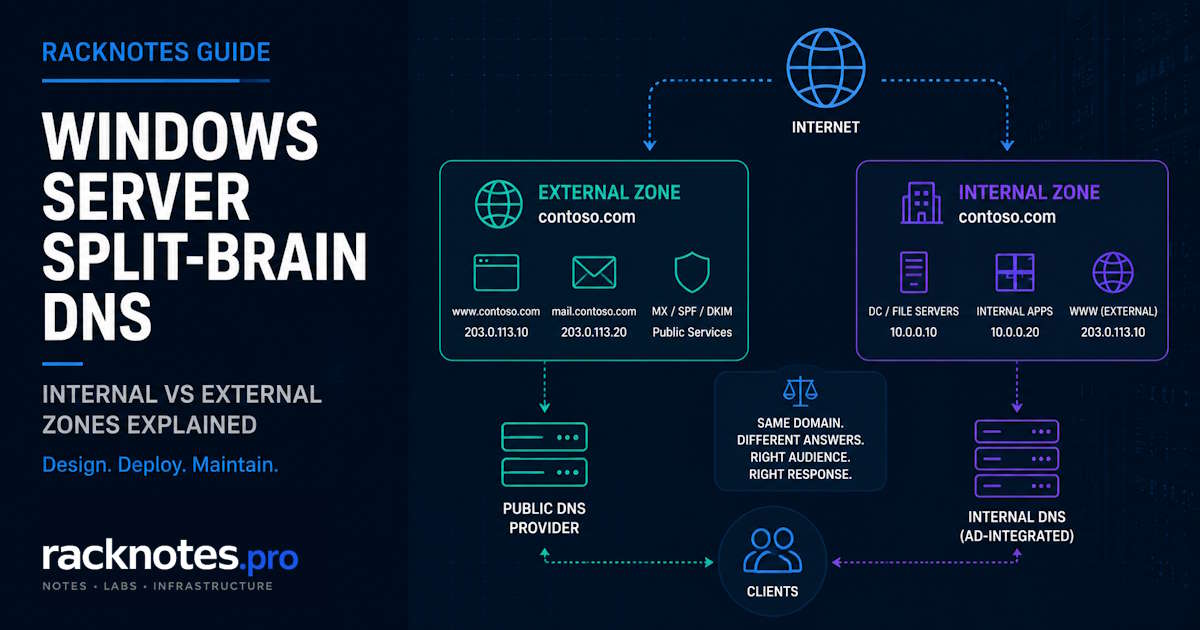
Split brain DNS returns two different answers for the same DNS name, depending on who is asking. The same pattern also goes by split horizon DNS and split view DNS outside Microsoft’s own documentation. On Windows Server, a common trigger is an Active Directory domain that shares its name with the public website, but that overlap is one path into split brain DNS, not the definition of it. Windows Server 2016 and later give you two structurally different ways to build it: two independent DNS zones, or DNS Policy with zone scopes on a single zone.
- Split brain DNS gives different answers for the same DNS name to different client groups. Split horizon DNS and split view DNS describe the same pattern under different vocabulary.
- Windows Server supports two models: separate internal and external zones, or DNS Policy with zone scopes on a single zone (Server 2016+), AD-integrated or standalone.
- Zone data, zone scopes, and the records inside them can replicate through Active Directory. DNS Policies themselves do not; they live locally on each DNS server.
- Dynamic updates and scavenging work only in the default zone scope. Anything placed in a non-default scope is maintained by hand.
- A conditional forwarder cannot fill in a record missing from a zone the internal server is already authoritative for.
What Is Split Brain DNS?
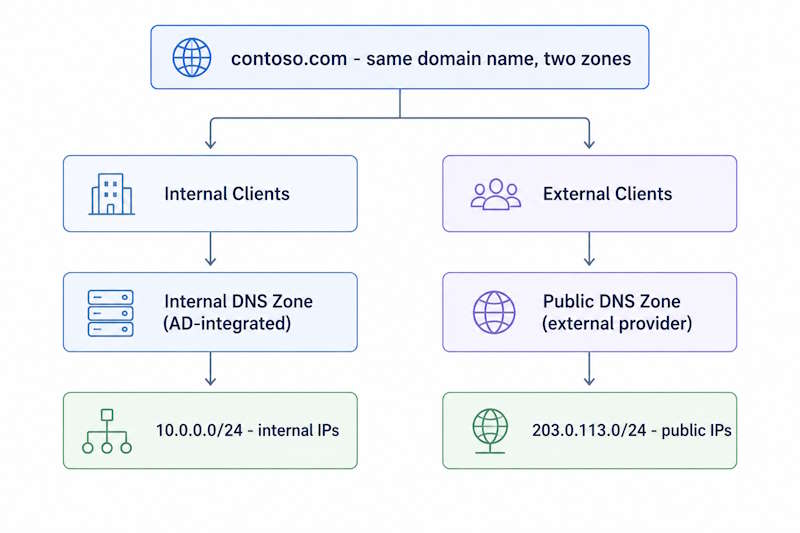
Split brain DNS means a single DNS namespace returns different answers depending on where the query originates. The same hostname resolves to different IP addresses for different audiences.
A typical example: www.contoso.com resolves to 10.0.0.39 for internal clients and to 203.0.113.10 for anyone querying from outside the network. Same name, two correct answers, and which one a client gets depends entirely on the query path, not on anything wrong with either answer.
Split Brain DNS vs Split Horizon DNS vs Split View DNS
These three terms describe the same architectural pattern under different vocabulary. Split horizon DNS is the term used more often outside the Windows ecosystem, in BIND configurations and by most networking vendors. Split view DNS shows up in similar non-Microsoft contexts. Microsoft’s own DNS Policy documentation specifically uses split brain DNS.
In this article, the terms refer to the same core pattern: different DNS views for the same namespace. Individual products may implement that pattern differently.
When Do You Need Split Brain DNS?
A common Windows Server scenario is an Active Directory forest root that matches the public domain. That overlap is not the only reason to use split brain DNS.
Split brain DNS also comes up when:
- an internal application needs a private IP while a public-facing version of the same service needs a public one
- the same FQDN has to resolve correctly from both inside and outside the network, for example a hybrid Exchange deployment or a reverse proxy setup
- internal users need to reach a different endpoint than public users for the same name, such as an internal load balancer instead of the public-facing one
A new Active Directory deployment can avoid the classic namespace overlap; see the note near the end of this article. For an existing forest already running on a matching namespace, the configuration below is the realistic near-term path.
Windows Server Split Brain DNS: Two Implementation Models
Windows Server gives you two structurally different ways to build split brain DNS. Neither is universally correct; each comes with a different maintenance shape.
Separate Internal and Public DNS
The traditional two-zone model uses two separate copies of the namespace: one for internal clients and one for external clients.
- Internal zone – AD-integrated or standalone, hosted on Windows Server DNS, contains every internal record (domain controllers, file servers, internal apps) plus mirrored records for anything hosted externally that internal staff also need to reach
- External zone – hosted on a separate authoritative DNS service, which may be another Windows DNS server or an external DNS provider, and contains only records that external clients should see
For an ordinary missing name inside a zone for which the internal DNS server is authoritative, the server does not fall back to its normal forwarders to obtain the public version of that record. A delegated child namespace is a different case. This is the detail that catches people: a conditional forwarder is not a fix for a missing record in the authoritative internal view itself. See Windows Server DNS Forwarders for how forwarding behaves when the server is not authoritative for the name.
The internal zone can drift out of sync with changes made later on the public side. A new subdomain goes live on the public-facing zone months later, internal staff report that the new portal does not load from the office, and the cause is a missing internal record, not a network problem.
DNS Policy and Zone Scopes
Starting with Windows Server 2016, the DNS Server role supports DNS Policy and zone scopes, which let a single zone serve different answers depending on the client subnet or the network interface a query arrived on. This capability is unchanged through Server 2022 and Server 2025.
DNS Policy and zone scopes work with Active Directory-integrated zones or with standalone, file-backed zones, per Microsoft’s DNS Policies overview. The rest of this article focuses on the AD-integrated case, but zone scopes do not require Active Directory.
Using DNS Policy on an AD-integrated zone does not automatically mean a domain controller has to field public internet DNS traffic. Whether external queries reach that server at all is a separate network design decision; some deployments keep the AD-integrated zone answering internal clients only and leave public-facing authoritative DNS on a dedicated external service. Consolidating both roles onto the same AD-integrated infrastructure is a legitimate choice, not the only way to use DNS Policy, and it comes with the operational tradeoff covered further down: zone data replicates through Active Directory, DNS Policies themselves do not.
How DNS Policy and Zone Scopes Work
Zone Scopes
One zone can contain multiple logical views, with each DNS server applying its own local query-resolution policies. Each scope can carry a different answer for the same record name.
- Default scope:
www.contoso.com→10.0.0.39 - External scope:
www.contoso.com→203.0.113.10
Clients that do not match any policy fall through to the default scope, which is where the zone’s existing records already live.
Client Subnets and Server Interfaces
DNS Policy decides which scope answers a query using criteria you define. Two criteria matter most for split brain DNS:
- Client subnet, defined with
Add-DnsServerClientSubnet, useful when the DNS server can reliably tell internal and external clients apart by source subnet - Server interface IP, useful when internal and external queries arrive on physically or logically separate interfaces on the DNS server itself
Client subnet is useful when internal and external queries can both arrive on the same listening interface, for example behind a firewall doing NAT on inbound DNS. Do not assume a NAT or firewall design preserves the original client address without checking; if it does not, client subnet matching will not behave as expected.
Query Resolution Policies
A query resolution policy connects the matching criteria to a zone scope and an action. Add-DnsServerQueryResolutionPolicy takes a client subnet or server interface condition, points it at a named zone scope, and sets an ALLOW, DENY, or IGNORE action. Policies evaluate in processing order, so on a zone carrying more than one policy, check the order with Get-DnsServerQueryResolutionPolicy before assuming a new one fires first.
Configure Split Brain DNS on Windows Server
A worked example using client subnets, the more common real-world setup.
Step 1: Confirm or Create the Zone
If contoso.com already exists as an AD-integrated or standalone zone, do not recreate it. Creating a new AD-integrated primary zone:
Add-DnsServerPrimaryZone -Name "contoso.com" -ReplicationScope "Domain" -PassThruStep 2: Create the Zone Scope
Add-DnsServerZoneScope -ZoneName "contoso.com" -Name "external"Step 3: Add Internal and External Records
Default scope keeps the existing internal record. Add the external answer into the new scope:
Add-DnsServerResourceRecord -ZoneName "contoso.com" -A -Name "www" -IPv4Address "10.0.0.39"

Add-DnsServerResourceRecord -ZoneName "contoso.com" -ZoneScope "external" -A -Name "www" -IPv4Address "203.0.113.10"
Step 4: Create the Query Resolution Policy
Define which clients count as internal, then route everyone else to the external scope:
Add-DnsServerClientSubnet -Name "InternalSubnet" -IPv4Subnet "10.0.0.0/8"

Add-DnsServerQueryResolutionPolicy -Name "SplitBrainPolicy" -Action ALLOW -ClientSubnet "ne,InternalSubnet" -ZoneScope "external,1" -ZoneName "contoso.com"
Clients matching InternalSubnet fall through to the default scope. Everyone else gets routed to external.
The ne,InternalSubnet rule is intentionally broad. Use it only when the client-subnet object covers every source network that should receive the internal view and the DNS server sees those source addresses directly. In environments with multiple internal ranges, VPN resolvers, relays, or NAT, define the complete internal set or use ServerInterfaceIP when interface-based separation is more reliable.
If internal and external queries instead arrive on separate DNS server interfaces, use ServerInterfaceIP as the criterion. This is the current parameter name in the Add-DnsServerQueryResolutionPolicy cmdlet reference; an older Microsoft scenario example still shows the retired -ServerInterface form, so confirm against the current reference before copying a command from an older article.
Add-DnsServerQueryResolutionPolicy -Name "SplitBrainPolicy" -Action ALLOW -ServerInterfaceIP "eq,<external-interface-ip>" -ZoneScope "external,1" -ZoneName "contoso.com"Use one method or the other, based on which criterion the network actually supports. Both are documented; neither is required alongside the other.
DNS Policy Replication Across Multiple DNS Servers
This distinction matters in multi-server deployments.
For an AD-integrated zone, the zone data, its zone scopes, and the records inside those scopes replicate through Active Directory, following the zone’s configured replication scope (ForestDnsZones, DomainDnsZones, or legacy). See Windows Server DNS Replication Scope for how that boundary gets chosen; this article does not repeat that detail.
DNS query resolution policies do not replicate through Active Directory. They are stored locally on each DNS server. A policy created on Server01 exists only on Server01 until someone adds it to Server02 as well.
That produces a specific failure mode: Server01 has the correct zone scope and the correct policy, external queries answer correctly. Server02 receives the same zone scope through AD replication, records included, but never gets the policy. Server02 answers every query from the default scope, because nothing on that server tells it to do otherwise.
Microsoft’s own guide for deploying split brain DNS with Active Directory-integrated zones, Use DNS Policy for Split-Brain DNS in Active Directory, documents a PowerShell pattern for copying policies between servers:
$policies = Get-DnsServerQueryResolutionPolicy -ZoneName "contoso.com" -ComputerName Server01

$policies | Add-DnsServerQueryResolutionPolicy -ZoneName "contoso.com" -ComputerName Server02
Run this, or the equivalent manual configuration, on every DNS server that needs to apply the policy. There is no single replicated policy configuration across domain controllers; each one needs its own copy.
DDNS and Scavenging Limitations
Non-default zone scopes are easy to miss if routine checks only enumerate zones. Include Get-DnsServerZoneScope in configuration audits so those scopes and their manually maintained records remain visible.
See DNS Scavenging Windows Server for how scavenging behaves in the default scope; that guide does not cover the non-default scope limitation, which is specific to split brain deployments.
Why Public DNS Works but Internal DNS Fails
A resource that works everywhere except from inside the office is the classic symptom of a missing mirror in the two-zone model.
Typical sequence:
- public DNS carries
portal.contoso.com - the internal DNS server is authoritative for
contoso.com - the internal zone does not contain a
portalrecord - internal clients fail to resolve it
- a forwarder does not help, because the internal server is already authoritative for the zone
- Confirm the resource resolves correctly from outside the network:
Resolve-DnsName portal.contoso.com -Server 1.1.1.1 - Confirm what the internal DNS server is actually returning:
Resolve-DnsName portal.contoso.com -Server <internal-dns-ip> - Check whether the record exists at all in the internal zone:
Get-DnsServerResourceRecord -ZoneName contoso.com -Name portal - If the record is present but wrong, this is a mirroring gap – update it to match the current external answer
- If the record is absent entirely, add it and document the gap so the next migration includes this step
- Before concluding it is a mirroring gap, confirm the internal server is actually authoritative for the zone; if it is not, the cause is elsewhere – see Windows Server DNS Troubleshooting
How to Verify Split Brain DNS
Verifying split brain DNS means confirming both views return the correct answer, from the correct query path.
# Confirm what scopes exist on the zone
Get-DnsServerZoneScope -ZoneName "contoso.com"

# Inspect what each scope actually contains
Get-DnsServerResourceRecord -ZoneName "contoso.com"
Get-DnsServerResourceRecord -ZoneName "contoso.com" -ZoneScope "external"

# Confirm policy bindings match the intended logic
Get-DnsServerQueryResolutionPolicy -ZoneName "contoso.com"

# Query from an internal host, should return the internal answer
Resolve-DnsName www.contoso.com -Server <internal-dns-ip>

# Query from outside the internal subnet, should return the external answer
Resolve-DnsName www.contoso.com -Server 1.1.1.1
The last command validates the public authoritative path, not the internal DNS Policy scope specifically. Be clear about which of the two is actually under test before drawing conclusions from either result. For the DNS Policy model, testing the external scope means querying the Windows DNS server itself from a host outside the defined internal subnet, not just querying a public resolver.
Split Brain DNS Troubleshooting
| Symptom | Check first |
|---|---|
| Public works, internal fails | Internal authoritative record, likely missing mirror |
| Internal works, external fails | External zone or external scope contents |
| One DNS server answers correctly, another does not | Query resolution policy presence on that specific server |
| Zone scope exists but policy seems ignored | Policy criteria, scope name, and processing order |
| Non-default scope records look stale | Manual maintenance; DDNS and scavenging do not reach that scope |
| Forwarder does not resolve a missing same-zone record | Internal server is authoritative for the zone; forwarders do not apply |
For general resolution failures that are not specific to split brain configuration, see Windows Server DNS Troubleshooting.
A Note on Avoiding AD/Public Namespace Overlap
A new Active Directory deployment can avoid the classic AD/public-root overlap by using a subdomain of a registered namespace, such as corp.contoso.com, instead of using contoso.com for both purposes. That removes one common reason for maintaining parallel internal and public versions of the same zone, though split-horizon requirements can still exist for individual application namespaces.
This is not a configuration change on an existing forest. Renaming or migrating an AD domain name is a separate, carefully planned project, well outside the scope of DNS configuration. For an existing forest already running split brain DNS because the namespace overlaps, the configuration covered above is the realistic path unless a rename is already on the roadmap.
FAQ
What is split brain DNS?
Split brain DNS returns different answers for the same DNS name depending on which client is asking, for example a private address for internal clients and a public address for everyone else.
Is split brain DNS the same as split horizon DNS?
Yes. Split horizon DNS and split view DNS are different vendor terms for the same pattern; split horizon is more common outside Microsoft’s documentation, and split brain is the term Microsoft uses for its own DNS Policy implementation.
Does split brain DNS require Active Directory?
No. DNS Policy and zone scopes work with AD-integrated or standalone, file-backed zones. AD integration adds automatic replication of zone data across domain controllers, but it is not a requirement for the feature itself.
Do DNS Policies replicate between domain controllers?
No. Zone data and zone scopes can replicate through Active Directory, but query resolution policies are stored locally on each DNS server and have to be added to every server that needs them.
Do zone scopes replicate in Active Directory?
For an AD-integrated zone, yes, following the zone’s configured replication scope.
Does scavenging work in all zone scopes?
No. Dynamic updates and scavenging function only in the default zone scope; records in a non-default scope need manual maintenance.
Can a conditional forwarder fix split brain DNS?
Not when the internal DNS server is already authoritative for the zone containing the missing record. Conditional forwarders only help when the internal server is not authoritative for the name in question.
Split brain DNS rewards whoever documents the internal and external mapping the day a resource goes live, not whoever has to reconstruct it from a help desk ticket months later.
Windows Server DNS Series
10 articles — Zones & Configuration · Scavenging · Forwarders · Replication Scope · Split-Brain DNS · Troubleshooting · Dynamic Updates · Event IDs · Scavenging Recovery · Zone Transfers