
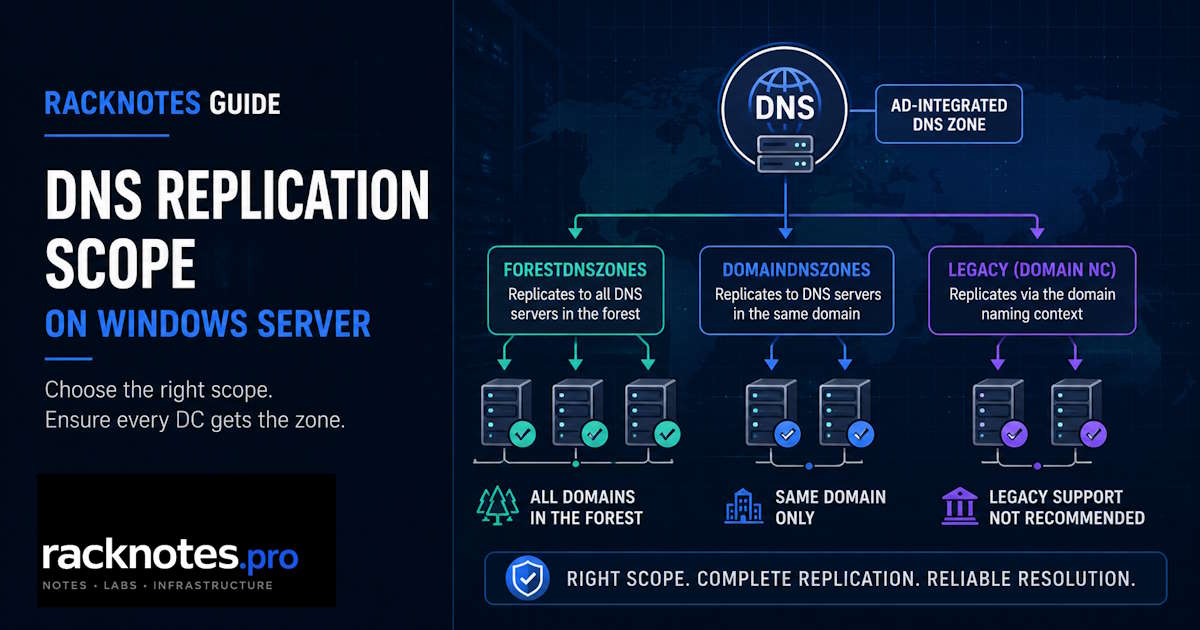
Active Directory DNS replication is how an AD-integrated DNS zone gets its data onto more than one DNS server. Instead of a primary server transferring zone data to secondaries over a dedicated DNS zone-transfer session, the zone is stored inside Active Directory Domain Services itself, and Active Directory’s own multi-master replication carries the changes to every DNS server that holds a copy.
Which DNS servers actually receive that copy depends on the zone’s replication scope: ForestDnsZones, DomainDnsZones, or a legacy domain-naming-context option inherited from older Active Directory builds. Getting the scope right does not guarantee Active Directory DNS replication is healthy, and healthy replication does not mean every DNS server in the environment has the zone. These are separate questions, and treating them as one complicates troubleshooting.
Active Directory DNS replication moves AD-integrated zone data through Active Directory itself, not through a separate DNS zone-transfer topology. DomainDnsZones replicates zone data to DNS servers on domain controllers in one domain; ForestDnsZones extends that to DNS servers on domain controllers across the whole forest. If a record looks different on two DNS servers, confirm the zone’s replication scope first, then check the relevant naming context with repadmin. Forcing an update means triggering Active Directory replication for that naming context, not running a conventional DNS zone transfer.
- AD-integrated DNS zone data lives in Active Directory Domain Services, and Active Directory DNS replication distributes it. There is no separate DNS zone-transfer path between AD-integrated replicas.
- ForestDnsZones and DomainDnsZones are the two built-in DNS application directory partitions; they set the replica set, meaning which DNS servers on domain controllers actually get a copy of the zone.
- A zone can have the correct scope but still fail to replicate if the underlying AD replication is broken. It can also replicate perfectly within its partition and still be missing from a DNS server outside that partition. Those are different failure modes.
Sync-DnsServerZonedoes not force AD replication between domain controllers. Userepadminagainst the relevant naming context instead.- There is no fixed AD DNS replication interval. Propagation follows the existing AD site-link topology, and DNS Server’s own polling of Active Directory adds a further layer.
- Changing replication scope can reset customized zone transfer settings, a documented Microsoft issue, not general data loss.
How Active Directory DNS Replication Works
An AD-integrated zone is stored in Active Directory Domain Services rather than only in a local zone file. Every DNS server running on a domain controller that hosts the zone can accept updates, and Active Directory replication, not a primary-to-secondary DNS zone transfer, distributes those changes to the other DNS servers in scope.
This multi-master behavior is what makes AD-integrated DNS different from a traditional primary/secondary setup: there is no single primary server, and no zone-transfer session between DNS servers carries the data. The replication that matters here is the same Active Directory replication that moves user accounts, group memberships, and GPOs, applied to a DNS-specific application partition. General zone types and AD-integrated vs file-backed fundamentals are covered in Windows Server DNS: Zones, Records, and Configuration Guide.
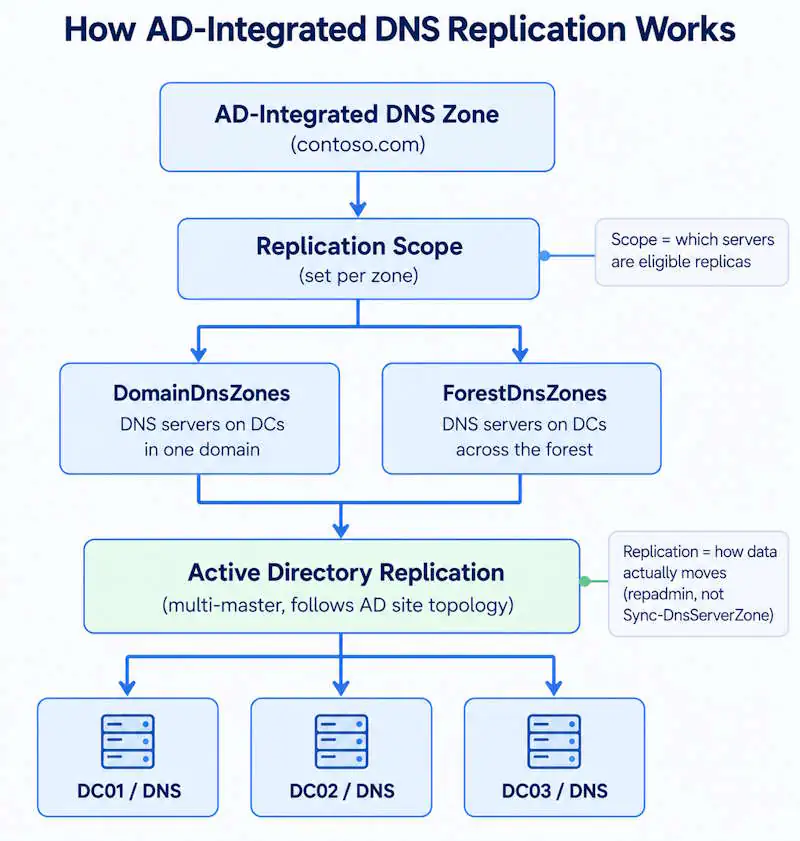
Two separate things decide where a record ends up. Replication scope selects the partition, which defines the eligible DNS replicas. Active Directory replication then does the actual copying. Checking or changing scope is not the same operation as syncing DNS.
Where AD-Integrated DNS Zones Are Stored
AD-integrated DNS zones live inside one of a small number of Active Directory containers, called DNS application directory partitions. Windows Server ships two built-in ones:
- ForestDnsZones – a forest-wide partition
- DomainDnsZones – a domain-wide partition
Older zones may instead use the domain naming context itself, the same partition that carries user accounts and GPOs; this is the legacy scope covered below. Windows Server also supports custom application directory partitions for deliberately limited replica sets, though this is a specialized option.
List what actually exists for a given DNS server with Get-DnsServerDirectoryPartition:
Get-DnsServerDirectoryPartitionTypical output includes entries such as DomainDnsZones.contoso.com and ForestDnsZones.contoso.com, one per built-in or custom partition the server participates in. This is not an ADSI Edit walkthrough; it is a read-only inventory check.
ForestDnsZones vs DomainDnsZones
| Scope | Storage | Replica set | Typical use |
|---|---|---|---|
| Forest | ForestDnsZones | DNS servers on domain controllers across the forest | Zone needs to be hosted forest-wide |
| Domain | DomainDnsZones | DNS servers on domain controllers in one domain | Zone only needs to be hosted within that domain |
| Legacy | Domain naming context | Domain controllers in that domain | Windows 2000 compatibility, migration candidate |
| Custom | Custom application directory partition | DNS servers explicitly enlisted | Deliberately limited, specialized replica set |
ForestDnsZones. The zone replicates to DNS servers running on domain controllers anywhere in the forest, regardless of domain. Use a forest-wide scope when DNS servers on domain controllers across the forest genuinely need to host the zone, for example a shared application namespace or a forest-root zone every domain resolves against. In the New Zone Wizard this appears as “All DNS servers running on domain controllers in this forest.”
DomainDnsZones. The zone replicates only to DNS servers on domain controllers within the same domain. Use a domain-wide scope when the zone only needs to be hosted by DNS servers on domain controllers in one domain, such as records specific to a single business unit’s domain. In the wizard this appears as “All DNS servers running on domain controllers in this domain.” Current wizard option labels for both scopes are documented in Microsoft’s Manage DNS Zones guide.
Legacy (domain naming context). The zone replicates through the domain naming context itself, the same replication path as user accounts and GPOs. The wizard exposes this as “All domain controllers in this domain, for Windows 2000 compatibility.” It predates the dedicated DNS application partitions introduced in Windows Server 2003, per Microsoft’s Active Directory-integrated DNS zones documentation. It is not inherently broken, but it is normally not chosen for new zones today and may remain in older environments that still use legacy settings.
Custom application directory partition. A specified partition with an explicitly enlisted set of DNS servers, exposed in the current wizard as a fourth option. This is a deliberately narrower replica set than either built-in partition, used when a zone should only replicate to a specific subset of DNS servers.
What DNS Replication Scope Actually Controls
Replication scope controls which DNS servers on domain controllers receive and host the zone data.
It does not by itself determine:
- whether the underlying Active Directory replication is healthy
- whether every client can actually resolve the zone
- whether a DNS server outside the replica set can still reach an authoritative answer through some other path, such as delegation or a conditional forwarder
A scope mismatch can produce inconsistent answers between DNS servers if some of them host the zone and others rely on a different resolution path, or cannot resolve the name at all. Whether that actually happens depends on the network’s resolution architecture, not on the scope setting alone.
How to Check DNS Replication Scope
Start an Active Directory DNS replication diagnosis by checking the configured scope.
Get-DnsServerZone | Select-Object ZoneName, IsDsIntegrated, ReplicationScopeRun this against any DNS server running on a domain controller. ReplicationScope shows Forest, Domain, or Legacy for each AD-integrated zone. Non-AD-integrated zones (file-backed primary, secondary) show None, since they never use Active Directory replication.
Checking the local server only confirms what that one server sees. Check a remote DNS server the same way:
Get-DnsServerZone -ComputerName dc01.contoso.com | Select-Object ZoneName, IsDsIntegrated, ReplicationScopeIf a DomainDnsZones-scoped zone is absent from a DNS server on a DC in another domain, that can be the expected replication boundary. If a ForestDnsZones-scoped zone is missing from a DNS server that should participate in the forest-wide DNS partition, that is not an expected boundary; investigate partition enlistment and Active Directory replication instead.
How to Check DNS Replication Between Domain Controllers
To check DNS replication status between domain controllers, verify the zone on both DNS servers, check the relevant DNS application directory partition with repadmin, and compare the same record on each server. Confirming the configured scope does not prove that Active Directory DNS replication reached every server it should have, so keep the three checks below separate.
1. Check whether the zone exists on both DNS servers
Get-DnsServerZone -ComputerName dc01.contoso.com
Get-DnsServerZone -ComputerName dc02.contoso.com
2. Check whether the relevant DNS application partition is actually replicating
repadmin /showrepl dc01.contoso.comLook for naming contexts such as:
DC=DomainDnsZones,DC=contoso,DC=com
DC=ForestDnsZones,DC=contoso,DC=com
The replication state of those specific naming contexts matters more here than confirming the ordinary domain naming context is healthy; DNS data lives in its own partition and can lag or fail independently of the rest of AD replication.
3. Compare the actual record
Get-DnsServerResourceRecord -ZoneName "contoso.com" -ComputerName dc01.contoso.com
Resolve-DnsName www.contoso.com -Server dc02.contoso.com
Together, these checks distinguish four cases: a zone that is absent because the server sits outside the replica set, a zone that is present but stale because replication has not converged, an underlying Active Directory replication failure, or an ordinary DNS resolution problem unrelated to replication.
To test DNS replication between domain controllers end to end, and only if it is safe to modify the zone, create a temporary A record with a non-production test name on one DC, then query that record directly against another DC with Resolve-DnsName -Server. If the record appears after the relevant partition has replicated successfully, Active Directory DNS replication is working end to end. Delete the temporary record after the test.
How to Force DNS Replication Between Domain Controllers
AD-integrated DNS uses Active Directory replication. Forcing a DNS change onto another domain controller means triggering Active Directory DNS replication for the relevant naming context, not treating the zone like a conventional primary/secondary transfer.
For broad replication, target a specific destination domain controller rather than leaving it implicit:
repadmin /syncall dc01.contoso.com /A/A synchronizes all naming contexts held by the target domain controller. /e extends the operation across sites; use it only when cross-site synchronization is actually intended, and check the documented behavior of each repadmin /syncall flag before combining them.
For DNS-specific work, target the exact naming context with repadmin /replicate. To force DNS replication from one DC to another, point it at the relevant DNS application directory partition and specify the destination and source domain controllers:
repadmin /replicate <DestinationDC> <SourceDC> "DC=DomainDnsZones,DC=contoso,DC=com"or for the forest-wide partition:
repadmin /replicate <DestinationDC> <SourceDC> "DC=ForestDnsZones,DC=contoso,DC=com"The source domain controller has to actually be a valid replication partner for that naming context, per Microsoft’s repadmin /replicate documentation; pointing the command at an arbitrary DC does not work. Do not reach for /force as a routine step. Forcing replication also does not repair a broken replication link; if the naming context already shows errors, the command fails the same way and the underlying AD problem is the thing to fix.
Sync-DnsServerZone is not a command for forcing Active Directory replication between domain controllers. It synchronizes the DNS server’s in-memory zone data to persistent storage, which can be Active Directory or a zone file. To push an AD-integrated DNS change between domain controllers, use Active Directory replication tools for the relevant naming context instead.
How Long Does Active Directory DNS Replication Take?
DNS replication time between domain controllers is not controlled by a separate DNS replication timer. For AD-integrated zones, convergence follows Active Directory replication topology: same-site changes use normal intra-site replication behavior, while cross-site convergence is affected by site links and their configured schedules.
Same-site replication is change-driven, so there is no fixed interval to wait out. Verify the actual naming-context status instead of relying on a fixed wait time.
AD replication convergence is only one part of the observed delay. After a directory replica receives the change, the DNS Server service also polls Active Directory Domain Services for changes to AD-integrated zones, so a replicated record may not become visible to queries at exactly the same instant the directory replication itself completes. The relevant setting is visible with:
Get-DnsServerDsSettingwhich includes a PollingInterval value controlling how often the DNS Server service checks Active Directory for changes to AD-integrated zones, documented in the Get-DnsServerDsSetting reference.
Rather than waiting an arbitrary number of minutes, check actual replication status:
repadmin /showrepl
repadmin /replsummary
If replication shows current and error-free for the relevant naming context and the record still has not shown up, the problem is more likely scope, DNS Server polling timing, or a resolution path issue than AD replication itself.
What Breaks When Scope Is Wrong
A scope mismatch does not throw an error. Typical symptoms:
- an application server in one domain failing to resolve a service record hosted in another domain’s zone, despite the zone being present and healthy elsewhere
- inconsistent
Resolve-DnsNameresults against different DNS servers for the same name - a DNS server on a DC in another domain not hosting a DomainDnsZones-scoped zone because that server is outside the partition’s replica set
None of these point specifically at Active Directory DNS replication scope. They can look like generic resolution failures, so the replication scope may not be the first thing checked. See Windows Server DNS Troubleshooting for the general server-side resolution triage sequence; this article covers only the replication-specific angle.
DNS Not Replicating Between Domain Controllers
When a record exists on one DC but not on another, Active Directory DNS replication can break in one of three places: the zone’s scope, the target server’s membership in the partition, or Active Directory replication itself. Work through them in order. Forcing replication first skips the diagnosis and can hide which one actually failed.
- Confirm the zone is actually AD-integrated –
Get-DnsServerZoneshould showIsDsIntegratedasTrue, not a file-backed primary or secondary - Check its configured replication scope with
ReplicationScope - Confirm the target DNS server should actually be in that replica set – a DNS server on a domain controller in a different domain is never in scope for a DomainDnsZones zone
- Verify the relevant application partition is present with
Get-DnsServerDirectoryPartition - Check
repadmin /showreplfor that specific naming context, not just the general domain naming context - Compare the zone or the specific record on both DNS servers
- Trigger replication for that naming context if the comparison confirms a gap
- Recheck the record after replication has had time to converge
- If the naming context itself shows Active Directory replication errors rather than a scope or timing issue, hand off to Active Directory Replication Not Working – this article does not repeat that repair workflow
A missing record looks like a replication failure, so the first move is often repadmin /syncall. If the server was never in the replica set, no amount of forced replication will deliver the zone there.
DNS Not Replicating to a New Domain Controller
This question often comes up with a freshly promoted DC, and the answer may be “it was never supposed to get that zone.” Check in this order:
- The DNS Server role is installed on the new DC, and
Get-DnsServerZoneruns against it - The zone in question is AD-integrated, not a file-backed zone that only ever existed on the old server
- The new DC sits inside the replica set the zone’s scope implies – same domain for DomainDnsZones, same forest for ForestDnsZones, explicitly enlisted for a custom partition
Get-DnsServerDirectoryPartitionon the new DC lists the expected DomainDnsZones or ForestDnsZones partition, confirming that the server sees the application partition it is expected to participate in – not, on its own, that replication is healthyrepadmin /showreplshows inbound replication for that partition without errors
If the new DC is outside the replica set, that is a scope decision, not a fault. If it is inside and the partition shows errors, Active Directory DNS replication is failing at the AD layer. Use the check and force steps above rather than a separate workflow.
Wrong Replication Scope vs Broken AD Replication
These four conditions produce similar symptoms but need different fixes.
| Condition | What you see |
|---|---|
| Wrong DomainDnsZones or ForestDnsZones scope | Zone is absent from a DNS server that is outside the intended replica set |
| AD replication failure | The naming context or its records are stale or failing even though the server should host the partition |
| DNS service or resolution issue | Active Directory replication is healthy but queries still fail |
| Missing application partition or enlistment | The expected ForestDnsZones, DomainDnsZones, or custom partition is missing, or the server was never enlisted |
Missing ForestDnsZones or DomainDnsZones
Start by confirming what actually exists on the DNS server in question:
Get-DnsServerDirectoryPartitionThis reports the DNS application directory partitions known to that specific DNS server, not a forest-wide inventory. If a built-in partition is not listed on one DNS server, first determine whether that server is expected to be enlisted in it, and compare the partition state from another appropriate DNS server. A missing entry on a single server is not by itself proof that ForestDnsZones or DomainDnsZones was deleted forest-wide or domain-wide.
If a built-in application partition is genuinely missing or damaged after that comparison, this is a recovery-level situation, not routine maintenance. Microsoft documents dnscmd /createbuiltindirectorypartitions for recreating the built-in DNS application partitions, but this is not a casual fix. Follow Microsoft’s guidance on custom and built-in application directory partitions directly rather than a shortened version here. Deleting and recreating objects in ADSI Edit as a first response risks making the situation worse, not better.
How to Change DNS Replication Scope
Set-DnsServerPrimaryZone -Name "contoso.com" -ReplicationScope ForestFull parameter details are in the Set-DnsServerPrimaryZone reference. -ReplicationScope applies to AD-integrated zones. File-backed primary zones use the file-zone parameter set and do not have an Active Directory replication scope. Changing the scope moves the zone into a different application directory partition, and the zone data then re-replicates to the DNS servers in the new scope through ordinary Active Directory replication. From a DNS server’s perspective this looks like a new zone object appearing in the target partition, not the existing object simply being relabeled.
Microsoft documents a specific issue where changing replication scope resets zone transfer settings, because the original zone object is effectively removed from its old partition and a new object is created in the target partition. Any DNS server that picks up that new object through normal AD polling applies default zone transfer settings, not the customized ones from before the change. Microsoft’s documented reset concerns the zone-transfer configuration specifically. Record data is moved with the zone, but verify the resulting zone configuration after the scope change rather than assuming every unrelated setting is unchanged.
Testing on a domain controller before it receives the change can make a successful scope change look like a failure.
Post-Change Validation
- Verify
ReplicationScopeon the zone - Confirm the relevant ForestDnsZones or DomainDnsZones partition
- Confirm the zone exists on the DNS servers expected to have it
- Compare the same record against more than one DNS server
- Check Active Directory replication status for the relevant naming context
- Verify customized zone transfer settings if any existed before the change
- Verify dynamic update behavior if it matters for this zone
Replication scope decides which DNS servers get the zone. Active Directory replication determines whether those servers actually receive the data. Troubleshoot them as separate questions.
FAQ
How does Active Directory DNS replication work?
An AD-integrated zone is stored in Active Directory Domain Services rather than a local zone file. Active Directory’s own multi-master replication distributes zone changes to the DNS servers within the zone’s scope, instead of a separate DNS zone-transfer session.
What is the difference between ForestDnsZones and DomainDnsZones?
ForestDnsZones replicates the zone to DNS servers on domain controllers anywhere in the forest. DomainDnsZones replicates it only to DNS servers on domain controllers in the same domain. The choice depends on whether DNS servers outside that domain need to host the zone directly.
How do I check Active Directory DNS replication between domain controllers?
Confirm the zone exists on both DNS servers with Get-DnsServerZone, check the relevant naming context with repadmin /showrepl, then compare the actual record with Get-DnsServerResourceRecord or Resolve-DnsName against both servers.
How do I force Active Directory DNS replication between domain controllers?
Trigger Active Directory replication for the relevant naming context with repadmin /syncall or repadmin /replicate, not Sync-DnsServerZone, which synchronizes a DNS server’s in-memory zone data to storage rather than replicating between domain controllers.
How long does Active Directory DNS replication take?
There is no separate DNS replication timer. It follows Active Directory’s own replication topology and site-link schedule, and the DNS Server service’s own polling of Active Directory adds a further layer before a change becomes visible to queries.
Why is DNS not replicating between domain controllers?
Common possibilities are that the target server is outside the zone’s replication scope, the relevant application partition has an underlying Active Directory replication problem, or the zone has not converged yet. On a newly promoted domain controller, check replica-set membership first.
What does Active Directory DNS replication scope control?
Which DNS servers on domain controllers receive and host the zone data. It does not by itself guarantee Active Directory replication is healthy or that every client can resolve the zone.
Does changing DNS replication scope reset anything?
It can reset customized zone transfer settings, a documented Microsoft behavior, because the zone is recreated in a different application partition. Record data moves with the zone, but verify the resulting configuration after a scope change rather than assuming every unrelated setting is unchanged.
Windows Server DNS Series
10 articles — Zones & Configuration · Scavenging · Forwarders · Replication Scope · Split-Brain DNS · Troubleshooting · Dynamic Updates · Event IDs · Scavenging Recovery · Zone Transfers