
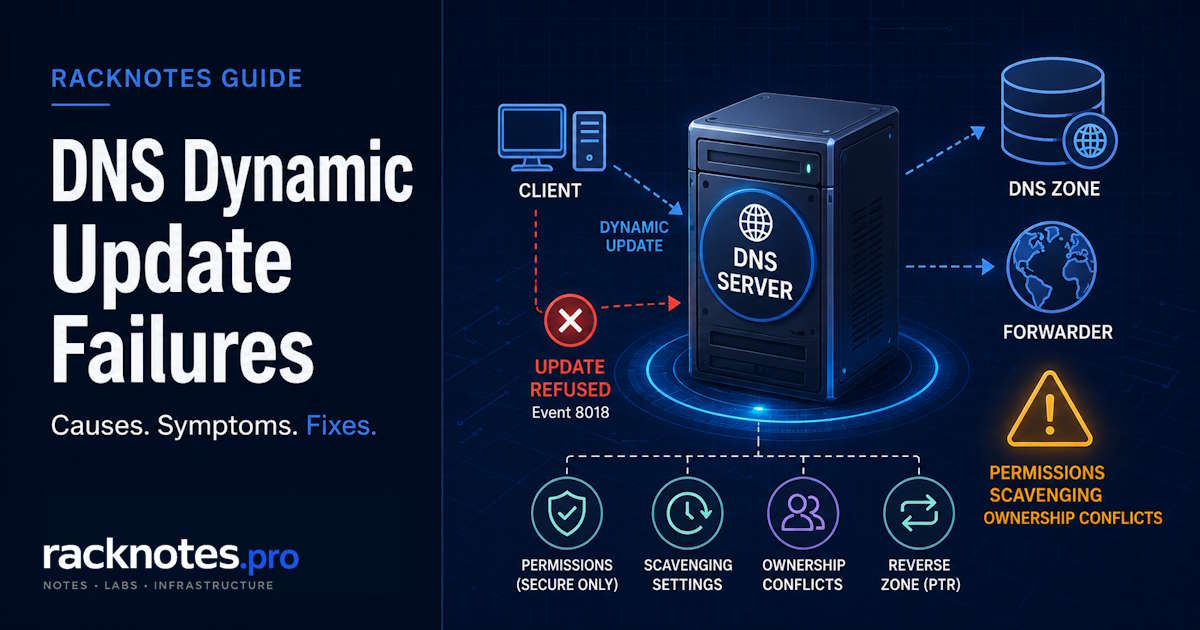
A Windows DNS dynamic update fails for one of four reasons: it was never triggered, the updater couldn’t discover or reach the writable authoritative server, the zone doesn’t accept the update type, or the record’s security descriptor doesn’t allow that principal. Identify whether the client or DHCP attempted the update, then record the exact event message, error code, zone, record owner/ACL, and SOA target.
Don’t delete records, force registration, change DHCP ownership, or loosen a Secure-only zone until the intended owner is known. On a DHCP client, prefer ipconfig /renew after fixing the root cause – /registerdns bypasses DHCP and can create a record DHCP can’t modify later.
Failures fall into four categories: the update was never sent, the updater couldn’t reach the writable authoritative server, the zone doesn’t accept it, or the server refused it under the record’s security descriptor. Ownership is a strong clue in Secure-only zones, but the ACL and update prerequisites decide it, not the owner field alone.
- Capture before changing anything: hostname, FQDN, addresses, SOA target, zone update setting, current record owner/ACL, and the exact event message and error code.
- One client fails: inspect the existing record’s ACL and owner in DNS Manager (View > Advanced > Security tab) – a stale record from a recreated computer account or a different DHCP identity is the common cause.
- Every client fails: check the zone’s Dynamic updates setting and confirm SOA resolution actually points at a writable authoritative server – a cache-only resolver or secondary isn’t automatically the failure.
- A records work, PTR records don’t: check the reverse lookup zone and DHCP’s DNS credential, and read DHCP Events 20319/20320 rather than assuming a silent failure.
- Records appear, then disappear: that’s aging and scavenging against the lease lifecycle, not a registration failure.
- Event 8018 means the server refused the update; Event 8015 means it timed out. Different problems, different fixes.
Quick diagnosis: DNS dynamic update failed by symptom
| Symptom | First place to check |
|---|---|
| One computer’s update fails | Existing record ACL / owner in DNS Manager (View > Advanced) |
| Every computer’s update fails | Zone dynamic-update setting; SOA discovery and reachability to the writable server |
| A record works, PTR record missing | Reverse lookup zone exists? DHCP DNS credential configured? |
| Record registers, then disappears | DNS aging and scavenging intervals vs. DHCP lease duration |
| DHCP Events 20317-20320 / error 9005 | Refused – record ACL/owner, zone mode, or intended updater mismatch |
| DNS Client Event 8015 | Timeout – SOA target, DNS reachability, firewall |
| No DHCP lease / APIPA addresses | DHCP authorization in AD (Event 1046) |
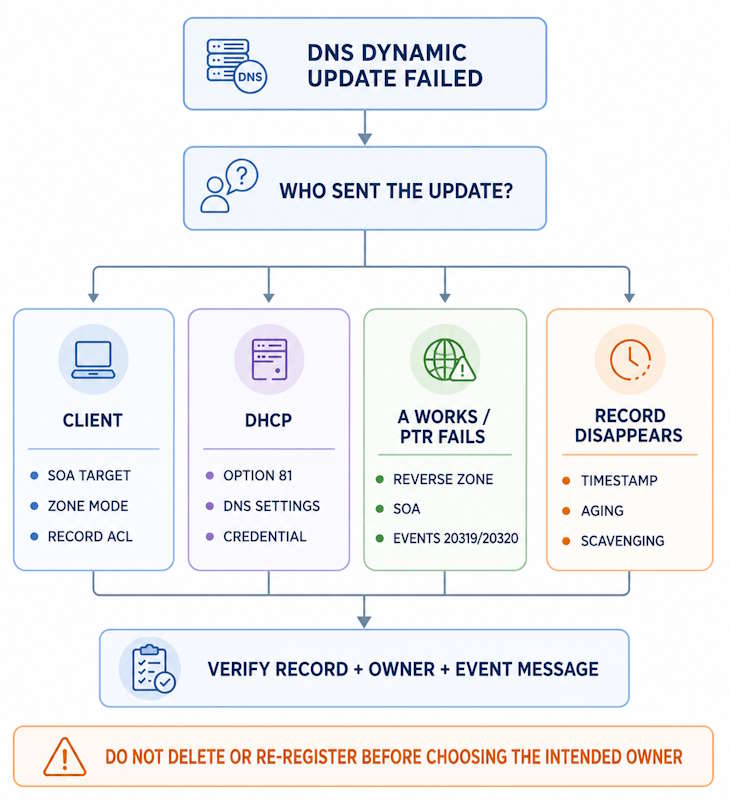
How Windows chooses the client or DHCP as updater
A failed update traces back to one of two mechanisms: either the DNS client or DHCP server never successfully sent it, or the DNS server received it and refused it. Which mechanism is in play determines the entire fix path. Microsoft documents the protocol and its failure modes in the Dynamic DNS Update documentation and the dynamic update troubleshooting guide. For DHCP-side behavior specifically, see registration behavior when DHCP manages dynamic updates.
For a Windows DHCP client using Option 81, the default negotiation has the client update its own A/AAAA record and DHCP update the PTR record – but it’s not a fixed rule. DHCP can be configured to update both, older clients may need DHCP to register both, and Windows 8.1+ can keep registering its own A record even when DHCP is set to “Always dynamically update,” unless configured to honor the override – a documented source of competing ownership in Secure-only zones.
| Configuration | Client action | DHCP action | Main risk |
|---|---|---|---|
| Default Windows DHCP negotiation | Client usually updates A | DHCP usually updates PTR | Separate owners are expected |
| DHCP “Always dynamically update” | Modern Windows client may still attempt A | DHCP attempts A and PTR | Competing records/owners |
| Client lacks Option 81 support | No direct update | DHCP can update A and PTR when enabled | DHCP identity owns records |
| Static-IP Windows client | Client attempts A and PTR | No DHCP registration | Computer account owns records |
| Dedicated DHCP credential on all DHCP servers | Depends on client DNS settings | Shared credential updates assigned records | Stable ownership across DHCP servers |
Microsoft’s current guidance generally prefers domain-joined clients to register their own records rather than DHCP owning them – but don’t treat one model as universally correct. Align the DHCP DNS tab, Option 81 behavior, client settings, and record ownership to the design you actually intend, then verify it.
Ownership is a strong diagnostic clue in Secure-only zones, since the creator normally controls the record – but the real authorization decision comes from the dnsNode security descriptor, inherited permissions, and explicit Deny entries, not the owner field alone. Check both Owner and effective permissions before blaming ownership itself.
One client: DNS dynamic update failed
Stale record owned by a different principal
The most common cause of single-client DNS dynamic update failed in an established AD environment: the existing DNS record’s ACL doesn’t permit the current computer account. The update is refused at the DNS server, but the client gets no useful error at the prompt.
This happens when:
- A computer account was deleted and recreated – the new account has a new SID, and the record’s ACL still reflects the old one
- The machine was rejoined to the domain – same SID-change effect
- The DHCP server created the record first, so the DHCP identity owns it and the client can’t overwrite it
- A different DHCP server created the record under a different identity
Event IDs: DNS Client System log – Event 8018 (“the DNS server contacted refused the update request”). DHCP server – Events 20317/20318 (IPv4 forward record) with error 9005 (DNS_ERROR_RCODE_REFUSED). 9005 means the server refused the operation – it doesn’t by itself prove the record is owned by the client; check the record/zone ACL, the intended updater, a Secure-only ownership conflict, or update being disabled before assuming the cause.
- Open DNS Manager with View > Advanced enabled
- Find the client’s A record in the forward lookup zone
- Right-click the record -> Properties -> Security tab
- Confirm the current computer account (
DOMAIN\ComputerName$) has Write permission – computers aren’t shown by default; click Object Types and check the Computers box - Check the System log on the client for Event 8018 to confirm the refusal
Before fixing anything, confirm the name isn’t a static infrastructure, cluster, service, or manually managed record, and record the current values, timestamp, owner, and ACL. Identify the intended updater, delete only the confirmed stale record, then trigger the appropriate client or DHCP workflow and verify both forward and reverse records under the new owner. Don’t delete every same-name A/AAAA record without checking for multihomed or load-balanced use.
For scripted ACL inspection: Get-DnsServerResourceRecord returns record data and timestamps but doesn’t expose the AD security descriptor. To query ownership programmatically, access the underlying dnsNode object in Active Directory using ADSI or Get-Acl on the AD path.
What ipconfig /registerdns actually does
ipconfig /registerdns forces direct client registration, bypassing DHCP’s ownership workflow – depending on configuration, this can include A and possibly PTR records. It returns to the prompt regardless of server acceptance; a refusal is silent unless you check the DNS Client event channel.
It’s useful only when direct client ownership is the intended design. For a Windows DHCP client, correct the root cause and use ipconfig /renew instead – this preserves the negotiated DHCP/DNS workflow rather than resetting a record’s ownership to the client.
Verify via the System log (provider Microsoft-Windows-DNS-Client) for Events 8015/8018, and the DNS server’s own audit Event 519 where enabled – not the client channel alone.
What ipconfig /registerdns does not do:
- Register SRV or Netlogon records – that’s
nltest /dsregdnson a DC - Guarantee PTR registration – PTR behavior depends on adapter/DHCP configuration
- Confirm the server accepted the update – the prompt returns regardless
Every client: DNS dynamic update failed
Zone not configured for dynamic updates
The simplest zone-wide cause of DNS dynamic update failed across every client: the zone is set to None, and all dynamic registrations are refused. Some newly created reverse lookup zones default to None and accept no PTR registrations.
Check: DNS Manager -> zone -> Properties -> General tab -> Dynamic updates. Three options: None, Nonsecure and secure, and Secure only (available only for AD-integrated zones).
For AD-integrated zones: set to Secure only – only authenticated principals can register records. For non-AD / standard primary zones: Nonsecure and secure may be the only dynamic-update option available for a file-backed zone, but it accepts unauthenticated updates – use it only where that risk is understood, and prefer an AD-integrated Secure-only zone where possible.
SOA discovery and the writable authoritative server
A cache-only resolver or secondary zone isn’t automatically a failure – see Windows Server DNS Forwarders for the broader forwarder/cache-only architecture question. The client queries its configured server for the zone’s SOA, identifies the writable authoritative server from that response, and sends the update there – Windows DNS secondaries can even forward it through the replication topology toward the primary. A cache-only resolver still works, provided the client gets the correct SOA response, resolves the primary, reaches it, and authenticates where required.
Resolve-DnsName contoso.com -Type SOA
Get-DnsClientServerAddress -AddressFamily IPv4
Get-DnsClient
Timeouts (Event 8015) point toward reachability to whatever server SOA discovery resolved to; refusals (Event 8018) point toward zone mode or ACL once that server is confirmed reachable. In an AD-integrated zone, any DC hosting a writable copy can accept the update – don’t assume the client’s configured DNS server itself must host the writable zone.
Secure-only zones and non-domain devices
Devices that can’t authenticate to AD DNS get refused on Secure-only updates – most IoT devices, appliances, and unmanaged printers. Domain-integrated Linux can update via Kerberos/GSS-TSIG; others need DHCP registering on their behalf with a dedicated credential.
A records work, PTR records don’t
PTR records register separately from A records, with DHCP responsible by default. A working while PTR is absent almost always means: no reverse zone exists, or DHCP lacks the credential to register in it.
Reverse lookup zone missing or unreachable
Reverse zones aren’t created automatically. A missing or unreachable one can cause PTR failures and fill the DHCP retry queue, delaying forward A registration too. On current Windows Server this surfaces as specific DHCP events, not a silent failure:
# Check which reverse zones exist
Get-DnsServerZone | Where-Object {$_.IsReverseLookupZone -eq $true} | Select ZoneName, ZoneType, DynamicUpdate

# Check recent PTR registration events
Get-WinEvent -FilterHashtable @{
    LogName = 'Microsoft-Windows-DHCP Server Events/Operational'
    Id      = 20319,20320
} -MaxEvents 50
A missing SOA response on the reverse zone is a major clue. Create reverse lookup zones for the address ranges that require PTR registration, aligned with administrative and subnet boundaries.
DHCP DNS registration settings
DHCP’s DNS tab (server- or scope-level) controls which records it creates: Enable DNS dynamic updates according to the settings below, only if requested by clients, Always dynamically update, Discard A and PTR records when lease is deleted, and update for clients that do not request updates (no Option 81). Server and scope settings can differ – capture the effective scope settings first:
Get-DhcpServerv4DnsSetting -ComputerName dhcp1.contoso.com
Get-DhcpServerDnsCredential -ComputerName dhcp1.contoso.com
DHCP Events 20319/20320 on PTR records with error 9005 indicate the reverse zone requires authentication and DHCP isn’t using a credential with write access to it.
DHCP DNS credentials and DnsUpdateProxy
When DHCP registers records in an AD-integrated Secure-only zone, it needs an identity that can authenticate. Without a dedicated DNS update credential, DHCP registers under its own computer account – on a domain controller, that’s the DC computer account, which Microsoft documents as Event 1056 because of its broad permissions.
Configure a dedicated low-privilege domain user account as the credential, using current PowerShell rather than netsh with a password on the command line – the older syntax exposes the password through console history, process inspection, and incident transcripts:
$credential = Get-Credential

Set-DhcpServerDnsCredential `
  -ComputerName 'dhcp1.contoso.com' `
  -Credential $credential `
  -PassThru

Get-DhcpServerDnsCredential -ComputerName 'dhcp1.contoso.com'
The account needs no administrative privileges – a plain domain user used consistently across every DHCP server updating the same records. The credential must stay valid, with rotation coordinated across every server using it; a forgotten permanent password isn’t a substitute for a documented lifecycle. Don’t restart the DHCP service automatically after setting the credential – it interrupts lease servicing, so only restart when actually required, in a maintenance window.
DnsUpdateProxy: members create records with a permissive security descriptor letting another qualified updater take ownership later – supported for multiple DHCP servers on overlapping scopes. The tradeoff: any authenticated principal, not just authorized DHCP servers, can update those records. It remains supported, but membership alone isn’t the complete design – prefer a dedicated shared DHCP credential instead, never run DHCP on a DC without one, and never add a DC to this group.
Secure dynamic updates and Kerberos
A domain-joined client doing a Secure-only update first negotiates a security context via TKEY, producing a GSS-TSIG signature the server validates before accepting it. Kerberos clock skew between client and DC breaks ticket acquisition and produces Event 8018. The default tolerance is five minutes, but it’s configurable policy – check the actual domain setting rather than treating five as fixed.
- Check time synchronization:
w32tm /query /status - Confirm the client’s SOA target actually hosts a writable copy of the zone:
Resolve-DnsName contoso.com -Type SOA - On a member computer, check the secure channel:
Test-ComputerSecureChannel -Verbose– for a domain controller, this isn’t the right tool; route to Netlogon/DC locator troubleshooting andnltestinstead - Check for a valid TGT:
klist– a valid ticket is useful but doesn’t by itself prove the complete update security negotiation succeeded - If a member computer’s secure channel is broken:
Test-ComputerSecureChannel -Repair, then re-test - If the sequence above doesn’t explain it, inspect the exact update event and, if needed, capture DNS traffic around the TKEY negotiation
Records register, then disappear
If records appear after boot/lease renewal and disappear on a regular cycle, that’s DNS aging and scavenging, not a registration failure – a common misdiagnosis. Each registered record carries a timestamp; scavenging removes ones whose timestamp hasn’t refreshed within the aging window. Account for lease duration, T1/T2 renewal, the scavenging period, replication latency, and offline time:
Get-DnsServerScavenging
Get-DnsServerZone | Select ZoneName, AgingEnabled, NoRefreshInterval, RefreshInterval
Use manually managed, timestamp-zero records only for infrastructure names intentionally maintained as static – not a blanket practice for every server or printer. Don’t convert DC locator or other automatically managed service records into manual ones, and document ownership for every static record you create. For the full scavenging configuration and safe rollout workflow, see DNS Scavenging Windows Server; for recovery after scavenging has already deleted valid records, see DNS Scavenging Deleted Records: Recovery and Prevention.
DHCP not authorized in Active Directory
An unauthorized DHCP server stops issuing leases – clients fall back to APIPA and never get an IP to register, which looks like DNS dynamic update failed but is a DHCP failure. Event 1046: “The DHCP/BINL service … has determined that it is not authorized to start. It has stopped servicing clients.”
- Check the DHCP console: a red down arrow indicates the server isn’t authorized
- Verify:
Get-DhcpServerInDC– confirm this server’s IP appears in the list - Test LDAP reachability:
Test-NetConnection -ComputerName [DC-IP] -Port 389, and check AD replication health - Authorize via console (right-click server -> Authorize) or PowerShell:
Add-DhcpServerInDC -DnsName [fqdn] -IPAddress [ip]– requires Enterprise Admin - If authorization fails because an entry already exists: compare the FQDN and IP
Get-DhcpServerInDCactually returns against this server’s current values, and look specifically for duplicate orCNFconflict objects underCN=NetServices,CN=Services,CN=Configuration– take an AD backup before deleting any confirmed conflict object, and follow Microsoft’s current authorization-failure procedure rather than a generic ADSI cleanup
Event ID reference
| Signal | Interpretation | First direction |
|---|---|---|
| DNS Client 8015 | Update timed out – read the full message for the target | SOA target, DNS reachability, firewall, service state |
| DNS Client 8018 | Server refused the update – read the full message | Zone update mode, record ACL/owner, intended updater |
| DHCP 20317 / 20318 | IPv4 forward (A) record registration failure / timeout | Forward zone, SOA, credential, embedded error code |
| DHCP 20319 / 20320 | IPv4 PTR record registration failure / timeout | Reverse zone, SOA, credential, embedded error code |
| DHCP 20321-20324 | IPv6 forward/PTR registration failure and timeout events | IPv6 zones and update path |
| DHCP 1046 | Server unauthorized in AD | Authorization entry, LDAP reachability, replication |
| DHCP 1056 | DHCP on a DC with no DNS update credential | Configure a dedicated credential |
| Error 9005 | DNS_ERROR_RCODE_REFUSED – operation refused | Full message, record ACL/owner, zone mode |
| 5774 (NETLOGON) | DC failed to register a DNS locator record | See the Active Directory DNS Problems guide linked above |
For DNS dynamic update failed diagnosis, read the full provider, message, and embedded error code before diagnosing from an Event ID alone – registration and deregistration events can vary by operation and Windows version. Scavenging Events 2501/2502 belong primarily to the DNS Scavenging article linked above. Detailed DNS Server role Event IDs (4000, 4013, 4015, 407, 408, 6702) are covered in the Windows Server DNS Event IDs guide linked in the scope note.
Reproducible diagnostic workflow
Group Policy commonly controls client-side registration behavior – see Group Policy in Active Directory if a GPO setting is the suspected cause. On the affected client:
ipconfig /all

Get-DnsClient | Select-Object InterfaceAlias, ConnectionSpecificSuffix, RegisterThisConnectionsAddress

Get-DnsClientServerAddress -AddressFamily IPv4
Resolve-DnsName contoso.com -Type SOA
Resolve-DnsName host1.contoso.com -Type A
On the DNS server:
Get-DnsServerZone -Name 'contoso.com' | Select-Object ZoneName, ZoneType, IsDsIntegrated, IsReadOnly, DynamicUpdate

Get-DnsServerResourceRecord -ZoneName 'contoso.com' -Name 'host1'
Use DNS Manager’s Advanced view for the record’s Owner and Security tab. On the DHCP server:
Get-DhcpServerv4DnsSetting
Get-DhcpServerDnsCredential

Get-WinEvent -FilterHashtable @{
    LogName = 'Microsoft-Windows-DHCP Server Events/Operational'
    Id      = 20317,20318,20319,20320
} -MaxEvents 50
After applying the fix, for a DHCP Windows client, verify with ipconfig /renew rather than /registerdns, then confirm the A/AAAA record, PTR record, timestamp, owner/ACL, the client event, the DHCP event, and the DNS server’s audit event where enabled – not just the command prompt’s return.
Hardening checklist
- Client uses the intended AD DNS servers, and SOA discovery actually resolves to a writable authoritative server
- The target zone’s Dynamic updates setting matches the intended design – Secure only for AD-integrated zones
- The reverse lookup zone exists and accepts updates for the client subnet
- The existing record’s owner and ACL match the intended updater – verified in DNS Manager’s Security tab, not assumed
- DHCP uses a dedicated DNS update credential when it registers records, set via
Set-DhcpServerDnsCredential– not the DC computer account - DHCP is authorized in Active Directory
- Aging and scavenging intervals account for the full refresh lifecycle – lease duration, T1/T2 renewal, offline devices
- Static records are limited to genuinely static infrastructure, documented, and not applied to automatically managed service records
- Results are verified in DNS Manager, the DNS-Client event log, and DHCP events – not from the command prompt alone
FAQ
Why does ipconfig /registerdns show no error but DNS dynamic update failed on the server?
The command triggers a local registration attempt and returns to the prompt regardless of server acceptance – failures are silent there. Check the DNS-Client event channel (Applications and Services Logs -> Microsoft -> Windows -> DNS Client Events) for Events 8015 or 8018. If neither appears and the record is still wrong, confirm which server SOA discovery actually resolved to.
The DHCP server logs error 9005 – what does that mean?
Error 9005 (DNS_ERROR_RCODE_REFUSED) means the server refused the operation – it doesn’t by itself prove the record belongs to the client. Inspect the record type, zone, updater identity, current ACL/owner, and DHCP DNS design before concluding the cause.
How do I check who owns a DNS record?
In DNS Manager: enable View > Advanced, find the record, right-click -> Properties -> Security tab. The Owner and ACL entries show which security principal created and can modify the record – computer accounts aren’t shown by default, so click Object Types and check the Computers box. For programmatic inspection, query the underlying dnsNode AD object using ADSI or Get-Acl on the AD path, since Get-DnsServerResourceRecord doesn’t expose the security descriptor.
A machine was rejoined to the domain and now DNS dynamic update failed – why?
Rejoining creates a new computer account with a new SID. If the record’s ACL still reflects the old SID, the new account gets refused. Verify the ACL and owner first, then delete the confirmed stale record and let the client re-register – the new account will own the new record.
PTR records for DHCP clients are missing but A records are fine – where do I start?
Check in order: does a reverse lookup zone exist for the subnet? Is it set to accept dynamic updates (some newly created reverse zones default to None)? Is DHCP configured to register PTR records (DHCP server Properties -> DNS tab)? Does DHCP have a credential to authenticate to a Secure-only reverse zone? DHCP Events 20319/20320 with error 9005 point at the PTR step specifically – configure a dedicated DNS update credential with Set-DhcpServerDnsCredential.
Can Linux or non-domain clients use DNS dynamic updates in a Windows AD environment?
Devices that can’t authenticate to AD DNS get Secure-only updates refused. Properly domain-integrated Linux systems can update via Kerberos/GSS-TSIG; for anything else, DHCP registration with a dedicated credential is the supported path.
Can a client use a cache-only DNS server and still register successfully?
Yes, if SOA discovery returns the writable authoritative server and the client can resolve, reach, and authenticate to it. The cache-only server doesn’t itself need to host the zone.
References
- Dynamic DNS Update in Windows and Windows Server
- Troubleshooting DNS dynamic update issues
- Registration behavior when DHCP manages dynamic updates
- DHCP logging events for DNS record registrations
- DHCP deployment and DNS settings/credentials
- Event 1056 after installing DHCP on a domain controller
- DHCP authorization failures and Event 1046
- DNS scavenging setup
Windows Server DNS Series
10 articles — Zones & Configuration · Scavenging · Forwarders · Replication Scope · Split-Brain DNS · Troubleshooting · Dynamic Updates · Event IDs · Scavenging Recovery · Zone Transfers