
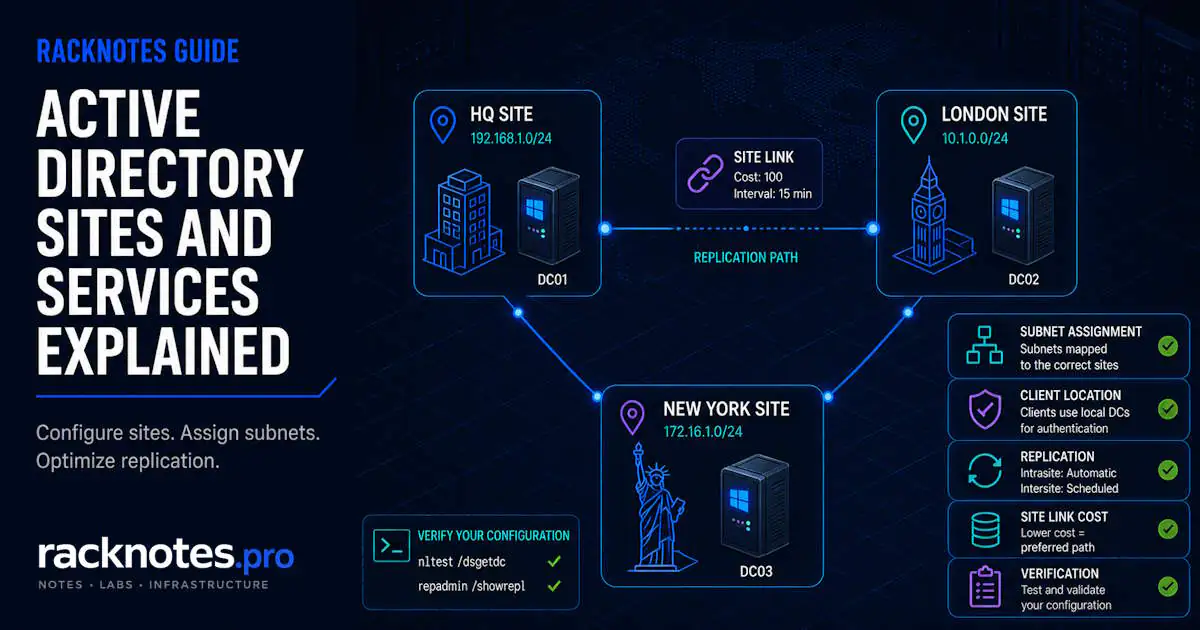
Active Directory Sites and Services maps the physical network topology of an AD environment. Sites group well-connected IP subnets, and subnets map IP ranges to sites for site-aware client discovery. Domain controllers are placed in the corresponding site and advertise services for that topology, while site links give the KCC the information it needs to build intersite replication paths.
When the topology is correct, clients prefer nearby domain controllers and replication follows the intended WAN design. Missing or incorrect subnet mappings can send authentication traffic to remote DCs and make replication behavior harder to predict.
This guide explains the core objects, shows how to configure sites, subnets, and site links, explains <automatically generated> KCC connections, and provides a verification workflow for confirming the topology works as intended.
- Single office, single subnet: one site, nothing to configure. Default setup is correct. A new forest always includes DEFAULTIPSITELINK – it just has no meaningful intersite role with one site.
- Locations separated by meaningful WAN boundaries usually need separate sites, with the relevant subnets mapped and site links configured for the intended replication topology.
- Clients prefer DCs in their own site – but only if subnet assignments tell AD which site the client belongs to. Missing mappings show up as NO_CLIENT_SITE entries in Netlogon.log and NETLOGON Event ID 5807, not Event ID 1311.
- Site links describe logical replication paths for the KCC. They do not choose the physical MPLS, broadband, or 4G circuit – that is handled by routing, SD-WAN, or VPN.
- Connection objects marked
<automatically generated>are normal KCC output, not errors – change the topology inputs, not the connection objects. - After any Active Directory Sites and Services change: verify with
nltest /dsgetsite,nltest /dsgetdc:<domain> /force,repadmin /replsummary, andrepadmin /showreplbefore assuming it worked.
What Is Active Directory Sites and Services?
The console itself is straightforward: sites, subnets, and site links are all configured from a single MMC tree. What trips people up is the model underneath it.
A site is not the same as a domain or a forest, and the term has nothing to do with logical AD structure. One domain can span multiple sites, and one site can contain domain controllers from multiple domains – site membership is a physical-topology concept, layered on top of the logical forest/domain/OU hierarchy covered in the Active Directory structure guide, not part of it.
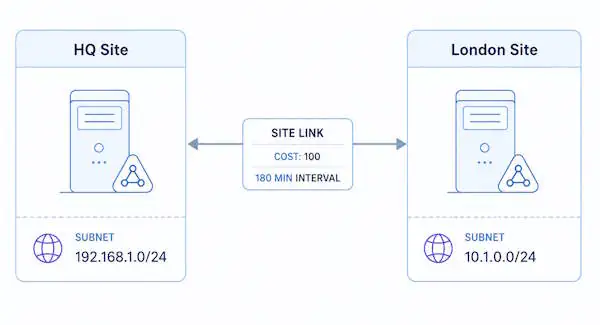
The distinction that matters operationally: intrasite replication is automatic and triggered by changes, with no configurable schedule. Intersite replication is controlled by the site links you define, with explicit cost and interval values. Without site configuration, AD treats everything as intrasite – correct for one office, and wrong the moment a WAN link enters the picture.
A new forest always includes a default IP site link named DEFAULTIPSITELINK. In a single-site environment it exists but has no meaningful intersite role – it only matters once a second site is defined. For a single-office environment with one contiguous IP range, one site is correct and no action is required; creating additional sites without a WAN boundary adds administrative overhead with no operational benefit.
How Active Directory Site Topology Works
The core topology objects include:
| Component | What it controls |
|---|---|
| Site | Named logical grouping of subnets (for example, “HQ” or “London”) |
| Subnet | IP range associated with a site – the key to DC Locator behavior |
| Site Link | Logical replication path between two or more sites – defines cost and replication interval |
| Site Link Bridge | Controls transitive replication paths; “Bridge all site links” is enabled by default and assumes fully routed IP connectivity between all sites |
| NTDS Site Settings | Site-level KCC configuration object, stored under the site itself; rarely modified directly. Not the same object as the per-DC NTDS Settings covered below. |
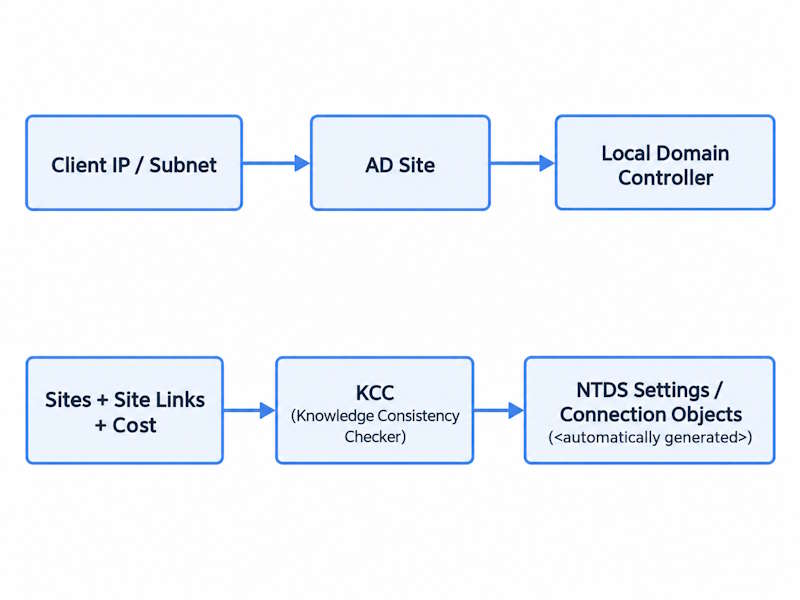
The KCC (Knowledge Consistency Checker) runs on every DC and automatically builds the replication topology from site and site-link configuration. It recalculates on a regular cycle – by default every 15 minutes – so topology changes are not reflected instantly. Subnet mapping and DC Locator behavior also depend on AD replication completing and cached locator data expiring. In practice, expect 15-30 minutes before a topology change is visible, but verify with the commands later in this guide rather than assuming.
NTDS Settings and the KCC
Each domain controller has its own NTDS Settings object under that DC’s server object. This is different from the site-level NTDS Site Settings shown in the table above. The KCC reads the site and site-link topology and uses it to create and maintain the replication connection objects listed under a DC’s NTDS Settings. Administrators normally influence the result by adjusting sites, subnets, and site links rather than hand-building connection objects; the automatically created connections are covered in detail below.
A site link is a logical replication path, not a physical circuit. The WAN doesn’t know AD exists, and AD doesn’t know which circuit is carrying its traffic.
Global Catalog Placement in Multi-Site Environments
In multi-site deployments, decide per site whether a local Global Catalog server is worth the overhead. Relevant factors: number of users at the site, WAN reliability and latency to the nearest existing GC, whether applications need local GC access (Exchange and similar on-premises workloads are typical examples), and how often users roam between sites. For smaller branch sites with reliable WAN connectivity and no application requirement for a local GC, Universal Group Membership Caching can reduce the need for a local GC by caching group membership locally. Larger sites, unreliable WAN links, or workloads that depend on frequent GC access usually justify a locally promoted GC.
How DC Locator Uses Sites and Subnets
DC Locator is the process clients use to find a domain controller for authentication. Site configuration is what makes DC Locator prefer local DCs over remote ones. The core relationship: client IP address, mapped to an AD subnet, mapped to an AD site, drives site-aware DC discovery.
When a client starts the logon process, it determines its site based on the IP subnet assigned in AD Sites and Services. The client then:
- Queries DNS for a DC with a site-specific SRV record matching its site.
- Attempts authentication against a local DC from that site.
- Falls back to any available DC only if no local DC is reachable or no site match exists.
The site is not manually configured on clients – it is calculated automatically from the client IP address against the subnet objects stored in AD. This is why subnet assignments matter more than site names. A correctly named site with no subnets assigned does nothing useful for DC Locator.
For a site without its own DC, site coverage allows eligible DCs in other sites to advertise service for that uncovered site based on the topology. This gives clients a site-aware fallback, but it is not a substitute for placing a local DC where the site’s size, WAN reliability, or workload justifies one.
When Should You Create an Additional Active Directory Site?
Create a new site when a WAN link separates DCs or clients from the main office. Do not create sites for VLANs on the same LAN – VLANs are routing boundaries, not replication boundaries. A DC on VLAN 20 and a DC on VLAN 10 connected by a Layer 3 switch on gigabit links do not need separate sites in AD Sites and Services. Network connectivity and replication/service-locality requirements are the real design factors, not geography by itself.
| Scenario | Correct configuration |
|---|---|
| Single office, multiple VLANs | One site – no additional configuration |
| Head office and branch over MPLS | Two sites, one site link |
| Head office and branch with MPLS plus 4G failover | Two AD sites and one logical site link; configure physical path selection in routing, SD-WAN, or VPN – site-link cost does not choose which physical circuit carries the packets |
| Three offices, hub-and-spoke WAN | Three sites, site links matching the WAN topology |
How to Open Active Directory Sites and Services
On a domain controller, or any machine with RSAT installed, open it from Server Manager under Tools, or run the console directly:
dssite.mscThe console opens straight to the Sites container, where sites, subnets, and site links are all managed from the same tree.
Configure Active Directory Sites and Services Step by Step
Create a New Site
# Create the new site
New-ADReplicationSite -Name "London"

# Verify
Get-ADReplicationSite -Filter *
Creating the site alone does not change replication. A domain controller must be placed in the site, and the site must participate in a valid site-link topology, before intersite replication can use it – subnets matter separately for correct site-aware client and DC mapping, covered next.
Add a Subnet to a Site
Every relevant subnet that contains DCs or clients needs a site assignment. This is the step most guides gloss over and many operators skip when adding a second location.
# Assign subnet to the new site
New-ADReplicationSubnet -Name "10.1.0.0/24" -Site "London"

# Assign HQ subnet explicitly if not already defined
New-ADReplicationSubnet -Name "192.168.1.0/24" -Site "Default-First-Site-Name"

# Verify assignments
Get-ADReplicationSubnet -Filter * | Select-Object Name, Site
Unassigned client subnets do not cause immediate authentication failures. Instead, clients cannot be mapped to an AD site, so DC Locator falls back to any available DC regardless of location. Check Netlogon.log for NO_CLIENT_SITE entries and review NETLOGON Event ID 5807 for accumulated unmapped client addresses. Event ID 1311 is different – it indicates the KCC cannot build or maintain a valid replication topology, typically due to disconnected site links, offline DCs, or misconfigured bridgeheads.
A branch office DC is promoted before its subnet is added to AD Sites and Services. The DC lands in the site of its replication source – which may be the HQ site or Default-First-Site-Name, not the intended branch site. Clients in the branch have no site match, so DC Locator sends authentication requests to both branch and HQ DCs without preference. On a congested WAN link, logins become noticeably slow during peak hours. Netlogon.log on the branch DC accumulates NO_CLIENT_SITE entries, and NETLOGON Event ID 5807 appears for unmapped client addresses. The fix – adding the missing subnet and moving the DC to the correct site – takes minutes. Diagnosing the cause typically takes much longer.
Configure Site Link Cost and Replication Interval
# Create a site link between HQ and London
New-ADReplicationSiteLink -Name "HQ-London" `
  -SitesIncluded "Default-First-Site-Name","London" `
  -Cost 100 `
  -ReplicationFrequencyInMinutes 180

# Verify
Get-ADReplicationSiteLink -Filter * | Select-Object Name, Cost, ReplicationFrequencyInMinutes
Site-link cost is a relative value – the default is 100. Lower cost means the KCC prefers that logical replication path. Cost is useful when AD has a choice between different topology paths, such as London-Frankfurt directly versus London-HQ-Frankfurt. It does not select which physical circuit carries packets between the same two endpoints – that is determined by routing, SD-WAN, or VPN configuration. Separately, the site-link schedule controls when replication is allowed to run at all, while the replication interval controls how often replication is attempted during that available window. The cost values below are illustrative and relative to your specific topology.
| Link type | Illustrative cost |
|---|---|
| LAN or primary MPLS | 100 |
| Secondary MPLS or stable broadband | 150-200 |
| Variable-quality broadband | 200-300 |
| 4G or unreliable backup path | 400-500 |
Replication interval: the default 180-minute interval means many ordinary directory changes may not replicate across sites until the next scheduled intersite replication cycle. Password changes are a separate case – the PDC Emulator receives them preferentially, ahead of normal replication, so a recently changed password should not be described as simply waiting for the site-link interval. For most SMB environments a 180-minute interval is acceptable for ordinary changes; if same-day propagation matters, lower it to 60 minutes. The minimum configurable intersite replication interval for a site link is 15 minutes. A shorter interval on an unreliable WAN exposes existing replication problems more frequently; it does not cause them.
What Are <automatically generated> Connections in Active Directory Sites and Services?
Opening an NTDS Settings object under a domain controller in AD Sites and Services often shows one or more connection objects labeled <automatically generated>. These are not errors, and they are not duplicate objects to clean up – they are exactly what the KCC is supposed to produce.
The KCC continuously evaluates site and site-link topology and creates or adjusts these connection objects to build a working replication path between DCs. When the topology changes – a new site, a new site link, a change in cost, a DC going offline – the KCC updates the connection objects to match on its next cycle.
To change replication topology, change the inputs – sites, subnets, site links, and costs – rather than the connection objects themselves. Deleting a KCC-generated connection object directly is possible, but it is rarely the right fix.
A recurring pattern in mixed environments: an operator deletes an <automatically generated> connection object to “clean up” the topology, watches it reappear at the next KCC cycle, and concludes the console is buggy. The topology – the site link that requires that connection – was never actually removed, so the KCC correctly rebuilds what the current inputs call for.
Manually created connection objects are supported for specific edge cases, but they should not be the default way topology is managed – they are not automatically adjusted the way KCC-generated ones are, so they can silently become wrong as the environment changes. Confirm the actual state with repadmin /showrepl, which lists each DC’s current replication partners.
Verifying Active Directory Sites and Services Changes
AD Sites and Services changes do not confirm success on their own. Run these checks after any topology change.
- Confirm which site the local DC is in:
nltest /dsgetsite– run directly on the DC. Output should name the site you assigned it to. - Force a DC Locator query:
nltest /dsgetdc:<domain> /force– clears the cached result and returns the DC found after a fresh lookup. Confirm the DC is in the expected site. - Check replication health summary:
repadmin /replsummary– fastest way to identify failed replication partners before reviewing detail. - Check detailed replication:
repadmin /showrepl– intersite replication should show expected partners and a recent last-replication timestamp. - Check for replication failures scoped to the site:
Get-ADReplicationFailure -Scope Site -Target "London"– any errors indicate a misconfigured site link or unreachable partner DC. - Verify DC placement:
Get-ADDomainController -Filter * | Select HostName,Site,IPv4Address– confirm each DC is in the site that matches its subnet.
If nltest /dsgetdc returns a DC in the wrong site, check subnet assignment and Netlogon.log for NO_CLIENT_SITE entries before investigating site-link configuration; subnet mapping is one of the most common causes.
Quick Troubleshooting Reference
| Symptom | Likely cause | First check |
|---|---|---|
| Client selects a remote DC | Missing or incorrect subnet mapping, cached DC Locator result, no local DC | nltest /dsgetsite, then nltest /dsgetdc:<domain> /force |
| New DC appears in unintended site | No matching subnet during promotion; replication-source site was used instead | Get-ADDomainController -Filter * | Select HostName,Site,IPv4Address |
| NO_CLIENT_SITE in Netlogon.log or NETLOGON Event ID 5807 | Client IP range not mapped to an AD subnet | Add or correct the subnet object in AD Sites and Services |
| Event ID 1311 in Directory Service log | KCC cannot construct a complete replication topology | Check site-link connectivity, DC availability, and repadmin /replsummary |
| Replication uses an unintended logical path | Site-link membership or cost does not match the available topology | Get-ADReplicationSiteLink -Filter * -Properties * |
| Physical traffic uses 4G instead of MPLS | Routing, SD-WAN, VPN, or WAN-edge path selection – not AD site-link cost | Inspect routing tables and WAN failover policy |
Active Directory Sites and Services Best Practices
- Map every relevant client and DC subnet to the correct site.
- Design sites around real network connectivity and service locality, not office names or VLAN count.
- Set site-link costs deliberately whenever more than one replication path exists between sites.
- Keep replication intervals aligned with business requirements and actual WAN capability.
- Avoid overlapping subnet definitions unless there is a clear design reason.
- Keep DC site placement aligned with subnet and site design.
- Verify topology after changes instead of assuming the KCC has converged.
- Avoid manually editing KCC-generated connection objects without a specific, documented reason.
- Treat Global Catalog placement as a design decision based on site size, WAN reliability, application needs, and authentication behavior.
Common Mistakes
All DCs land in the default site after adding a branch. This happens when the branch DC is promoted before its subnet is configured in AD Sites and Services. A DC promoted without a matching subnet lands in the site of its replication source DC – not automatically in Default-First-Site-Name, but wherever the source DC lives. Fix: add the subnet, then move the DC to the correct site using the console or Move-ADDirectoryServer. Do not leave it – replication and DC Locator behavior will be wrong for every client in that subnet.
Subnet ranges overlap between sites. If 10.1.0.0/16 is assigned to HQ and 10.1.5.0/24 is assigned to London, AD matches the more specific subnet. Overlapping definitions work but create confusion and future misassignment risk. Keep subnet definitions clean and non-overlapping.
Site link cost left at the default for every link. When multiple routes have equivalent cost, do not assume AD will follow the physical path you consider preferable – assign costs deliberately when one logical replication path should be preferred over another. In a topology with multiple equivalent logical routes, equal costs can leave an unintended path equally eligible even when the network design has a clear preferred route.
Event IDs 1925 and 2087 indicate failed replication connectivity or DNS resolution failure – they are not caused by an aggressive replication interval. A shorter interval exposes an existing problem more frequently. The underlying issue is DNS, RPC, firewall, or DC reachability. Diagnose the actual connectivity failure rather than raising the interval to reduce symptom frequency. For replication failures in depth, see Active Directory replication troubleshooting.
FAQ
What is Active Directory Sites and Services?
Active Directory Sites and Services is the management console for AD’s physical network topology – the sites, subnets, and site links that control which domain controllers clients use and how replication moves between locations. It is a physical-topology model, separate from the logical forest, domain, and OU hierarchy.
Do I need to configure Active Directory Sites and Services for a single-office setup?
No. The default single-site configuration is correct. DEFAULTIPSITELINK exists in every new forest but has no meaningful role until a second site is created. Adding sites without a WAN boundary creates administrative overhead with no operational benefit.
What happens if I don’t assign subnets to sites?
Clients cannot determine which site they belong to, so DC Locator falls back to any available DC regardless of location. On a WAN-connected branch, authentication crosses the WAN unnecessarily. Check Netlogon.log for NO_CLIENT_SITE entries and NETLOGON Event ID 5807 for unmapped client addresses. Event ID 1311 is a separate issue – it indicates the KCC cannot construct a complete replication topology and is not triggered by missing subnet mappings.
How long do Active Directory Sites and Services changes take to apply?
Replication topology changes take effect after the KCC recalculates (every 15 minutes by default) and the updated topology propagates. Subnet mapping and DC Locator behavior also depend on AD replication completing and cached locator data expiring, so not every change is simply a 15-30 minute wait. Verify explicitly after each change rather than assuming.
What is the minimum intersite replication interval?
15 minutes. Active Directory site-link replication intervals cannot be configured below that value.
What is site coverage in Active Directory?
For a site without its own DC, eligible DCs in other sites advertise service for that uncovered site based on the topology. This gives clients a site-aware fallback, but it is not a substitute for placing a local DC where the site’s size, WAN reliability, or workload justifies one.
Can a site link include more than two sites?
Yes, but membership does not by itself create full-mesh replication. A multi-site link tells AD that those sites can communicate over that logical path at the configured cost and schedule – the KCC still calculates the actual replication topology and connection objects from that input, so a multi-site link should not be described as creating a direct pairwise connection between every member. For a true hub-and-spoke topology where branches should replicate only through the hub, separate per-pair site links are usually clearer than one link covering every location.
Final Thoughts
For many SMB environments, Active Directory Sites and Services becomes a low-maintenance part of AD once the topology is configured correctly, but it should be reviewed whenever subnets, locations, WAN paths, or DC placement change. The KCC handles day-to-day replication topology on its own, and the connection objects it builds are not something to second-guess. The fundamental concepts apply to every currently supported Windows Server version.
Skipping this step may not create a visible problem on day one. The trouble appears later, when a branch office goes live, logins slow down during peak hours, and nobody connects the authentication delay to AD topology. Subnet assignment takes minutes; diagnosing the root cause afterward usually takes much longer.
Active Directory Sites and Services provides the physical-to-logical mapping that the rest of the AD infrastructure depends on for efficient operation. For the domain and forest structure that sites sit within, see the Active Directory structure guide linked above. For replication failures after the topology is configured, use the replication troubleshooting guide linked in Common Mistakes above. Microsoft’s Active Directory Replication Concepts is the authoritative reference for KCC topology building. The Understanding Active Directory Site Topology documentation covers site link bridge behavior and transitive replication paths, while the Event ID 1311 troubleshooting guide covers KCC topology failures in detail.
Active Directory Series
25 articles – Windows Server 2025 · Forest & Domain · FSMO · GPO · Replication · DNS · Security · Backup & Recovery