
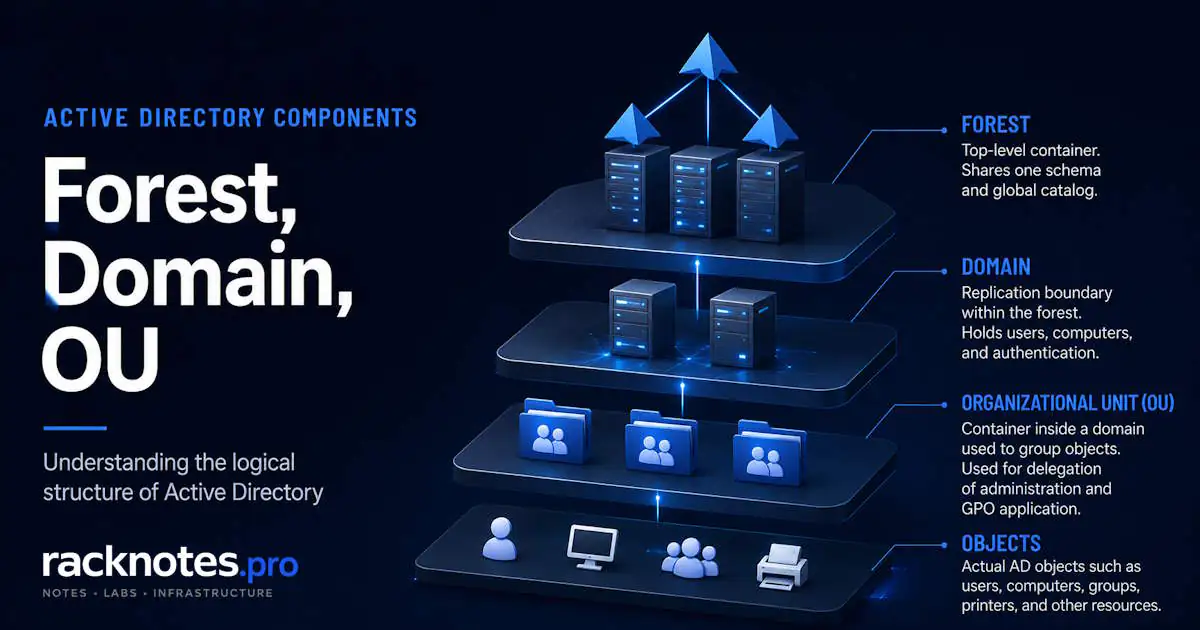
Active Directory structure is the hierarchy used to organize directory data into forests, domain trees, domains, organizational units, and objects. AD also has a separate physical topology built around sites, subnets, and domain controllers. That distinction makes the rest of AD architecture easier to follow. If you need the fundamentals first, What Is Active Directory? covers what AD DS does before this article picks up the hierarchy.
- A forest is the top-level AD DS logical boundary
- A forest contains one or more domains; domains that share a contiguous DNS namespace form a domain tree
- A domain is a directory partition that contains OUs and directory objects
- OUs are administrative containers used for delegation and GPO scope
- Security groups are for authorization, not part of the OU hierarchy
- Sites and subnets describe physical topology, not object placement
What Is Active Directory Structure?
Active Directory structure has two separate models that get discussed as if they were one. The logical model organizes directory data: a forest contains one or more domains, and domains that share a contiguous DNS namespace form a domain tree; each domain holds organizational units (OUs) and directory objects. The physical model organizes hardware and network paths: sites, subnets, and domain controllers, used for replication and client location.
OUs are optional administrative containers inside a domain, not a mandatory tier in the same sense that a domain belongs to a forest. A single-domain environment with a handful of OUs is a complete, valid AD structure, not a simplified version of a “real” one.
Active Directory Structure Diagram
The diagram below combines the layers explained in this article into one picture: forest at the top, then domain tree, domain, OUs, and directory objects underneath. The sections that follow explain each layer using this same structure.
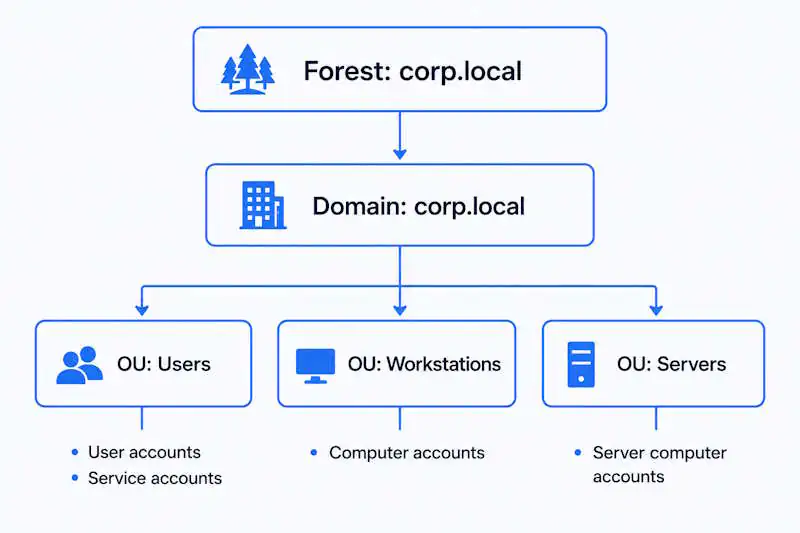
Active Directory Logical Structure
The logical model has five elements worth knowing by name: forest, domain tree, domain, OU, and directory object. Each element in the diagram above answers a different administrative question.
What Is an Active Directory Forest?
A forest is the top-level logical boundary in AD DS. It’s not a server; it’s the boundary every domain inside it shares: one schema, one configuration partition, and a global catalog that provides forest-wide search capabilities. Microsoft’s documentation on the AD DS logical model describes the forest, not the domain, as the actual security boundary of an Active Directory environment.
A forest contains one or more domains. Domains that share a contiguous DNS namespace form a domain tree, and a forest can contain one or more such trees. Most SMB environments run a single forest with a single domain, which is why the distinctions between forest, tree, and domain often feel abstract in practice. They matter more once additional domains or trees are introduced.
Where Domain Trees Fit
A domain tree consists of one or more domains that share a contiguous DNS namespace, not a separate container object. ad.example.com and europe.ad.example.com belong to the same tree. A forest can contain more than one tree when domains use different DNS namespaces but still share the forest’s schema, configuration, global catalog, and transitive trust.
In a single-domain forest, the only domain tree contains just the forest root domain, so the distinction is mostly conceptual until additional domains are added. It matters mainly in multi-domain forests, and mostly in conversations about DNS namespace planning rather than routine operations.
What Is an Active Directory Domain?
A domain is a directory partition, an authentication scope, and a replication boundary inside a forest. Domain controllers replicate the domain naming context with other DCs in the same domain. A domain holds most of the objects an administrator touches day to day: user accounts, computer accounts, groups, and Group Policy Objects.
A domain is not an independent security boundary. Administrators who control the forest can reach into any domain inside it. A separate domain is not an independent AD DS security boundary; if that level of isolation is required, a separate forest is the relevant boundary. Most SMB and homelab environments should start with one forest and one domain, and add another only when a documented administrative, legacy, or security requirement can’t be satisfied through OUs or delegation.
What Is an Organizational Unit (OU)?
An OU is a container inside a domain, used to organize users, computers, and groups for two specific jobs: applying Group Policy and delegating administrative permissions. Those are the two core structural purposes of an OU. It is not a security boundary or a resource-permission mechanism.
Linking a GPO to a Workstations OU places the computers in that OU within the GPO’s scope, subject to normal Group Policy processing and filtering. Delegating the Reset Password permission on a Users OU lets a help desk group reset passwords for everyone in that OU. Those are the two jobs OUs do well. OU naming, nesting depth, and delegation modeling are a separate design decision, out of scope here.
What Are Directory Objects?
Directory objects are the entries that domains and OUs organize. The types an administrator manages day to day include user accounts, computer accounts, security and distribution groups, service accounts, and occasionally contacts for cross-organization address book entries. These everyday account and resource objects are stored in a domain naming context, and many are placed in OUs for administration and policy scope.
Logical vs Physical Active Directory Structure
The logical structure (forests, trees, domains, OUs, and objects) determines how data, policy, and administration are organized. The physical structure (sites, subnets, site links, and domain controllers) determines how clients locate domain controllers and how replication traffic moves across the network.
A site is not contained inside an OU or a domain the way an OU is contained inside a domain. It describes network topology, not object placement. A domain can span multiple sites, and a single site can host domain controllers for more than one domain. GPOs can be linked to sites, but that’s a separate scope with different processing order – a detail that belongs to Group Policy in Active Directory, not here.
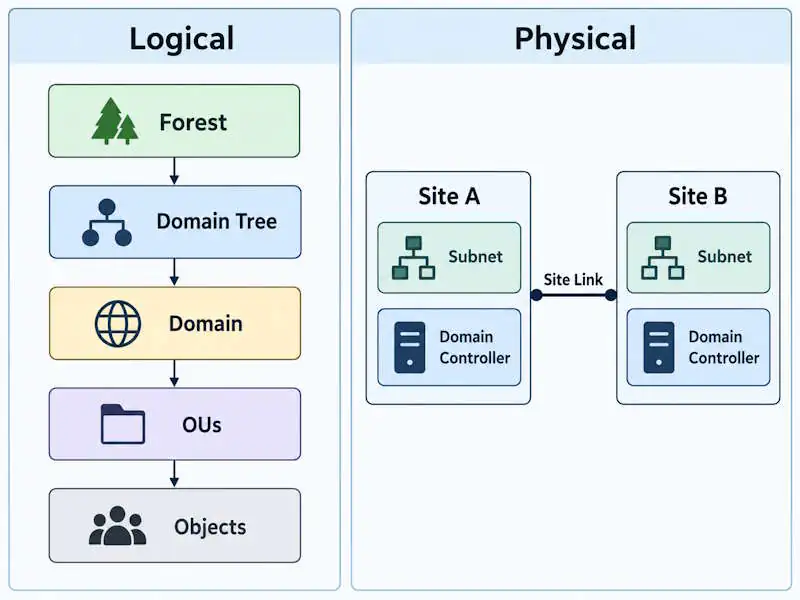
For subnet mapping, site links, and DC-locator behavior, see Active Directory Sites and Services and Microsoft’s site topology design documentation.
Active Directory Components at a Glance
| Component | What it is | Main purpose | Where it fits |
|---|---|---|---|
| Forest | Top-level AD DS logical boundary | Shared schema/configuration and forest-wide structure | Contains domains/trees |
| Domain tree | Related domains with a contiguous DNS namespace | Namespace hierarchy | Inside a forest |
| Domain | Directory partition | Holds and replicates domain objects | Inside a forest |
| OU | Administrative container | Delegation and GPO scope | Inside a domain |
| Object | Directory entry | Represents users, computers, groups, etc. | Inside the directory |
| Site | Physical topology construct | DC location and replication topology | Separate from the logical hierarchy |
OU vs Security Group
Both OUs and security groups can be used to organize users administratively, but they work differently: an OU contains directory objects by placement, while a security group has explicit membership. An OU scopes Group Policy and delegated administration; a security group controls resource authorization.
| OU | Security group | |
|---|---|---|
| Purpose | Administration scope | Resource access control |
| Used for | GPO targeting, delegation | File share permissions, printer access, application authorization |
| Membership | Determined by object placement | Explicit membership assignment |
| Affects resource access | No | Yes: NTFS permissions, share permissions, application ACLs |
OU placement is not represented as a security principal in the user’s access token. Resource authorization is evaluated against security-principal SIDs, including the user’s own SID and security-group memberships.
Default Containers Are Not OUs
CN=Users and CN=Computers are default containers, not OUs, and a GPO cannot be linked to either one directly. Objects left in these default containers cannot receive GPOs linked only to dedicated OUs, although applicable site- and domain-linked policies can still apply. Placing managed user and computer accounts in dedicated OUs is covered in the AD Post-Install Checklist.
Active Directory Structure Example
A concrete example is more useful here than a prescriptive design. This single-domain forest contains one domain tree whose root domain is corp.example.com. The domain holds four top-level OUs: Users (with Sales and Finance sub-OUs), Workstations, Servers, and Service Accounts. The same domain is represented across two sites: New York, with subnet 10.10.0.0/16 hosting DC01, and Chicago, with subnet 10.20.0.0/16 hosting DC02.
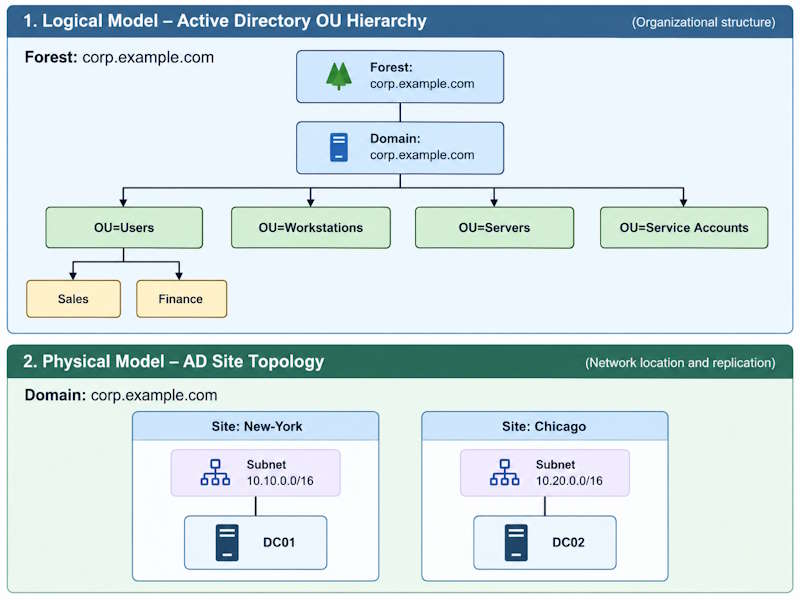
The same domain can span both sites, and either site can host domain controllers for more than one domain. Sites are not nested beneath the OU tree; they run alongside it. This is one example, not a universal OU-design recommendation – nesting patterns, naming conventions, and delegation models are covered in Active Directory OU Design and Microsoft’s OU design guidance.
For a real-world homelab example, Raphael documents a small two-domain-controller Active Directory environment with AD-integrated DNS in his Active Directory homelab build .
Active Directory Structure Best Practices
- Start with one forest and one domain; add either only for a documented requirement
- Keep the OU hierarchy only as deep as delegation and Group Policy requirements require
- Use security groups for resource access, never OUs
- Place managed user and computer accounts in appropriate OUs instead of relying on the default
CN=UsersandCN=Computerscontainers - Treat sites and subnets as a separate design question from the OU hierarchy
How to Inspect the Existing Active Directory Structure
In an inherited domain, these read-only commands are a quick way to confirm the real forest, domain, and OU hierarchy before making changes.
Get-ADForest |
    Select-Object Name, RootDomain, Domains, GlobalCatalogs

Get-ADDomain |
    Select-Object DNSRoot, ParentDomain, ChildDomains

Get-ADOrganizationalUnit -Filter * |
    Select-Object Name, DistinguishedName
Get-ADForest confirms which domains and global catalog servers actually exist in the forest. Get-ADOrganizationalUnit -Filter * returns the full OU tree as Distinguished Name paths, showing how deep the structure really goes without opening ADUC.
Optionally, confirm the default container paths directly:
Get-ADDomain |
    Select-Object UsersContainer, ComputersContainer
Common Active Directory Structure Mistakes
The order below reflects common structural problems in SMB environments, not a frequency ranking.
Creating unnecessary domains. A child domain for a department is rarely justified. It adds another domain partition, additional domain-controller requirements, and cross-domain administrative complexity; use one only when a documented requirement requires it.
Building unnecessarily deep OU hierarchies. A six-level structure may make sense to the original designer but becomes harder to maintain and audit over time. Deep nesting makes policy inheritance harder to trace, especially when Block Inheritance and Enforced settings are scattered through the tree.
Using OUs for resource permissions. OUs organize directory objects and provide delegation/GPO scope; they are not security principals for file, share, printer, or application authorization. Use security groups for resource permissions.
Leaving objects in default containers. Managed accounts left in the default containers cannot receive GPOs linked only to dedicated OUs and may miss the policy scope intended for the rest of the environment.
Confusing sites with the OU/domain hierarchy. Sites describe physical topology. Moving a DC between sites changes replication behavior, not delegation or GPO scope.
Frequently Asked Questions
What is the Active Directory hierarchy?
A forest contains one or more domains, and domains that share a contiguous DNS namespace form a domain tree. Within each domain, OUs can organize directory objects such as users, computers, and groups. Sites, subnets, and domain controllers sit alongside this as physical topology, not inside the logical hierarchy.
What are the main components of Active Directory structure?
Forest, domain tree, domain, OU, and directory objects make up the logical side. Sites, subnets, and domain controllers make up the physical side.
What is the difference between a forest, tree, and domain?
A forest is the outermost boundary and shares a schema, configuration, and global catalog across its domains. A domain tree is a set of one or more domains sharing a contiguous DNS namespace. A domain is a directory partition and replication boundary inside the forest. In a single-domain forest, one tree contains only the forest root domain, so the distinctions are mostly conceptual until additional domains are added.
What is the physical structure of Active Directory?
Sites, subnets, domain controllers, and site links. They control DC location and replication traffic, and exist separately from the forest/domain/OU hierarchy. See Active Directory Sites and Services for the operational detail.
Is an OU the same as a security group?
No. OUs scope Group Policy and delegation. Security groups control resource authorization, and resource access is evaluated against security-principal SIDs, not OU placement.
Are CN=Users and CN=Computers OUs?
No. They’re default containers, and a GPO cannot be linked to either one directly.
Bottom Line
Most structural problems in Active Directory aren’t design failures. They’re the result of environments that grew without a plan: users left in default containers, OUs added without a consistent hierarchy, permissions applied to whatever container was convenient at the time.
A workable Active Directory model is easier to reason about when each layer has one job: the forest defines the outer AD DS boundary, domains hold and replicate domain data, OUs organize objects for administration and policy scope, and sites/subnets describe the separate network topology.
OU naming and delegation strategy, and physical topology, are covered in the dedicated guides linked earlier in this article. For deployment, see How to Install Active Directory.
Active Directory Series
25 articles – Windows Server 2025 · Forest & Domain · FSMO · GPO · Replication · DNS · Security · Backup & Recovery