
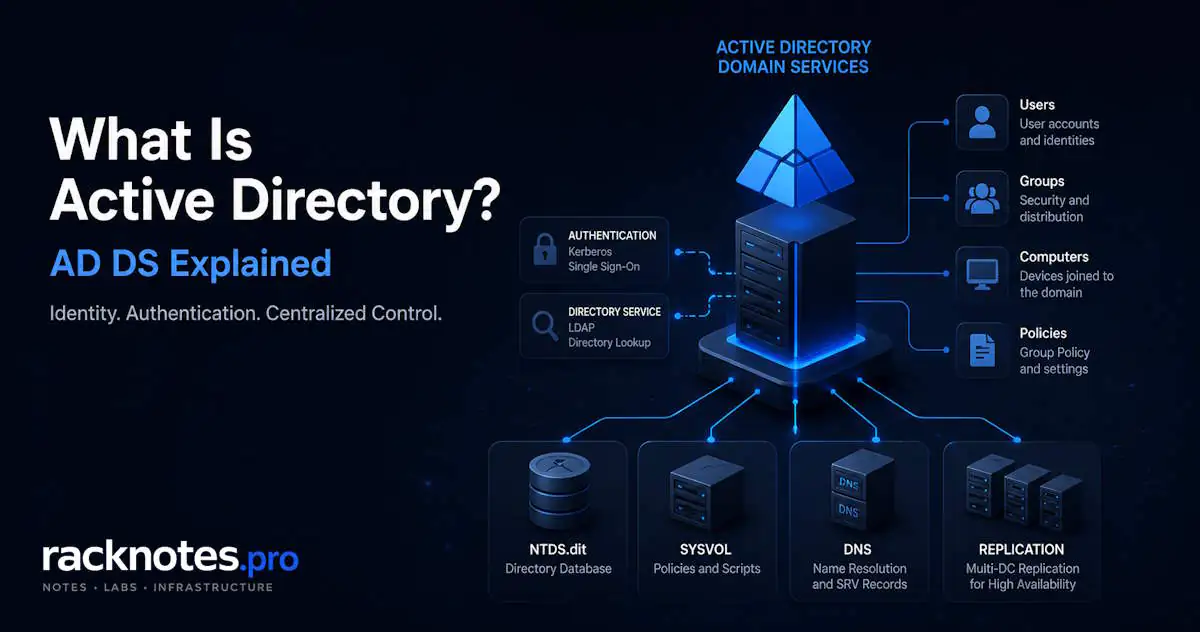
What Is Active Directory? How AD DS Works on Windows Server 2025

13 min read

Most Windows networks reach a point where local accounts stop scaling. Every machine has its own user database, passwords are managed individually, and there is no way to enforce a consistent security baseline across the environment without touching every device. Active Directory Domain Services (AD DS) is Microsoft’s answer — and understanding what is active directory, how it works, and where the first deployment decisions go wrong is the prerequisite for everything that follows.

This article covers what is active directory from an architecture and operational standpoint — the components, how authentication works, and the decisions that are difficult to undo after the fact. The installation procedure is in How to Install Active Directory on Windows Server 2025.

TL;DR
  • Active Directory Domain Services is Microsoft’s centralized identity, authentication, and policy platform for Windows networks
  • Authentication runs on Kerberos; directory queries use LDAP — both depend on DNS to function; without DNS, authentication breaks entirely
  • The AD database (NTDS.dit), transaction logs, and SYSVOL must reside on NTFS volumes — ReFS is unsupported and untested by Microsoft
  • A single domain controller is a single point of failure — logon, Group Policy, and FSMO operations fail when it goes offline
  • Domain name choice is difficult to reverse — ad.company.com is safer than company.local for certificate and hybrid compatibility

What Is Active Directory Domain Services (AD DS)?

Active Directory Domain Services is Microsoft’s directory service for Windows environments. It provides a centralized store for network objects — user accounts, computer accounts, security groups, printers, and policies — and handles the authentication and authorization that connects those objects to resources. Introduced with Windows 2000 Server and consistently extended through Windows Server 2025, AD DS has been the dominant identity platform for on-premises Windows infrastructure for over two decades. Microsoft’s official overview is available on Microsoft Learn: Active Directory Domain Services Overview.

When someone asks what is active directory, the short answer is: a hierarchical database of network objects combined with the authentication infrastructure that controls access to those objects. The longer answer is that AD DS is simultaneously an identity store, a Kerberos authentication service, an LDAP directory, a Group Policy distribution mechanism, and a DNS-dependent replication system. Treating active directory as “just a user database” is one of the first and most expensive misconceptions in Windows administration — it leads to misdiagnosis when something breaks.

What active directory manages:

  • User accounts and credentials
  • Computer accounts — every domain-joined machine has one
  • Security groups and distribution groups
  • Organizational Units (containers for delegation and GPO targeting)
  • Group Policy Objects (enforced configuration applied at logon and refresh)
  • Trust relationships between domains and forests

How Active Directory Works

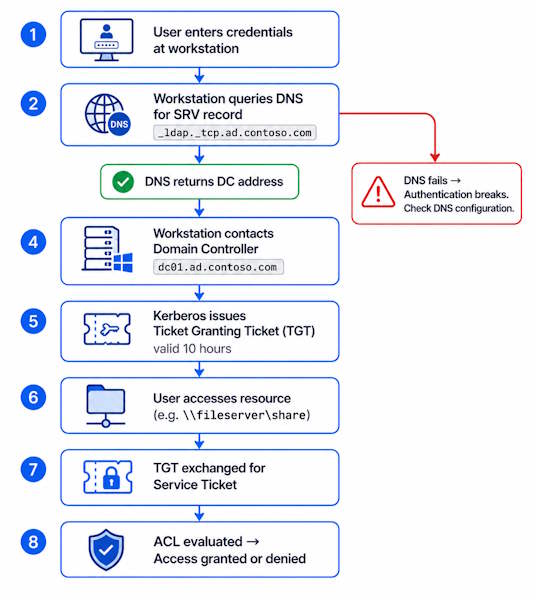
Understanding what is active directory at a technical level starts with the authentication flow. When a user submits credentials at a domain-joined machine: the moment a user submits credentials at a domain-joined machine:

  1. The workstation queries DNS for a Domain Controller SRV record
  2. DNS returns the DC address — if this step fails, nothing else works
  3. The workstation contacts the Domain Controller
  4. The DC validates credentials and Kerberos issues a Ticket Granting Ticket (TGT)
  5. When the user accesses a resource, the TGT is exchanged for a service ticket
  6. Group membership is evaluated against the resource’s ACL — access granted or denied

This happens in under a second on a healthy network. The step that most documentation buries in a footnote: step 1 is DNS. Every authentication request, every replication cycle between domain controllers, every Group Policy application starts with a DNS query. Active directory does not function without working DNS — this is not a configuration option.
Failure scenario

The most common cause of authentication failures after an AD deployment is DNS misconfiguration. Domain-joined machines must point their primary DNS to a Domain Controller, not to a router or ISP resolver. When a machine cannot resolve the domain’s SRV records (_ldap._tcp.<domain>, _kerberos._tcp.<domain>), it cannot locate a DC, and logon fails with generic credential errors that look like account problems. Always verify DNS before anything else.

Kerberos and LDAP

Kerberos handles authentication — proving identity. LDAP (Lightweight Directory Access Protocol) handles directory queries — looking up users, groups, attributes, and object properties. Both run through the Domain Controller. Kerberos has been the default authentication protocol since Windows 2000. NTLM is the legacy fallback; it should be treated as a protocol to restrict, not rely on. The Kerberos authentication model is documented at Microsoft Learn: Kerberos Authentication Overview.

Single Sign-On in Practice

Once the active directory Kerberos service issues a TGT at logon, that ticket is reused across resource access for its lifetime — 10 hours by default. A user authenticates once at the workstation and accesses file shares, printers, intranet applications, and Exchange without re-entering credentials. This is what single sign-on means in an active directory environment: not a separate product, just Kerberos working as designed.

Active Directory authentication flow — Kerberos TGT and service ticket process on Windows Server 2025

Core Components of Active Directory

What is active directory made of at a technical level? Five interdependent components that must all function correctly for the service to work.

Domain Controllers

A Domain Controller (DC) is a Windows Server with the AD DS role installed and promoted. It hosts a writable copy of the AD database, processes authentication requests, enforces Group Policy, and replicates changes to other DCs. Every domain needs at least one — every production environment needs at least two.

When the only Domain Controller in a domain goes offline, the consequences are immediate: new logons from devices without cached credentials fail, Group Policy cannot apply to new sessions, password changes are blocked, and FSMO role operations stop. This is not a degraded state — it is effectively a domain outage for any operation that requires communication with a DC. Service accounts without cached credentials fail on the spot.

The AD Database: NTDS.dit

The active directory database is stored in a file called NTDS.dit. By default it lives at C:\Windows\NTDS\, alongside its transaction log files (edb*.log). This is not a file administrators interact with directly — it is managed entirely by the AD DS service through the ESE (Extensible Storage Engine) database engine. The database file, log paths, and SYSVOL location are documented in Microsoft Learn: Move the Active Directory database.

Filesystem requirement: NTFS only. The NTDS.dit database, its transaction logs, and the SYSVOL replication folder must reside on NTFS-formatted volumes. ReFS is not a supported filesystem for any of these paths as of Windows Server 2025. This is a function of the ESE engine and DFSR replication behavior — not a preference. Verify the target volume format before running the AD DS promotion wizard.

Schema

The active directory schema defines what object types AD can store and what attributes those objects have. A User object has attributes for display name, UPN, SID, department, and hundreds of others because the schema defines them. Schema extensions — Exchange Server adds mailbox attributes, SCCM adds device management attributes — apply forest-wide and cannot be reversed. Extending the schema is a one-way commitment.

Global Catalog

The active directory Global Catalog is a partial-attribute replica of every object in the entire forest. It enables cross-domain searches and assists with logon when Universal Group membership must be evaluated. In multi-domain forests, logon can fail if no Global Catalog server is reachable in the site. At least one DC per site should hold the Global Catalog role.

Component Function Failure Impact
Domain Controller Hosts AD DS, processes authentication, replicates changes Authentication and GPO fail if no DC available
NTDS.dit The AD database file — ESE engine, NTFS only Corruption or loss requires DC restore or rebuild
Schema Defines all object types and attributes forest-wide Extensions irreversible; corruption requires forest recovery
Global Catalog Partial forest-wide replica for cross-domain queries Universal Group logon failures in multi-domain forests
SYSVOL Replicates GPO files and scripts via DFSR — NTFS only Group Policy fails to apply; SYSVOL replication issues compound

The Active Directory Hierarchy: Forest, Domain, and OU

What is active directory’s logical structure? It organizes objects into a three-level logical hierarchy. Understanding the boundaries each level creates is important before making any deployment decisions.

Forest is the outermost security boundary. All domains in a forest share a common schema, a common Global Catalog, and implicit two-way Kerberos trusts. A forest contains one or more domains. The schema is forest-wide — extending it affects every domain in the forest.

Domain is the administrative and replication boundary. Objects within a domain share a common database and common policy scope. Most organizations — including most SMB environments — operate a single domain. Multiple domains in a forest add replication complexity, separate administrative overhead, and cross-domain trust management that is rarely justified below large enterprise scale.

Organizational Unit (OU) is a container within a domain. OUs organize objects for three purposes: delegation of administrative control, Group Policy Object scope, and visual organization. OUs do not create security or replication boundaries — they are an administrative construct. Designing OU structure before deployment avoids the GPO application issues that come from objects sitting in the wrong containers.

A typical single-domain structure for an SMB environment:

Active Directory forest, domain, and OU hierarchy example — ad.contoso.com single-domain structure

The structure, delegation model, and GPO inheritance implications are covered in depth in Active Directory Components: Forest, Domain, and OU and Active Directory OU Design: Structure, Delegation, and GPO Scope.

Active Directory vs Local Accounts

What is active directory’s value over local accounts? The decision most SMB operators face: does this environment actually need a domain?

Feature Local Accounts Active Directory
Centralized management No — each machine is a separate account silo Yes — single console, single account database
Single sign-on No — per-machine credential prompts Yes — Kerberos-based SSO across resources
Policy enforcement Manual — configurations drift over time Built-in via Group Policy, applied at logon and refresh
Multi-site support Not scalable Sites and Services replication topology control
Administrative delegation Not available OU-level granular delegation
Password policy Per-machine, inconsistent Domain-wide, enforced — Fine-Grained Password Policies for exceptions

Local accounts are sufficient for isolated machines and environments under five devices with no shared resources. Once a file server, shared printers, or application access enters the picture, per-machine account management becomes the operational bottleneck. In practice, any environment with 10 or more devices and any shared resource benefits from a domain. Virtually every environment with a file server does.

Is Active Directory Still Relevant in 2026?

What is active directory’s status in 2026? Yes, actively used — and the question is worth addressing directly because of the widespread confusion between Active Directory and Entra ID (formerly Azure Active Directory).

AD DS remains the dominant identity platform for on-premises Windows infrastructure. It runs Group Policy, Kerberos authentication, and domain joins for hundreds of millions of Windows devices. The vast majority of organizations with Windows file servers, domain-joined workstations, or on-premises applications are running AD DS today.

Entra ID is not a replacement for on-premises active directory. It is a cloud identity service designed for SaaS application access, mobile device management, and cloud-native workloads. Organizations with Kerberos-dependent applications, Group Policy requirements, or on-premises file servers cannot simply move to Entra ID and remove AD DS. The common production pattern is hybrid: AD DS on-premises, synchronized to Entra ID via Entra Connect, giving users a single identity that works for both on-premises resources and Microsoft 365.

For any environment running Windows Server infrastructure, active directory remains the right foundation. The cloud direction affects how you extend and synchronize that identity — not whether you need it.

Common Active Directory Misconceptions

Most operators who ask what is active directory get a technically accurate but operationally incomplete answer. The gaps show up during deployment and troubleshooting.

Failure scenario

Placing NTDS.dit, AD transaction logs, or SYSVOL on a ReFS volume is an unsupported configuration. Microsoft does not test AD DS on ReFS. If you are building a new DC on Windows Server 2025, verify the target volume is NTFS before running the AD DS promotion wizard. Discovering this after promotion means either a full AD DS role removal and rebuild, or stopping the NTDS service and migrating the database to an NTFS path — neither is a documented standard procedure.

“Active directory is just a user database.”

AD DS is authentication infrastructure, Group Policy distribution, Kerberos ticket issuance, LDAP query handling, DNS-integrated name resolution, and a multi-master replication service. Users are stored in it — but that is not what active directory does. This distinction matters operationally: when something breaks, knowing which layer failed (authentication, replication, DNS, policy application, or schema) determines the diagnostic path. Treating AD as a flat user store leads to misdiagnosis. The tools are different, the log locations are different, and the recovery procedures are different depending on which layer is broken.

“Active directory runs fine on a single server.”

It runs. It is not fine. A single DC is a single point of failure for authentication, Group Policy, and all five FSMO roles. When it goes offline — for maintenance, hardware failure, or a bad update — cached credentials allow existing logged-in sessions to continue briefly. New logons from devices without cached credentials fail immediately. Service account logons fail on the spot. Password changes are blocked. Domain joins fail. The recovery path from an offline-only DC — seizing FSMO roles — requires another DC. Which does not exist.

“Any filesystem works for the AD database.”

NTDS.dit, its transaction logs, and the SYSVOL replication folder must reside on NTFS volumes. The NTFS requirement comes from the ESE database engine and DFSR replication behavior. ReFS is not supported for any of these paths on Windows Server 2025. This is documented by Microsoft and is not configuration-dependent.

Common First Deployment Mistakes

Knowing what is active directory architecturally does not prevent the common operational mistakes made during first deployments.

Choosing the wrong domain name.

The domain name chosen during forest creation is the hardest decision to reverse. company.local is the most common mistake. The .local suffix conflicts with mDNS (Multicast DNS) — the zero-configuration protocol used by macOS, Linux, and most network printers. On those platforms, .local is reserved for local network discovery, and the collision causes DNS resolution failures for Apple and Linux clients in AD environments. Beyond mDNS conflicts, .local cannot appear in publicly trusted certificates, which creates SAN problems for any internal HTTPS service authenticating with AD credentials.

The correct choice for most environments: a routable subdomain of your registered public DNS name. Use ad.company.com or corp.company.com — not company.com itself, which creates namespace collision. A routable subdomain gets real DNS coverage, works with public certificate authorities, and has no mDNS conflict. Renaming a domain after deployment requires disjoining and rejoining every machine in the domain. In practice, most organizations that deployed with .local live with it rather than undertake the rename.

Setting functional levels without a plan.

The Forest Functional Level and Domain Functional Level control which DC operating systems can join the domain and which AD features are available. Raising functional levels is a one-way operation — you cannot lower them after raising. Setting Windows Server 2025 functional level immediately in a new deployment is generally fine if you have no legacy DCs to worry about. The mistake is raising levels before decommissioning older DCs and then needing to add one back. For most new deployments on current hardware, Windows Server 2016 functional level enables all practically needed features while leaving room for unexpected requirements.

Deploying a single Domain Controller.

Already covered in misconceptions. The practical response to “we only have one physical server”: deploy a second DC as a VM on the same host. Two VMs on one physical machine is not ideal — a physical failure takes both DCs offline — but it handles the much more common scenarios: Windows Update reboots, configuration errors, and storage failures. If the environment has any budget for a second physical server, a low-spec machine running Windows Server Core with just the AD DS and DNS roles is sufficient. It does not need to be matched hardware.

Skipping OU design before joining machines.

Objects placed in the default Computers and Users containers are outside standard GPO scope. These are not OUs — they are legacy containers with different Group Policy inheritance behavior. Machines joined to the domain before OUs exist end up in Computers, and GPOs linked to production OUs do not apply to them. Moving objects later and cleaning up applied policy requires more work than designing the OU structure before the first domain join — a pattern that repeats in every active directory environment that skips this step. The OU design approach is covered in Active Directory OU Design.

Quick Verification with PowerShell

After promoting the first domain controller, three PowerShell commands confirm the active directory domain is functional and what is active directory reporting about its own state: the domain is functional and the DC is correctly registered. These are covered fully in the Active Directory Post-Install Checklist — the versions here are for a quick sanity check immediately after promotion:

# Forest configuration: schema version, functional level, all domains in forest Get-ADForest # Domain configuration: functional level, FSMO role holders, domain mode Get-ADDomain # Confirm DC registration — if a newly promoted DC is missing, DNS or replication has not completed Get-ADDomainController -Filter *

Get-ADForest returns the schema version, forest functional level, and the list of domains. Get-ADDomain shows the domain functional level and current FSMO role assignments. Get-ADDomainController -Filter * lists every DC the domain sees — a newly promoted DC that does not appear here has a DNS registration or replication issue that needs resolution before the environment is considered healthy.

Frequently Asked Questions

What is the difference between Active Directory and a domain controller?

What is active directory vs what is a domain controller: active directory is the directory service — the database, the authentication framework, the policy mechanism. A domain controller is the Windows Server that hosts and runs active directory. AD is the software and its data; the domain controller is the machine. You need at least one domain controller for an AD DS domain to function — in practice, at least two.

Is Active Directory still used in 2026?

Yes. AD DS is the dominant on-premises Windows identity platform and is not being retired. Entra ID (formerly Azure AD) is the cloud counterpart for SaaS and cloud-native workloads — not a replacement for environments with Group Policy requirements, Kerberos-dependent applications, or on-premises file servers. Most mid-size organizations run hybrid: AD DS on-premises synchronized to Entra ID via Entra Connect.

What is the difference between a domain and a forest in Active Directory?

A forest is the outermost boundary — one schema, one Global Catalog, one set of implicit trusts. A domain is an administrative and replication boundary within the forest. Most organizations run a single forest with a single domain. Multiple domains are justified by specific security isolation or administrative separation requirements — rarely needed in SMB environments.

Does Active Directory require DNS?

Yes, completely. DC location, Kerberos ticket requests, and AD replication all start with DNS queries for SRV records. Without DNS resolving to the correct DC addresses, authentication fails. AD DS installs its own DNS server during promotion specifically because the DNS dependency is that fundamental. Pointing domain-joined machines at a router or upstream resolver instead of the DC’s DNS is one of the most reliable ways to break authentication.

Can Active Directory run on a single server?

Technically yes. Should not be the permanent state. A single DC means a single point of failure for authentication, Group Policy, and all FSMO roles. Two DCs are the minimum for any environment where unplanned downtime is unacceptable. The second DC can be a VM on the same physical host — not ideal for physical failure scenarios, but handles the more common cases of reboots and configuration errors.

What filesystem does Active Directory require?

NTFS. The NTDS.dit database file, all AD transaction logs, and SYSVOL must reside on NTFS volumes. ReFS is not supported for any of these paths on Windows Server 2025. Verify volume format before running the AD DS promotion wizard.

What is the NTDS.dit file?

NTDS.dit is the active directory database file — the physical store of everything what is active directory contains — every user, computer, group, OU, and their attributes live in it. Default location: C:\Windows\NTDS\ on every DC. It is managed exclusively by the AD DS service and should never be modified directly. Backing up AD means backing up the System State, which includes NTDS.dit and SYSVOL. A corrupted or lost NTDS.dit requires either a DC restore from System State backup or a metadata cleanup followed by re-promotion from scratch.

Final Thoughts

What is active directory in practice? The identity and policy foundation for Windows infrastructure since Windows 2000. The core architecture — Kerberos authentication, LDAP directory, forest and domain hierarchy, Group Policy distribution — has remained consistent across every Windows Server version since. That stability is why understanding what active directory is and how it works translates directly to operational competence across the entire Windows Server ecosystem.

The decisions that matter most happen before installation: domain naming, filesystem verification, and the commitment to run at least two DCs. These are not configuration preferences — they are architectural commitments with operational consequences that compound over time. The environments that avoid the most remediation work are the ones where these decisions were made deliberately before the first domain controller was promoted.

The next step: How to Install Active Directory on Windows Server 2025.