
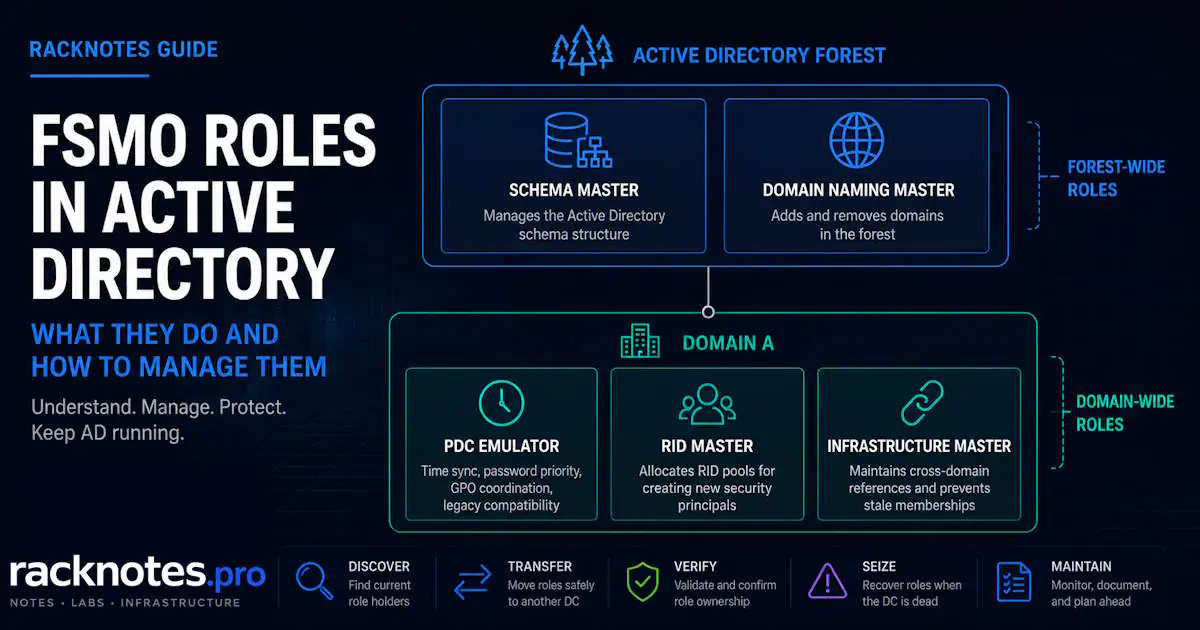
FSMO roles are five Active Directory operation-master roles used for tasks that cannot safely run on multiple domain controllers at once. Two are forest-wide (one per forest); three are domain-wide (one per domain, in every domain). Before DC maintenance or decommissioning, check the current holders with netdom query fsmo or PowerShell. If a role must move, transfer it while the current holder is healthy; seize it only when that DC cannot return normally. This guide covers checking, transferring, seizing, verifying, and troubleshooting all five roles.
netdom query fsmoshows all five current role holders in one command- Check roles before any DC maintenance or decommissioning
- Transfer while the current holder is healthy and available
- Use PowerShell for repeatable, scriptable transfers
- Seize only when the holder cannot return normally
- Verify replication and role ownership after any transfer or seizure
- PDC Emulator has the broadest day-to-day operational impact of the five
- Seizing the RID Master advances its RID pool as a safeguard – don’t seize it casually
What Are FSMO Roles in Active Directory?
Active Directory relies on multi-master replication for most operations – any writable DC can update a password, group membership, or computer account, and replication reconciles the changes afterward. A few operations require a single authoritative owner instead: the Schema Master serializes schema changes, the Domain Naming Master controls forest namespace changes, and the RID Master allocates unique RID pools to writable DCs so they can create security principals without duplicate identifiers.
FSMO – Flexible Single Master Operations – designates which DC owns each of these five serialized operations. Two operate at forest scope, meaning exactly one holder exists across the entire forest regardless of domain count; three operate at domain scope, meaning each domain in the forest has its own holder. Per Microsoft’s FSMO roles overview, this division exists specifically because these operations can’t be safely reconciled after the fact the way ordinary replicated changes can.
| Role | Scope | Function |
|---|---|---|
| Schema Master | Forest | Only DC that can modify the AD schema |
| Domain Naming Master | Forest | Adds or removes domains/partitions from the forest |
| PDC Emulator | Domain | Password/lockout priority, time hierarchy, GPO editing, legacy compatibility |
| RID Master | Domain | Allocates RID pools for new security principals |
| Infrastructure Master | Domain | Maintains cross-domain object references |
The Five FSMO Roles Explained
Schema Master
The Schema Master is the only DC that can modify the AD schema, including adding or changing object classes and attributes. It is used during adprep /forestprep and schema-extending application installs (Exchange, for example). No immediate impact is expected if it’s unavailable unless an operation that specifically requires it is attempted.
Domain Naming Master
The Domain Naming Master controls adding or removing domains and directory partitions from the forest. Most environments use this role rarely, typically during initial setup or forest restructuring. No immediate impact is expected if it’s unavailable unless a domain-add/remove operation is attempted.
PDC Emulator
The PDC Emulator is the most operationally active of the five roles, with several distinct responsibilities:
- Password and lockout handling – password changes replicate preferentially to the PDC Emulator. If another DC receives a bad-password authentication failure, it can consult the PDC Emulator before returning that failure to the user. Account lockout processing is also handled by the PDC Emulator.
- Time hierarchy – Windows Time follows the AD DS domain hierarchy. The PDC Emulator in the forest-root domain is the authoritative time source at the top of that hierarchy and should normally be configured to obtain time from a reliable external source. Other domain members select time sources through the domain hierarchy; they do not all synchronize directly with the PDC Emulator.
- Group Policy edit coordination – the GPMC connects to the PDC Emulator by default, reducing simultaneous conflicting edits
- Legacy compatibility – pre-Windows 2000 client authentication and NT 4.0 BDC emulation
PDC loss has the highest day-to-day operational impact among FSMO role outages, but the practical effect depends on password-change and lockout activity, time-source configuration, replication health, Group Policy administration, legacy dependencies, and how long the role remains unavailable. It does not cause Kerberos authentication to fail across the domain within minutes on its own. Kerberos issues appear if time drift exceeds the allowed skew or another dependent condition exists. See Active Directory Time Synchronization for the full time-hierarchy and clock-skew troubleshooting workflow.
RID Master
Every security principal has a SID built from the domain SID plus a Relative ID (RID). The RID must be unique within the domain. The RID Master allocates RID pools to writable DCs, which use those local pools when creating users, computers, and groups. Existing local RID pools let object creation continue until a DC needs another pool. If a DC exhausts its pool while the RID Master is still unreachable, it can’t create new users, computers, or groups until the pool can be replenished or the role is restored. Existing objects and normal authentication are unaffected.
Infrastructure Master
Maintains cross-domain object references – when a group in Domain A contains a member from Domain B, the Infrastructure Master in Domain A keeps that reference current as Domain B changes.
Placement guidance depends on two conditions that materially change modern behavior:
- If every DC in the domain is also a Global Catalog server, Infrastructure Master placement doesn’t matter – there are no non-GC DCs left for it to update.
- If AD Recycle Bin is enabled, each DC updates its own cross-domain references directly, and the Infrastructure Master has no operational task for that function regardless of GC placement.
- Only when neither condition holds, and the role is actually needed, does Microsoft’s placement guidance to avoid a Global Catalog server apply.
Even when the role has no active operational work because either condition above applies, keep a valid role owner assigned – monitoring and administrative tools can still flag a missing or orphaned role holder regardless of whether the role is doing anything. In a single-domain forest, the cross-domain reference problem this role addresses doesn’t exist, so placement is not a meaningful decision either way.
How to Check FSMO Roles in Active Directory
Before any DC maintenance – migration, decommission, hardware work – confirm current role holders first. The fastest single check is:
netdom query fsmoIt returns all five current role holders in one command. The sections below cover that command in detail, plus the PowerShell and GUI alternatives.
netdom query fsmo: Check All FSMO Role Holders
netdom query fsmoThis is the fastest single check and the right first step regardless of which method you use afterward. Run it before any planned DC maintenance or decommissioning to know exactly which roles are at stake. If the output looks inconsistent with what you expect, verify it against replication health rather than assuming the query itself is wrong – netdom query fsmo confirms who holds each role, not whether the domain’s overall replication and directory health are good.
Check FSMO Roles with PowerShell
# Forest-level roles
Get-ADForest | Select-Object SchemaMaster, DomainNamingMaster

# Domain-level roles
Get-ADDomain | Select-Object PDCEmulator, RIDMaster, InfrastructureMaster
Forest-level roles come from Get-ADForest and apply once per forest; domain-level roles come from Get-ADDomain and apply once per domain. In a multi-domain forest, run the domain-level query against each domain you need, not just the forest root.
To check a specific DC’s roles directly:
Get-ADDomainController -Identity <DCName> | Select-Object OperationMasterRolesCheck FSMO Roles in the GUI
Active Directory Users and Computers (right-click the domain, Operations Masters) shows PDC Emulator, RID Master, and Infrastructure Master. Active Directory Domains and Trusts shows Domain Naming Master. The Active Directory Schema snap-in shows Schema Master. The GUI path works for viewing and for transfer, but not for seizure.
Document the result. Knowing where the PDC Emulator is avoids losing time locating the role holder during an incident.
| Tool | Best for |
|---|---|
| Netdom | Quick, one-command holder lookup |
| PowerShell | Automation, scripted checks, and transfers |
| GUI | Manual, single-role administration |
| NTDSUtil | Seizure and recovery scenarios |
How to Transfer FSMO Roles to Another Domain Controller
Transfer FSMO roles when the current holder is healthy and reachable. Seize a role only when the current holder cannot return normally. Transfer is the correct operation for planned DC decommission, hardware migration, or deliberate rebalancing – the original holder participates in and confirms the handoff, unlike a seizure. In Microsoft and administrator terminology, “move FSMO roles” normally means transferring them to another DC while the current holder is available; there is no separate command for “moving” versus “transferring.”
Prerequisites: replication is healthy, the target is a writable DC, and you have the applicable permissions – Schema Master requires Schema Admins (Microsoft also recommends the account be an Enterprise Admin), Domain Naming Master requires Enterprise Admins, and PDC Emulator, RID Master, and Infrastructure Master each require Domain Admins in that domain.
Transfer FSMO Roles with PowerShell
# Transfer a single role
Move-ADDirectoryServerOperationMasterRole -Identity "DC2" -OperationMasterRole PDCEmulator

# Transfer multiple roles at once
Move-ADDirectoryServerOperationMasterRole -Identity "DC2" -OperationMasterRole RIDMaster, InfrastructureMaster
The cmdlet accepts the five role names directly (SchemaMaster, DomainNamingMaster, PDCEmulator, RIDMaster, InfrastructureMaster) and can move one role or several in a single call. Don’t add -Force for a normal transfer – it’s specifically for seizure, covered below. The target must be a writable DC that’s current on replication; check replication health before running the transfer, not after.
Moving all five roles to one target is a valid, deliberate choice in some scenarios (consolidating before decommissioning the current holder, for example) – it isn’t a default recommendation to apply automatically in every environment. Full reference: Manage FSMO roles, Microsoft Learn.
Transfer FSMO Roles with GUI
Active Directory Users and Computers handles PDC Emulator, RID Master, and Infrastructure Master. Active Directory Domains and Trusts handles Domain Naming Master. The Active Directory Schema snap-in handles Schema Master. PowerShell is generally easier to verify for multi-role transfers; the GUI path works fine for a single role at a time.
Verify the FSMO Role Transfer
A transfer is not fully validated by role ownership alone. Verify the new holder, replication health, and that there are no conflicting or stale observations across DCs:
netdom query fsmoGet-ADDomain | Select-Object PDCEmulator, RIDMaster, InfrastructureMaster
Get-ADForest | Select-Object SchemaMaster, DomainNamingMasterrepadmin /showreplA successful transfer should produce consistent results across all three query methods. If the results disagree, determine which DC each command queried and verify replication health. Different directory replicas or replication state can temporarily produce inconsistent observations, so a mismatch does not by itself prove the transfer failed.
How to Seize FSMO Roles
Seize an FSMO role only when the current holder is permanently unavailable or cannot be returned safely, such as after hardware failure, a deleted VM, or unrecoverable OS damage. If the current holder is healthy or expected to return normally, transfer instead – seizure is not a substitute for transfer when the original DC is only temporarily offline; in that case, wait.
Seize FSMO Roles with PowerShell
Move-ADDirectoryServerOperationMasterRole -Identity "DC2" -OperationMasterRole PDCEmulator -ForceWith -Force, the cmdlet still attempts a graceful transfer first and seizes the role only if that transfer can’t complete – it is not an immediate, unconditional seizure command. Do not use -Force simply because the current holder is temporarily unreachable; confirm it is genuinely unavailable for recovery first.
Seize FSMO Roles with NTDSUtil
ntdsutil remains a valid alternative for seizure, and like the PowerShell cmdlet, it attempts a transfer first and only seizes if that transfer can’t complete:
ntdsutil
roles
connections
connect to server DC2
quit
seize PDC
quit
quit
Seizing the RID Master specifically burns part of the available RID range as a safeguard against duplicate SIDs: Microsoft’s transfer-or-seize guidance documents the PowerShell cmdlet advancing the next RID pool by 30,000, versus 10,000 for ntdsutil. Don’t seize the RID Master casually – only when the original holder genuinely can’t return.
Seize FSMO Roles From a Dead Domain Controller
When the original holder is genuinely gone, work through this in order rather than seizing immediately:
- Confirm the DC is actually unrecoverable, not just temporarily offline
- Choose a healthy, writable target DC for the seized role
- Verify replication and overall AD health before seizing
- Seize only the roles that were actually held by the dead DC
- Handle the old DC’s metadata deliberately afterward rather than leaving it in place
- Don’t simply reconnect the old DC and treat it as the role holder again
What to Do With the Old DC After Seizure
If the original role holder later comes back online after a role was seized elsewhere, that’s a role-ownership conflict and stale-DC reintegration problem – not automatically a USN rollback scenario. USN rollback is a separate, unsupported-restore mechanism (typically an improperly rolled-back snapshot or database restore without VM-Generation ID protections); a returning former role holder doesn’t create it by itself.
Do not simply reconnect the former role holder and return it to service. Microsoft recommends removing the previous role holder from the domain; if the computer is needed again as a DC, rebuild or forcibly demote and clean up the old DC, then promote it again after metadata cleanup – not restore it as if it were still the role holder. If the incident also requires restoring a domain controller from backup or forest-level recovery, see Active Directory Forest Recovery; that’s a broader recovery scope than FSMO seizure alone.
FSMO Troubleshooting: Netdom, Transfer, and Role Holder Errors
When a problem looks FSMO-related, such as unexpected object-creation failures, authentication issues, or a transfer that appears not to have completed, work through these checks before moving a role:
netdom query fsmo
repadmin /replsummary
repadmin /showrepl
dcdiag /test:advertising
dcdiag /test:ridmanager
Each command checks something different. netdom query fsmo (and the AD PowerShell cmdlets) confirm role ownership; repadmin checks replication health; dcdiag /test:advertising confirms that the DC is advertising itself as a directory service, not that it owns an FSMO role; and dcdiag /test:ridmanager provides RID-specific diagnostics. Clean results across these checks are a strong signal that there is no obvious FSMO-related infrastructure problem, but they do not rule out unrelated AD issues. See Active Directory Replication Not Working for the full replication diagnostic workflow if repadmin surfaces errors.
netdom query fsmo: RPC Server Is Unavailable
The RPC server is unavailable means role discovery couldn’t complete over the required AD/RPC path. Check DNS resolution for the target DC or domain, confirm the DC is online and reachable on the network, and verify RPC connectivity before changing any role ownership. This error blocks the query itself; it doesn’t confirm anything about the roles’ actual state.
netdom query fsmo: Domain Does Not Exist
The specified domain either does not exist or could not be contacted usually points to a DNS or domain-discovery problem rather than the FSMO roles themselves. Verify the domain name is correct, confirm the machine can resolve the domain’s DNS records, and check that you actually have connectivity to a DC in that domain. Don’t assume the domain or its roles are gone until DNS and connectivity are ruled out.
netdom query fsmo: The Parameter Is Incorrect
Start by checking the command syntax and the domain or server context before treating this as an AD infrastructure problem. Confirm the exact syntax for your Windows version first.
The Requested FSMO Operation Failed
The requested FSMO operation failed. The current FSMO holder could not be contacted means an operation that requires the current FSMO holder could not contact that DC. Confirm whether the holder is reachable, check replication and network connectivity, and only proceed to seizure after confirming it cannot return normally.
FSMO Role Placement and Best Practices
Reliable connectivity matters more than any specific role-distribution scheme. Where practical, have a second writable DC ready to take over rather than choosing a target during an incident. Keep the PDC Emulator on a reliably connected DC because it has the broadest operational surface of the five. Infrastructure Master placement depends on the GC and Recycle Bin conditions above, not a blanket rule. RODCs cannot hold FSMO roles, so they are not candidates for role placement.
In a two-DC environment, keeping all five roles together on one reliable writable DC is a valid default. There is no need to distribute roles purely for symmetry. More important is knowing where the holders are, maintaining a healthy second writable DC, and having a tested transfer or seizure plan before you need it.
Before Decommissioning a Domain Controller
A DC decommission is one of the clearest real-world reasons to check FSMO roles, transfer any held roles, verify the new holders, verify replication, and only then demote. Decommissioning a DC without checking its FSMO roles first is a common cause of unexpected role loss.
- Check role ownership on the target DC (
netdom query fsmo) - Verify replication is currently healthy
- Transfer each held role intentionally, not as an afterthought
- Verify the new holders with a fresh query
- Confirm DNS, Global Catalog, and other DC dependencies are satisfied
- Demote cleanly – modern Windows Server typically uses the Server Manager or PowerShell demotion workflow; legacy
dcpromocompatibility behavior may still exist in some contexts, but it isn’t the default path to reach for
FSMO Roles Checklist
netdom query fsmoto identify current role holders- Verify replication health before touching anything
- Choose a healthy, writable target DC and confirm replication before changing role ownership
- Transfer while the current holder is available
- Verify holder changes with a fresh query after any change
- Seize only if the holder cannot return normally
- Handle the old DC deliberately if you’ve seized from it
- Document the final role layout, including any standby plan
FAQ
How do I check FSMO roles?
Run netdom query fsmo to display the current holders of all five FSMO roles in one command. PowerShell alternatives (Get-ADForest, Get-ADDomain, Get-ADDomainController) work as well and are easier to script.
What does netdom query fsmo do?
It returns the current holders of all five FSMO roles – Schema Master, Domain Naming Master, PDC Emulator, RID Master, and Infrastructure Master – in a single command, without changing anything.
How do I transfer FSMO roles with PowerShell?
Use Move-ADDirectoryServerOperationMasterRole -Identity "TargetDC" -OperationMasterRole <RoleName>, with one or more role names, after confirming the target is a writable DC with healthy replication. See the transfer section above for full examples and prerequisites.
What’s the difference between transferring and seizing FSMO roles?
Transfer involves the current holder, which communicates with the new holder and confirms the handoff. Seizure claims the role without the original holder’s involvement and should be reserved for cases where that DC genuinely cannot return.
How do I seize FSMO roles from a dead domain controller?
Confirm the DC is genuinely unrecoverable, then use Move-ADDirectoryServerOperationMasterRole -Force or ntdsutil‘s seize commands against a healthy writable target. Seize only the roles the dead DC actually held, then clean up its metadata deliberately rather than leaving it in place.
What happens if the PDC Emulator goes offline?
Password and lockout handling, the domain’s time hierarchy, and preferred Group Policy editing lose their normal PDC source. The practical impact depends on workload and how long the role stays unavailable; PDC loss does not automatically cause domain-wide Kerberos failure. Transfer or seize the role as appropriate to restore normal operation.
Can all five FSMO roles be on one DC?
Yes. In a newly created forest, the first DC in the forest-root domain initially holds all five FSMO roles, and running all five on one DC remains a completely valid steady state for single-DC and many two-DC environments afterward. Distributing roles is worth considering mainly for PDC Emulator availability once you have a second reliable writable DC, not as a goal on its own.
Active Directory Series
25 articles – Windows Server 2025 · Forest & Domain · FSMO · GPO · Replication · DNS · Security · Backup & Recovery