
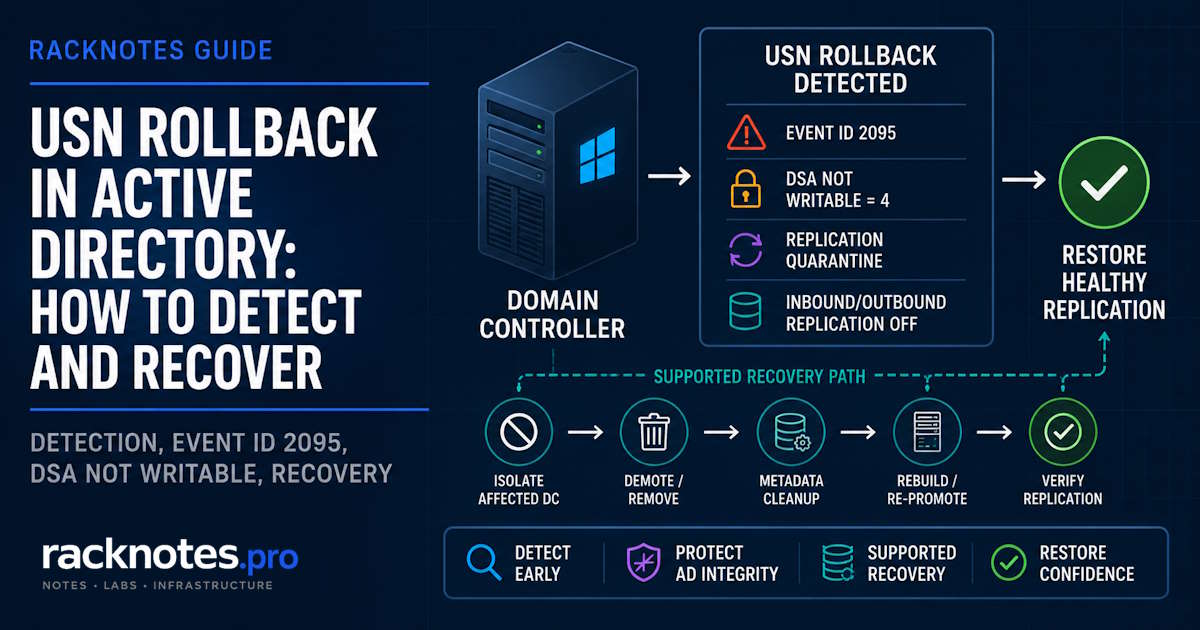
A USN rollback in Active Directory happens when a domain controller is returned to an older database state through an unsupported restore, snapshot revert, or disk rollback, while its replication partners still hold a newer picture of what that DC had already sent them. The DC comes back online and replication quietly stops converging: no crash, no error dialog, just accounts missing on other domain controllers and a growing list of Directory Service warnings. In this AD failure mode, the obvious response can make the problem worse: clear the warning, force replication, move on, and a recoverable problem can become a permanent one.
This article covers what a USN rollback actually is, how to detect one with confidence, what Event ID 2095 and VM-Generation ID do and don’t protect against, and the recovery decision path for multi-DC and single-DC environments. It does not re-teach System State backup or the full authoritative vs. non-authoritative restore procedure; that’s covered in restoring a domain controller from backup, linked where the recovery path needs it.
- A USN rollback happens when a domain controller gets returned to an older state and reuses update sequence numbers its replication partners already saw. Partners believe those changes were already received, so the changes never make it back.
- Event ID 2095 means AD DS has already quarantined the DC: inbound and outbound replication are both disabled, Net Logon is paused, and
Dsa Not Writableis set to4. That’s AD protecting itself, not a bug to clear. - VM-Generation ID (Windows Server 2012+, on a supporting hypervisor) can detect a supported snapshot revert and reset replication state safely. It does not turn a snapshot into a backup, and safe restore still needs a reachable writable partner.
- Recovery in a healthy multi-DC environment usually means isolating the affected DC, then demoting and rebuilding it rather than forcing an inconsistent database back into replication.
- A true single-DC forest is not a classic USN rollback candidate at all, since there is no replication partner to disagree with it. A single DC in a multi-domain forest, or a domain that used to have multiple DCs, is a different and more common case.
What Is a USN Rollback in Active Directory?
This happens when a domain controller is returned to an earlier point in time (through an unsupported snapshot revert, a manual disk-image restore, or a copied VHD or VHDX) while its replication partners still hold a newer picture of what that DC had already sent them.
Every write on a domain controller gets a locally assigned Update Sequence Number, and every partner tracks the highest USN it has already received from that source. If the DC’s database jumps backward without Active Directory being aware of it, the DC starts reusing USN values its partners have already recorded as seen. The partners assume nothing new happened and skip those changes on the next replication cycle. The result isn’t a replication error you can just retry past: it’s replication that reports success while quietly dropping updates.
This is different from ordinary replication latency or a stalled partner. A stalled DC eventually catches up once connectivity returns. An affected DC can show repadmin /showrepl results that look clean while the directory is actually diverging underneath, at least until Active Directory itself detects the condition and quarantines the DC.
How USNs and Invocation IDs Track Active Directory Replication
Two values matter here, and understanding both separates “the replication warning went away” from “we fixed the right thing.”
What Is a USN in Active Directory?
Each domain controller keeps its own Update Sequence Number, a local counter that increases every time a change is written to that DC’s copy of the database. A USN by itself only means something in combination with which DC produced it: USN 50000 from DC1 and USN 50000 from DC2 are unrelated numbers that happen to share a value.
What Is an Invocation ID?
The Invocation ID is a GUID that identifies a specific instance, or generation, of a domain controller’s database. Replication partners key their tracking not on the DC’s name or IP, but on the combination of Invocation ID and USN. As long as the Invocation ID stays the same, partners assume USNs from that source only ever move forward.
When a DC is restored in a supported way, its Invocation ID changes. That tells partners this is a new database generation, start tracking updates from here, instead of this is the same generation and it just jumped backward.
Why Reusing Old USNs Causes a Rollback
The failure chain is straightforward once it’s written out as a sequence:
- The DC makes a change and its local USN increases.
- A replication partner records that USN as received.
- The DC gets rolled back to an earlier state outside AD’s awareness.
- The DC reuses an old USN under the same Invocation ID.
- The partner still believes that USN range was already applied.
- The change is silently never replicated.
Nothing in this chain requires a crash or a visible error. USN rollback is dangerous because the symptoms, such as missing password changes or objects that exist on one DC and not another, can appear well after the rollback event and often on a different system.
What Causes a USN Rollback?
These causes share the same root problem: the domain controller’s database was moved backward in time through a path Active Directory can’t safely detect.
- Reverting a virtualized DC to an old snapshot or checkpoint on an unsupported combination of guest OS and hypervisor
- Restoring a VM image or full-disk backup that bypasses generation-aware safeguards entirely
- Manually copying an old VHD or VHDX file over a running DC’s virtual disk
- Any other manual, disk-level rollback that returns the NTDS database to an earlier state outside of a supported restore path
The exact risk depends on the Windows Server version, the hypervisor, and whether VM-Generation ID is actually active and read by the guest; all three have to line up for the safeguard to trigger. A disaster-recovery test can create the same risk when older VM state is restored without a supported recovery path, so DR drills that restore a whole environment, DCs included, deserve the same scrutiny as an accidental single-VM revert.
How to Detect a USN Rollback
Don’t rely on a single signal. Event logs, replication state, and Invocation ID history each catch different angles of the same problem, and any one alone can produce a false read. This is a narrow, specific failure inside the broader replication-error picture; see AD replication not working first for triage if a rollback hasn’t been confirmed yet.
The chronology matters here. Before Active Directory detects the rollback, repadmin can look completely normal, since the affected DC and its partners both believe they’re in sync. Once AD DS actually detects the condition and quarantines the DC, replication rejection errors such as 8456 or 8457 start appearing, because inbound and outbound replication have both been disabled on that DC. A clean repadmin report earlier in the incident doesn’t rule out a rollback; it just means detection hasn’t triggered yet.
Start with:
- Event ID 2095 in the Directory Service event log on the suspect DC
Dsa Not WritableinHKEY_LOCAL_MACHINE\SYSTEM\CurrentControlSet\Services\NTDS\Parameters(see the next section for what the values mean)- Replication rejection errors 8456 or 8457, plus related events such as 2103, once quarantine is already active
Run these against the suspect DC and a healthy partner to compare state:
repadmin /replsummaryA broader source-and-destination failure summary across the environment. Use it first to spot which DC is rejecting or being rejected.
repadmin /showrepl DC-NAMEInbound replication status for the specified DC: partner, naming context, and last-attempt result. Follow up with the same command on a partner to see its side.
repadmin /showutdvec DC-NAME "DC=contoso,DC=com"The up-to-dateness vector for the named partition. Run it against the suspect DC and a healthy partner, then compare the vector entries by source Invocation ID and originating USN.
repadmin /showobjmeta DC-NAME "CN=jdoe,OU=Users,DC=contoso,DC=com"Per-attribute replication metadata for one object, useful for confirming whether a partner’s version actually matches what the suspect DC believes it sent.
Get-ADReplicationUpToDatenessVectorTable -Target DC-NAME
Get-ADRootDSE -Server DC-NAME | Select-Object dnsHostName, highestCommittedUSN
PowerShell equivalents: the up-to-dateness comparison scripted across DCs, and a direct read of highestCommittedUSN from a DC’s RootDSE.
A single high or low USN value proves nothing on its own. Read USNs alongside Invocation ID and the partner’s recorded state; a DC that looks behind on one metric can be perfectly healthy once you check whether its Invocation ID actually changed.
Event ID 2095 and Dsa Not Writable = 4
Event ID 2095 is logged when a source DC sends a USN to a partner that already recorded it as received, with no accompanying Invocation ID change. AD DS quarantines the DC automatically: inbound and outbound replication are both disabled, Dsa Not Writable is set to a nonzero registry value, and Net Logon is paused. That blocks account and password changes from originating on the affected DC and stops it replicating in either direction until resolved.
Dsa Not Writable isn’t a single-purpose flag. A value of 2 points at low disk space, paired with Event 1393. A value of 8 indicates a corrupted up-to-dateness vector; Microsoft’s recovery guidance there is to demote and then re-promote that DC before it can replicate the bad vector. A value of 4, especially alongside Event 2095 or NTDS General Event 2103, is specifically the USN rollback signature.
Operator warning: deleting or resetting Dsa Not Writable does not repair the underlying inconsistency. It removes the quarantine that’s keeping an already-broken DC from spreading bad data to the rest of the forest. Microsoft documents this explicitly: modifying the value puts the DC in a permanently unsupported state, and its partitions stay inconsistent with replication partners regardless of what the registry says afterward. If a workaround like this is ever mentioned in a forum thread or an old blog post, treat it as a description of what breaks, not a recommended fix.
Can You Restore a Domain Controller from a Snapshot?
There are two distinct scenarios, and confusing them creates most of the risk.
Unsafe rollback behavior: a snapshot or checkpoint on a combination that doesn’t support VM-Generation ID, a manual VHD/VHDX swap, or any disk-level rollback Active Directory has no way to detect. The DC comes back believing nothing happened, and the failure chain above plays out in full.
Supported virtualization safeguards: starting with Windows Server 2012, on a hypervisor that exposes VM-Generation ID and a guest able to read it, a DC can detect it was reverted and respond safely instead of silently reusing old USNs. “The hypervisor supports it” and “it will actually protect you here” are not the same claim, which the next two sections cover in detail.
How VM-Generation ID and msDS-GenerationID Prevent USN Rollback
The hypervisor generates a 128-bit VM-Generation ID for each virtual machine. Active Directory reads that value and stores it in the msDS-GenerationID attribute on the DC’s own computer object, a non-replicated attribute, so this comparison always happens locally.
The check runs on two triggers: every reboot, and before every write commit even without a reboot, so a snapshot applied while the DC is running gets caught too. If the hypervisor’s current value doesn’t match the stored one, Active Directory treats it as confirmation the VM was rolled back: it resets the Invocation ID, discards the current RID pool so no reused relative IDs leak out, updates msDS-GenerationID, and performs a non-authoritative SYSVOL resync. Replication partners then see a genuinely new generation instead of the same old USNs reappearing.
VM-Generation ID protection requires both a guest OS and AD DS version that understand the feature and a hypervisor that exposes it correctly. Verify the actual support matrix for the specific Windows Server version and virtualization platform in use instead of assuming the safeguard is active; the exact requirement isn’t a single “Integration Components installed” checkbox, it depends on the platform.
Three limits on the safe-restore path are easy to miss and matter directly for how a DC gets backed up and recovered:
- The restored DC must be able to contact a writable replication partner to complete the non-authoritative convergence. If every writable DC in the domain is restoring, offline, or otherwise unreachable at the same time, none of them has a valid source to converge from.
- Microsoft explicitly advises against restoring all domain controllers in a domain simultaneously. Active Directory replication itself can still work in that scenario, but SYSVOL replication halts, since every DC marks itself non-authoritative for SYSVOL at once with nothing authoritative left to sync from.
- Any change that originated on the restored DC after the snapshot was created and had not replicated outbound before the restore is permanently lost. VM-Generation ID prevents the rollback from corrupting replication; it does not recover data that never left that DC.
This is worth verifying directly against current Microsoft guidance on virtualized domain controller deployment and configuration for the specific hypervisor and Windows Server version in play, since exact behavior has been refined since the original Windows Server 2012 implementation.
What VM-Generation ID Does Not Protect
These limits matter directly to how a DC should be backed up and recovered.
- It does not make a VM snapshot a true Active Directory backup. A snapshot can be reverted safely, but a snapshot that was never taken can’t be restored from; there’s still no substitute for a scheduled, AD-aware backup.
- It does not protect every manual disk rollback or copy-and-replace scenario. Manually replacing an existing DC’s virtual disk with an older copy can return the NTDS database to an earlier state without a supported restore workflow. Don’t assume VM-Generation ID protects an arbitrary VHD/VHDX copy-and-replace; the result depends on how the VM is restored and whether the hypervisor presents the generation change in a supported way.
- It depends on support from both the guest OS and the hypervisor. A current, fully patched Windows Server DC gets none of this protection on a hypervisor that doesn’t expose VM-Generation ID correctly for that platform and version.
- It does not preserve unreplicated content created after the snapshot. As above: whatever happened after that snapshot and never left the DC is gone once it’s reverted, full stop.
- It does not remove the need for AD-aware System State or VSS-aware backup. Snapshot safety and backup validity are two separate properties. A generation-ID-aware hypervisor makes snapshots safer to use for lab resets and short-lived rollbacks; it doesn’t replace the System State backup workflow that actually needs to exist for real disaster recovery.
A snapshot revert belongs to the supported VM-Generation ID safe-restore model only when AD DS detects the generation change and the restore prerequisites, guest and hypervisor support, a reachable writable partner, no simultaneous domain-wide restore, are all met. It still is not a backup.
How to Recover from a USN Rollback
This is a decision path, not a universal checklist. What’s appropriate depends heavily on whether healthy replication partners exist.
Step 1: Isolate the affected domain controller
Get it off the network path for client authentication and stop it from originating further changes while diagnosis is underway. Dsa Not Writable = 4 already blocks a lot of this automatically, but isolating the DC at the network or DNS level prevents clients from continuing to try it.
Step 2: Determine whether healthy domain controllers still exist
Check replication partner health, DNS registration, Global Catalog coverage, and overall AD DS status on the rest of the environment. Whether this is single-DC or multi-DC changes almost everything downstream; see the dedicated section below.
Step 3: Evaluate FSMO role impact
If the affected DC holds one or more FSMO roles, determine whether a role transfer is possible or whether seizure is necessary. Seizure has its own consequences and should not be the default response to an unhealthy DC; reserve it for cases where the original role holder genuinely cannot come back online safely.
Step 4: Choose a supported recovery path
Depending on topology and how far the inconsistency has spread, the realistic options are:
- Demote the affected DC and rebuild it from a clean promotion
- Force-demote it, clean up its metadata, then re-promote a replacement
- Restore from a valid AD-aware System State backup where the backup timing and scope actually fit
In a healthy multi-DC forest, rebuilding is usually cleanest: it sidesteps exactly how far the inconsistency spread and lets replication re-populate the rebuilt DC from partners that were never rolled back. Microsoft also documents an emergency VHD-based recovery procedure for a no-System-State-backup scenario, using a DSRM boot and a registry marker to force a new Invocation ID, but states plainly that restores performed this way are unsupported and should be used only when there’s no alternative. It is not routine permission to boot an old VHD or snapshot.
If the inconsistency has become a forest-wide failure that cannot be safely resolved through normal domain-controller repair or replication, that’s forest recovery scope rather than single-DC recovery; see the dedicated forest recovery guide.
Step 5: Perform metadata cleanup if required
If the DC was forcibly removed or the demotion did not complete cleanly, its metadata can linger in the forest and needs cleanup before a replacement DC takes its place. A dedicated metadata cleanup walkthrough is planned but not yet published on RackNotes; for now, verify the exact ntdsutil sequence against current Microsoft documentation before running it, since getting the target object wrong has forest-wide consequences.
Step 6: Rebuild or re-promote
Rebuilding the failed DC from scratch is almost always cleaner than coaxing an inconsistent database back into a trusted state. Forcing replication to accept a rolled-back DC’s data risks reintroducing the same silent-drop behavior that caused the problem in the first place.
Step 7: Verify replication before returning the DC to service
Before returning the DC to service, check:
repadmin /replsummaryfor a forest-wide replication health snapshotrepadmin /showreplon the rebuilt or restored DC specifically- Directory Service event logs for any recurrence of 2095 or 2103
- DNS registration and SYSVOL/NETLOGON availability
- Overall AD health with a standard AD health check pass
| Scenario | Risk | Recommended direction |
|---|---|---|
| Healthy multi-DC environment, one DC affected | Replication inconsistency isolated to one DC | Isolate, confirm healthy partners, rebuild or follow the supported recovery path above |
| DC reverted via unsupported snapshot or disk rollback | High risk of the failure mode above | Keep isolated, diagnose fully, never force replication to push through |
| Supported VM-Generation ID restore detected | AD DS already responded automatically | Verify the relevant events and replication state; still run a full health check afterward |
| Only one DC affected, no healthy partner available | No healthy partner to rebuild from | See the single-DC section below; evaluate backup validity before anything else |
Dsa Not Writable = 4 present | Active Directory’s own protective state | Do not bypass it manually; follow the supported recovery path |
What If This Is the Only Domain Controller?
Classic USN rollback is fundamentally a replication-state disagreement: a source DC presents already-acknowledged USNs to a replication partner without a corresponding Invocation ID change. That mechanism needs a partner holding an opinion about the DC’s state. “Single DC” covers at least three different situations, and treating them as one can lead to the wrong recovery decision.
Only DC in the entire forest
This is not a standard USN rollback scenario in the classic sense. There is no replication partner against which old USNs can conflict, so the detection mechanism described earlier has nothing to trigger against. That doesn’t make an unsupported snapshot or disk rollback safe: reverting the only DC in a forest can still lose real directory changes, it’s just a different failure than the multi-DC replication-inconsistency problem. A valid, recent System State backup is the deciding factor here, not an optional safety net.
Only DC in one domain, but other domains exist in the forest
Don’t assume there are no replication partners just because this DC is alone in its own domain. Configuration and Schema partitions replicate forest-wide, so a DC that looks isolated at the domain level can still be a real replication partner to DCs in other domains for those partitions. Check the actual topology before treating this DC as isolated the way a true single-DC forest is.
Previously multi-DC environment, now only one DC remains
A rollback or quarantine condition detected while partners still existed does not become harmless just because those partners were removed afterward. If Dsa Not Writable was ever set to 4 on this DC, or Event 2095 was logged before the environment was consolidated down to one DC, the underlying inconsistency is still there.
One failure pattern in smaller environments is consolidation from two or three domain controllers down to one, for cost or maintenance reasons, without confirming that replication was fully healthy at the time of decommission. If a rollback or quarantine event happened on the surviving DC before its partners were removed, there is no longer anything to compare its current state against, and the inconsistency simply becomes permanent and invisible.
Across all three cases, the key question is whether a valid, recent System State backup exists. Standard demote-and-rebuild logic does not apply unchanged without a healthy partner, and escalation to Microsoft support or a carefully scoped recovery procedure is often safer than an improvised fix.
How to Prevent USN Rollback
Prevention focuses on the specific failure paths covered above, not on a generic backup checklist:
- Use AD-aware backup, not generic VM-level backup, as the primary recovery mechanism for domain controllers
- Confirm the System State / VSS-aware backup path actually runs and completes on a schedule, not just that it’s configured
- Verify the hypervisor genuinely supports VM-Generation ID for the specific Windows Server version in use
- Never treat snapshots or checkpoints as the primary DC backup strategy, even on a hypervisor that supports VM-Generation ID
- Never manually replace VHD or VHDX files on a domain controller that’s part of a running forest
- Document snapshot and restore procedures explicitly, including which operations are safe and which aren’t for the specific virtualization platform in use
- Monitor replication health immediately after any virtualization maintenance, restore, or DR test, not just during routine operations
Operators running Hyper-V or another hypervisor for their DCs should treat checkpoint and backup hygiene as directly tied to AD replication health, not a separate concern. The same discipline applies on Proxmox hosts running virtualized DCs; the rollback mechanics described here don’t care which hypervisor exposed the problem.
FAQ
What is a USN rollback in Active Directory?
It’s when a domain controller gets returned to an earlier state and reuses Update Sequence Numbers its replication partners already recorded as received, causing those partners to silently skip changes that were never actually replicated.
Can I recover from a USN rollback without demoting the domain controller?
In a healthy multi-DC environment, demoting and rebuilding the affected DC is usually the safest and cleanest path. Forcing an inconsistent database back into replication risks spreading the same silent data loss further. There isn’t a reliable shortcut that avoids this in most real-world cases.
What does Event ID 2095 mean?
It means a domain controller sent a previously acknowledged USN to a replication partner without a matching change in Invocation ID, the signature of a USN rollback. Active Directory responds by disabling inbound and outbound replication, pausing Net Logon, and setting Dsa Not Writable = 4 on the affected DC.
Should I delete the Dsa Not Writable registry value to fix replication?
No. That value is a protective quarantine, not the bug itself. Removing it doesn’t repair the underlying inconsistency; it just lets an already-broken DC start replicating bad data to the rest of the forest.
Does VM-Generation ID protect against all snapshot restore scenarios?
No. It protects supported snapshot or checkpoint reverts on a hypervisor and guest combination that actually expose and read the Generation ID, and only when the restored DC can reach a writable replication partner. It doesn’t cover manual VHD/VHDX replacement, generic file-level backup restores, or hypervisors that don’t support the feature.
What’s different about a USN rollback on a single domain controller?
A true single-DC forest has no replication partner for the classic rollback mechanism to trigger against, so it isn’t a standard case of it, though an unsupported restore can still lose data. A single DC in one domain of a larger forest, or a domain that used to have multiple DCs, is a different situation where a valid System State backup and, often, escalation matter more than the usual demote-and-rebuild path.
Final Thoughts
USN rollback is a well-documented failure mode with built-in protection on supported Windows Server and hypervisor combinations. The risk remains when that protection is assumed to be universal or when warning signs are cleared instead of investigated. Know whether your hypervisor and guest actually support VM-Generation ID and can reach a writable partner during restore, keep a real AD-aware backup running independent of any snapshot strategy, and if Dsa Not Writable ever shows up as 4, treat it as Active Directory doing its job correctly.
Official Microsoft References
The sources below cover the specific USN rollback detection and recovery mechanics discussed in this guide.
- How to detect and recover from a USN rollback
- Active Directory replication error 8456 or 8457
- Safely virtualizing Active Directory Domain Services
- Virtualized domain controller deployment and configuration
- Restore a virtualized domain controller
- Clean up Active Directory domain controller server metadata
- Transfer or seize FSMO roles
Active Directory Series
25 articles – Windows Server 2025 · Forest & Domain · FSMO · GPO · Replication · DNS · Security · Backup & Recovery