
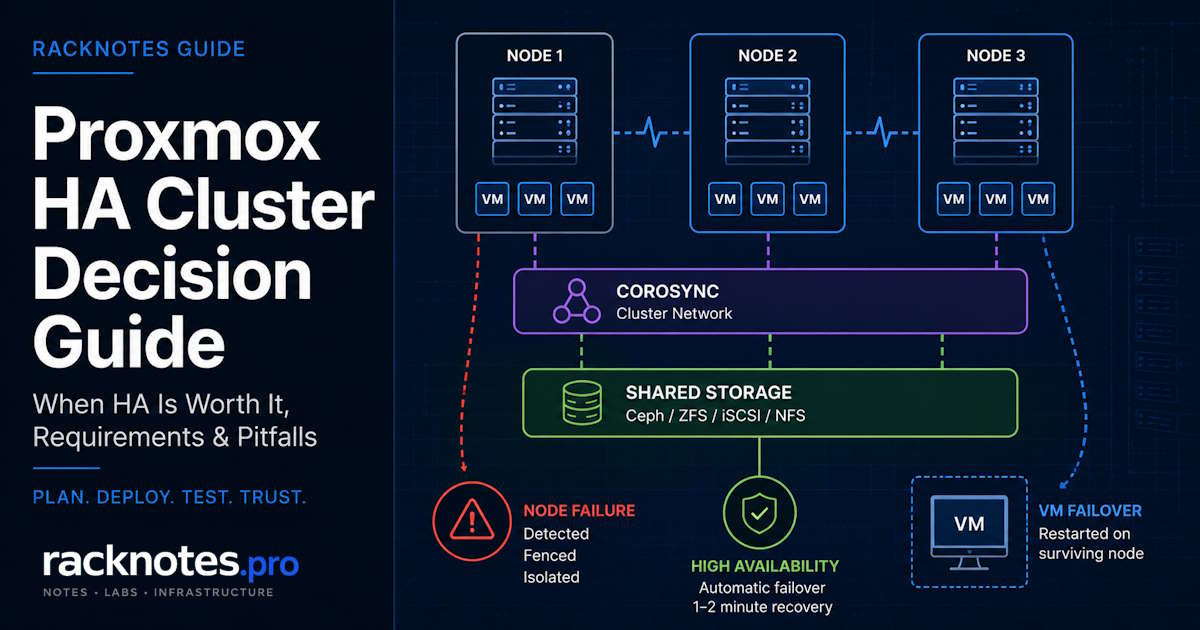
A Proxmox HA cluster automatically restarts selected VMs and containers on another node after a host failure. Proxmox VE 9.2 can also use dynamic load information to improve guest placement, but the core requirements remain the same: reliable quorum, storage available on surviving nodes, predictable Corosync communication, spare capacity, and tested fencing behavior.
The simplest reliable design uses three nodes. Two-node HA is possible with an external QDevice, while guest storage can come from shared/distributed storage (Ceph, NFS, iSCSI) or supported ZFS replication with an accepted recovery-point gap. None of these designs removes the need for backups.
This guide focuses on the architecture and the decision: what a Proxmox HA cluster requires, which topology fits, when HA is worth deploying, and what to test before relying on automatic failover.
Deploy a Proxmox HA cluster when workloads need automatic node-failure recovery, the surviving nodes have enough spare capacity, guest disks remain available after a failure, and Corosync stays consistently low-latency.
Preferred baseline: three Proxmox nodes, reliable low-latency cluster networking, supported storage available on every failover target, tested watchdog/fencing behavior, and independent backups.
Two-node HA: possible with an external QDevice, but it has less compute redundancy and another quorum dependency.
Most single-node homelabs: use PBS backups and a tested restore or cold-standby plan unless automatic recovery materially changes the service outcome.
Version scope: this article is verified against Proxmox VE 9.2. The core HA cluster principles apply across recent Proxmox releases, but HA Rules replaced HA Groups in PVE 9.0, and the Dynamic Load Balancer and HA Arm/Disarm workflow covered below are PVE 9.2-specific. If your cluster runs an earlier release, follow the documentation for that installed version rather than assuming every detail here applies unchanged.
Proxmox HA Cluster Requirements
| Requirement | What it means in practice |
|---|---|
| Cluster quorum | Prefer three nodes; two nodes need an external QDevice for higher availability. |
| Reliable Corosync network | Consistently low latency between all nodes; independent links are strongly recommended for important HA deployments. |
| Guest storage available after node failure | Shared/distributed storage or supported ZFS storage replication with an accepted non-zero RPO. |
| Compatible nodes | CPU model, network bridges, storage IDs, device mappings, and guest dependencies must exist on every eligible target. |
| Spare capacity | Surviving nodes need enough CPU, memory, storage IO, and network capacity to restart failed workloads. |
| Watchdog and fencing | Verify the watchdog path and test failure behavior before relying on HA. |
| Backups | HA does not replace PBS or tested restore procedures. |
| Maintenance plan | A tested procedure for both single-node and cluster-wide maintenance that doesn’t accidentally trigger recovery behavior. |
A Proxmox HA cluster can only recover a workload when every dependency it needs remains available after the failure. If one required dependency is unavailable, automatic recovery for that workload can fail even when the rest of the cluster appears healthy.
What HA Protects, and What It Does Not
HA-managed guests can only be restarted once the cluster has safe ownership of the failed node (quorum plus confirmed fencing) and an eligible recovery target with the resources the guest needs. How Proxmox HA and fencing work covers the CRM/LRM mechanics, service states, and the full failure sequence in detail – this page focuses on what has to be true architecturally for that mechanism to succeed.
What HA does not do:
- It does not protect against application-level failure inside a guest. If a database corrupts itself, HA restarts the corruption on another node.
- It does not eliminate downtime. Proxmox documents typical HA error detection and failover at about two minutes. Application availability can take longer because the guest still has to boot, services must start, and dependent systems may need to reconnect.
- It does not protect against storage failure. If the storage backing HA-managed guests becomes unavailable, HA resources cannot restart successfully anywhere.
- It does not replace backups. HA protects uptime; backups protect data. HA does nothing for accidental deletion, ransomware encryption, guest filesystem corruption, or a mistaken
rm -rfon shared storage. Any production setup needs both, so pair HA with a Proxmox backup and restore plan.
A useful mental model is that a Proxmox HA cluster is a node-failure response system, not an uptime button.
How Many Nodes Does a Proxmox HA Cluster Need?
Three-node Proxmox HA cluster
Three nodes is the simplest reliable baseline. One node can fail while the remaining two still hold a majority and can act. N+1 capacity still matters here: retaining quorum does not mean the two remaining nodes can absorb the failed node’s workload.
Two-node Proxmox HA cluster with QDevice
A QDevice runs on an external qnetd host and contributes a tie-breaking vote; it does not run cluster workloads or add compute capacity. Without one, a two-node cluster that loses either node drops to a single vote out of two, so there is no majority and no automatic action. Place the QDevice outside the failure domain most likely to take down both cluster nodes together; a small local Linux system is usually easier to reason about than a WAN-dependent VPS because losing the WAN path introduces another quorum dependency.
What About Four or More Nodes?
Even node counts are fully valid designs. With default votes, a four-node cluster normally requires three votes and tolerates exactly one node loss, the same loss count as a three-node cluster. Do not remove a working node purely to make the count odd if that node provides needed capacity. QDevice rules and vote math differ somewhat between even- and odd-sized clusters; the detailed mechanics, pvecm status interpretation, and no-quorum recovery are covered in the Proxmox cluster quorum and QDevice guide. For the design decision here: three nodes preferred, two nodes plus QDevice possible, larger even-sized clusters fine as long as the capacity math still works.
Choose the HA Storage Architecture
A Proxmox HA cluster requires guest disks to be available on a surviving node. Two architecture classes satisfy that requirement. Ceph is part of the shared/distributed storage model, not a separate third category.
Shared/distributed storage – Ceph RBD, NFS, or iSCSI – gives every eligible node direct access to the same guest disks. Ceph distributes that storage across the cluster’s own nodes rather than depending on external hardware, but it comes with higher network, disk, and operational requirements than a single NAS or SAN target.
Local ZFS with storage replication is the other supported architecture, per Proxmox’s storage replication documentation: eligible guest volumes replicate to another node on a schedule, and recovery starts from the last successful replication cycle. This is asynchronous, so it carries a non-zero RPO – writes made after the last sync can be lost on a sudden node failure.
| Storage design | Failover behavior | Main trade-off |
|---|---|---|
| NFS/iSCSI shared storage | Guest can restart from the same disks | Storage system can remain a major shared failure domain |
| Ceph | Distributed storage across cluster nodes | Requires enough nodes, disks, network capacity, and recovery planning |
| ZFS replication | Starts from latest replicated local volume | Non-zero RPO; recent writes may be lost |
| Local non-replicated storage | HA cannot restart the guest elsewhere | Manual restore or migration required |
The failure that catches operators is the last row. Local non-replicated storage doesn’t cause data loss by itself; it means the guest can’t automatically restart elsewhere because its disks simply aren’t there. HA looks configured, the GUI shows green, and nothing recovers.
Shared storage does not remove the failure domain; it relocates it. A single NAS behind a three-node cluster can still be a central failure domain: if every HA-managed guest depends on it, losing that NAS can make all of those guests unavailable at once. Compare the options in shared storage for Proxmox HA, and see choose Proxmox storage for HA for the backend trade-offs.
Corosync Network Requirements for a Proxmox HA Cluster
Keep Corosync latency consistently low, ideally below roughly 5 ms, and avoid jitter or contention. A dedicated or physically independent path is strongly recommended for HA and production workloads, especially when storage, migration, or backup traffic can congest the main network. A lightly loaded shared network can function, but it must be tested under the actual peak traffic conditions, not just at idle.
The Proxmox Cluster Manager documentation specifies the required UDP ports, time synchronization across all nodes, and support for multiple redundant links. Bandwidth is rarely the constraint; predictable, low-jitter latency is.
Prefer native Corosync multi-link redundancy across genuinely independent physical paths when you need real failure-domain separation. A bond can still carry Corosync traffic, but its mode, carrier detection, and switch topology all need validating first. A bond is not automatically equivalent to independent Corosync links, and redundant links that share a hidden dependency (same subnet, same switch, same power feed) can fail together.
- Corosync multi-link: preferred for genuinely independent path redundancy.
- Active-backup bond: possible, but understand the detection caveats before relying on it.
- LACP bond: capacity and redundancy depend on the upstream switch domain.
- Two VLANs on one NIC: logical separation, not physical redundancy.
Design the Corosync paths with genuinely separate subnets and physical paths, and validate them under load through the design the Corosync and cluster network guide.
Capacity Planning for HA
Quorum is not capacity. A three-node cluster can remain quorate after one node fails and still be unable to restart every guest if the remaining nodes don’t have enough memory, CPU, or storage throughput. Size the cluster for the failure state, not just for normal operation.
This requirement is easy to overlook because normal operation does not reveal the problem. As an example: a cluster running at 75% memory across three nodes has no room to absorb a third of its workload onto two surviving nodes – HA will try, placement will fail, and the guests stay stopped. Use the size surviving nodes for N+1 capacity guide when planning the headroom.
Node Compatibility and Failover Eligibility
A guest is only highly available if more than one node can actually satisfy all of its runtime dependencies. Every eligible failover target needs the same network bridge names, the same storage IDs, a compatible CPU model, and any device mappings the guest depends on.
Mixed-hardware clusters commonly run into this problem. A VM with GPU passthrough, a hardware-bound license dongle, or a local-only device mapping may have only one node it can run on, leaving HA with no eligible target if that node fails.
HA Rules and Placement
HA Groups are deprecated since Proxmox VE 9.0 in favor of HA Rules. Node Affinity rules restrict or prefer eligible nodes for a guest, with positive/negative and strict/non-strict variants plus priority ordering. Resource Affinity rules instead constrain resources relative to each other: a positive rule keeps selected resources together on the same node, a negative rule keeps them apart.
Use explicit rules for hardware-bound workloads, licensing constraints, failure-domain separation, and services that must not land on the same node. Two DNS servers that both fail over onto the same host are not redundant DNS. The detailed rule syntax and CLI operations are covered in the HA internals guide linked above.
Dynamic Load Balancing in Proxmox VE 9.2
Proxmox VE 9.2 adds a Dynamic Load Balancer that uses real-time node and guest resource utilization to rebalance HA-managed guests while respecting configured HA rules. This improves workload distribution during normal operation.
It is not a substitute for the design work above. Dynamic balancing can improve how workloads are spread during healthy operation, but HA capacity planning still has to assume a node is unavailable. It does not create N+1 capacity, fix storage availability, or resolve hardware incompatibility that leaves a guest with no eligible target.
Plan for Maintenance Before You Need It
Before calling a cluster production-ready, establish a tested procedure for both single-node maintenance and cluster-wide network or Corosync maintenance, not just for the failures HA is meant to handle.
PVE 9.2 provides a node maintenance workflow for individual nodes and a cluster-wide HA Arm/Disarm workflow for planned maintenance that would otherwise risk unwanted fencing across the whole cluster. Both are commands, not complete procedures by themselves. The HA internals guide linked above covers the exact syntax, the difference between disarm modes, and how to verify state before re-arming.
Planned maintenance without the intended HA workflow. A node can be shut down according to the configured HA shutdown policy, but that behavior may not match what the operator actually wants during hardware maintenance – resources may stop, migrate, or remain associated with the node depending on the configured policy and maintenance workflow. For predictable maintenance, use node maintenance mode for a single node and HA Arm/Disarm for cluster-wide maintenance windows, then verify cluster communication, storage, and node state before returning to normal operation.
Proxmox HA Cluster Setup Checklist
At the architecture level, building a Proxmox HA cluster follows roughly this sequence:
- Build the Proxmox cluster itself.
- Confirm quorum and node membership.
- Configure reliable Corosync networking with redundancy.
- Choose shared/distributed storage or supported ZFS replication.
- Normalize bridge names, storage IDs, CPU compatibility, and device mappings across eligible nodes.
- Reserve N+1 failover capacity.
- Configure HA rules for any required placement constraints.
- Add the selected workloads to HA.
- Verify watchdog/fencing behavior and overall HA status.
- Test a controlled failure and recovery.
- Verify independent backups are actually working.
This is the sequence, not a click-by-click tutorial. Each step links to the relevant guide above for the implementation details.
Test the HA Design Before Production
- Move one HA guest into maintenance and back.
- Test planned node shutdown using node maintenance mode.
- Test loss of one Corosync link while the second link remains active.
- Test a full node failure under controlled conditions.
- Confirm the failed guest starts only once, on an eligible target.
- Measure detection, restart, guest boot, and application recovery separately.
- Confirm surviving nodes remain within CPU, memory, and storage limits.
- Test storage failure separately from compute-node failure.
- Verify backups and perform an isolated restore test.
- Document how to disarm and re-arm HA during cluster-wide maintenance.
Test with backups verified and a maintenance plan in place, not by pulling a power cable to see what happens. The cluster logs show what actually occurred, so review Corosync and HA logs after each test rather than judging by whether the guest came back.
- Check whether Corosync shares a path with VM, storage, or backup traffic.
- Test latency between nodes under peak load, not at idle:
ping -c 100 -i 0.1 <node> - Confirm time synchronization across all nodes:
chronyc sources - Review Corosync retransmit warnings:
journalctl -u corosync -n 200 - Verify each Corosync link has a genuinely independent path, including subnet and routing table.
- Check whether the switch introduces spanning-tree delays during link events.
Common HA Architecture Failure Modes
| Risk | Possible result |
|---|---|
| Loss of every Corosync path | Quorum loss; HA recovery or fencing depending on partition state |
| Congested shared network | Increased latency and jitter, membership instability |
| Misconfigured redundant links | Both links may fail through the same physical or routing dependency |
| Storage unavailable | HA resources cannot restart successfully |
| Insufficient target capacity | Resources remain stopped or placement fails |
| Untested watchdog or maintenance workflow | Unexpected node resets or delayed recovery |
These are possible outcomes, not guarantees. Many failures trace back to cluster network design, capacity assumptions, or procedures that were never rehearsed rather than to the HA stack itself.
When a Proxmox HA Cluster Is Not Worth It
HA is not the right answer for every setup:
- Workloads that tolerate a 15 to 30 minute restore. PBS restore is simpler and reaches the same business outcome.
- Single-node homelabs. Adding nodes purely to enable HA adds complexity without materially improving recovery for most homelab workloads.
- Mixed-hardware experiments. Different CPU generations, storage backends, or device mappings leave HA with no valid failover target.
- Storage that is not actually available cluster-wide. Without shared storage or replication, HA cannot restart the guest anywhere.
- Clusters with no spare capacity. Quorate and unable to place workloads is a worse position than a clean single-node restore.
- Operators who will not test failure. HA that’s never been tested can introduce new failure modes instead of preventing them.
A practical rule of thumb is that a Proxmox HA cluster earns its complexity when manual recovery is meaningfully slower than the roughly two minutes of documented detection and failover, and the hardware, network, and storage design actually supports the requirements. Otherwise, cold standby plus tested restore produces better real-world availability.
Proxmox HA Cluster Architecture Decision Matrix
| Architecture | Best fit | Main trade-off |
|---|---|---|
| 3 nodes + external NFS/iSCSI | Small SMB with existing resilient storage | Shared storage remains a central failure domain |
| 3+ nodes + Ceph | Hyperconverged cluster | Higher hardware, network, and operational requirements |
| 2 nodes + QDevice + shared storage | Limited compute footprint | Less spare capacity and additional quorum dependency |
| 2-3 nodes + ZFS replication | Local storage with accepted RPO | Recent writes can be lost after sudden node failure |
| Single node + PBS restore | Most homelabs and non-critical workloads | Manual recovery and longer downtime |
Final Thoughts
A Proxmox HA cluster is justified when automatic node-failure recovery materially improves a workload’s recovery time, the cluster can retain quorum, storage stays available on eligible recovery nodes, more than one node can genuinely run the workload, surviving nodes have the spare capacity to absorb it, and the failure and maintenance procedures have been tested rather than assumed.
Node Affinity rules replacing deprecated HA Groups, dynamic rebalancing, and the Arm/Disarm maintenance workflow are real PVE 9.2 improvements, but they support this architecture rather than being the reason it works. Three nodes, storage that survives a node loss, Corosync paths that are independent in the routing table and not just on the diagram, capacity sized for the failure state, and a tested failure drill are what actually make HA reliable.
The key questions are whether manual recovery is meaningfully slower than automatic failover for these workloads, whether the storage design supports restarting a guest elsewhere, and whether the failure modes will actually be tested. If yes, the complexity is earned. If no, cold standby with tested restore produces better availability than a partial HA deployment.
FAQ
How many nodes does a Proxmox HA cluster need?
Three is the simplest reliable design. A two-node cluster can run HA with an external QDevice providing a tie-breaking vote, but it carries less compute redundancy and one more quorum dependency. Two nodes with no QDevice cannot maintain quorum through a split, so neither side will act.
Does Proxmox HA require shared storage?
Not universally. Shared or distributed storage is the simplest design, since the guest disks are reachable directly on any eligible node. Supported local ZFS storage replication can also provide recoverable guest storage, though replication is asynchronous and carries a non-zero RPO. Local non-replicated storage means HA cannot restart the guest elsewhere at all.
Can Proxmox HA use ZFS replication?
Yes, for eligible local ZFS volumes, and it’s a documented supported design. The trade-off is a non-zero RPO: failover starts the guest from the last successful replication cycle, so changes written after that point are lost. Match the replication interval to what the workload actually tolerates.
How much spare capacity does a Proxmox HA cluster need?
Enough that surviving nodes can absorb the failed node’s workloads on top of their own, not just enough to stay quorate. Quorum is a voting concept; capacity is a completely separate question, and skipping it is a common reason a technically working HA cluster still fails to recover a guest.
Does a Proxmox HA cluster need Ceph?
No. Ceph is one HA-capable storage architecture, not a requirement. NFS, iSCSI, other supported shared storage, or supported local ZFS replication can all fit different designs depending on existing infrastructure and scale.
Is a four-node Proxmox cluster a bad design?
No. With default votes, a four-node cluster normally requires three votes and tolerates one node loss, the same node-loss count as a three-node cluster. The fourth node can still add useful compute and storage capacity. Use a QDevice only after evaluating the exact failure and partition behavior you need; don’t remove a working node solely to make the cluster odd-sized.
How much downtime does a Proxmox HA cluster have?
Proxmox documents typical error detection and failover at about two minutes. Application availability takes longer, because the guest still has to boot, services must start, and dependent systems may need to reconnect. Storage latency, concurrent resource count, and target node capacity all extend it. HA delivers fast bounded downtime, never zero.
Is Proxmox HA worth it for a homelab?
Usually only if a manual restore genuinely can’t meet the recovery target for a specific workload. Most homelab requirements are actually satisfied by reliable PBS backups and a tested restore process, without the added node count, storage architecture, and maintenance discipline HA requires to work correctly.
This guide covers Proxmox HA cluster requirements, architecture, and readiness. Internal HA Manager behavior, the CRM/LRM failure sequence, service states, and detailed fencing mechanics are covered in the HA internals guide; vote math, expected-votes configuration, and no-quorum troubleshooting are covered in the quorum guide. Split-brain recovery and node-rebuild walkthroughs are out of scope here, as is full Ceph architecture. Recovery times depend on hardware, network, and storage design and are presented as documented typical ranges rather than guaranteed values.
Proxmox VE Series
28 articles – Installation · Storage · Networking · HA · Recovery