
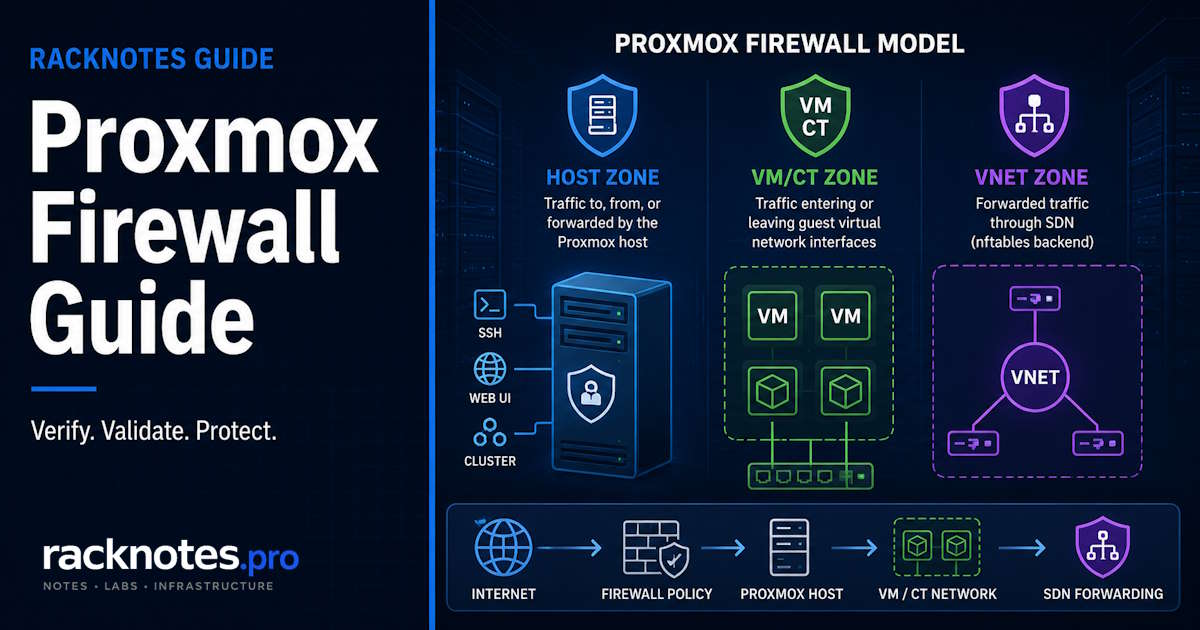
Proxmox firewall confuses people for a structural reason: the UI shows four menu locations – Datacenter, Node, VM, LXC – and it’s natural to assume each one is a separate filtering layer traffic passes through in sequence. That’s not how the underlying model works, and treating it that way is how operators end up applying a rule at the wrong scope and either locking themselves out or leaving a guest wide open.
Proxmox actually defines three firewall zones: Host, VM/CT, and – with the newer nftables backend – VNet. Datacenter and Node are two configuration scopes that both write policy for the Host zone. VM and LXC share one guest-firewall model. Getting that distinction right is most of what this guide is about.
Proxmox firewall has three rule zones rather than four stacked layers. Datacenter and Node rules control the Host zone, VM and LXC rules use the guest VM/CT zone, and the nftables-based technology-preview backend adds VNet Forward rules for SDN traffic. Enable the Datacenter firewall first only after defining management access and confirming a recovery path. Use Node rules to protect SSH and the Web UI, and enable guest rules only on the VM or CT interfaces that actually need isolation.
- Datacenter
enableis the cluster-wide master switch – nothing is enforced without it - Datacenter and Node rules both target the Host zone; Node-level Host rules take precedence over Datacenter-level Host rules
- VM and LXC share the same guest-firewall model; each filtered NIC needs its own firewall flag enabled, and guest firewalling defaults to off
- The nftables-based
proxmox-firewallremains a technology preview –pve-firewall(iptables) is still the production default - Confirm a recovery path and define the special
managementIP Set before setting Host policy to DROP
How the Proxmox Firewall Model Actually Works
Proxmox separates firewall configuration by both zone and scope, and conflating the two is the root of most Proxmox firewall confusion. Zone answers “what traffic is this policy for.” Scope answers “where is this policy defined.”
Host, VM/CT, and VNet zones
The Host zone covers traffic to, from, or forwarded by a Proxmox node itself – SSH, the web UI, corosync, backup traffic, anything addressed to the hypervisor. Per the official Proxmox VE firewall documentation, the VM/CT zone covers traffic entering or leaving a specific guest’s virtual network interface, and VMs and containers use the identical model here – there’s no separate “LXC zone” with different rules. The VNet zone, available only through the nftables-based backend, filters forwarded traffic passing through a Software-Defined Networking VNet.
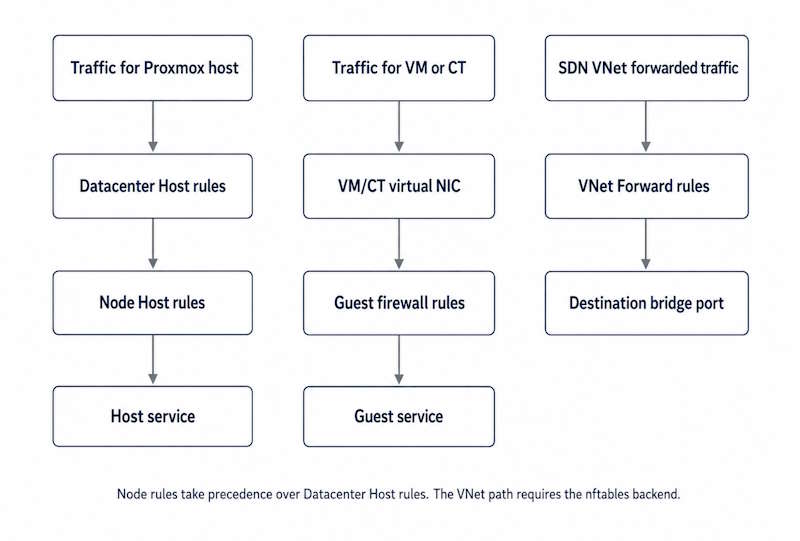
Datacenter and Node are not zones. They’re the two scopes where Host-zone policy gets defined – Datacenter for cluster-wide defaults, Node for one specific host. VM and LXC firewall settings both belong to the VM/CT zone regardless of which guest type you’re looking at.
Datacenter scope vs Node scope, and rule precedence
Datacenter-level Host rules apply cluster-wide. Node-level Host rules apply to one host. When both exist for the same traffic, node-level Host rules take precedence over datacenter-level Host rules – a node-specific exception can override a cluster-wide default without needing to touch the Datacenter policy itself.
What Datacenter scope also holds: the cluster-wide master switch, reusable Security Groups, IP Sets, and aliases. None of that automatically filters VM or CT traffic – Host-zone rules do not extend to the VM/CT zone. Guest traffic needs its own VM/CT rules, or VNet Forward rules if you’re running the nftables backend with SDN.
Enable switches and the guest NIC firewall flag
The Datacenter enable option is the cluster-wide master switch. Without it, no Proxmox firewall rules are enforced anywhere – not at Host scope, not at VM/CT scope. Host firewall rules are enabled by default at the node level once the cluster-wide switch is on. VM and CT firewalling works differently: the guest firewall option defaults to disabled, and even once enabled, each virtual network interface you want filtered needs its own firewall flag turned on individually.
A recurring pattern in Proxmox firewall reports: an operator enables the Datacenter firewall, assumes every guest is now protected, and only later realizes VM/CT firewalling was never turned on for those guests in the first place. The Datacenter switch controls whether the system is active at all – it doesn’t retroactively turn on guest-level filtering.
Practical takeaway:
- Datacenter
enableis the cluster-wide master switch - Host firewall rules default to enabled once the cluster-wide firewall is active
- VM/CT firewall rules default to disabled
- A VM/CT NIC needs its firewall flag enabled before guest filtering does anything
- Node-level Host rules take precedence over Datacenter-level Host rules
- Security Groups and IP Sets are reusable objects, not automatically applied policy – they do nothing until a rule references them
Proxmox Firewall Scope Table
| Configuration area | Actual scope | Traffic affected | Important behavior |
|---|---|---|---|
| Datacenter Firewall | Cluster-wide Host-zone defaults and shared objects | Proxmox hosts | Node-specific rules can take precedence |
| Node Firewall | One Proxmox host | Traffic to, from, or forwarded by that host | Highest lockout risk |
| VM/LXC Firewall | One guest and its enabled NICs | Traffic entering or leaving that VM/CT | Separate from Host-zone rules; off by default |
| VNet Firewall | One SDN VNet | Forwarded traffic through the VNet | nftables backend only |
| Security Groups | Reusable rule sets | Guests that reference the group | Definition alone applies nothing |
| IP Sets and aliases | Reusable address objects | Rules that reference them | Special sets like management carry built-in meaning |
Before You Enable DROP: Recovery Checklist
If you’re rolling this out as part of initial hardening covered in first things to do after installing Proxmox, treat the firewall as a distinct step with its own recovery plan – not something to bundle into the same session as other post-install changes.
- Confirm at least one recovery path exists: a physical console, IPMI/iDRAC/iLO, a hosting-provider KVM or serial console, or an already-open SSH session.
- Define the special
managementIP Set with your administrator addresses before changing any inbound policy. - Verify Proxmox’s own detected local network with
pve-firewall localnetso the automatic local-cluster inclusion matches what you expect. - Confirm which firewall backend is active –
pve-firewallorproxmox-firewall– since stop commands and generated rules differ between them. - Only then set Host policy to DROP, and re-test SSH and port 8006 from outside the session you used to make the change.
Out-of-band or physical console access is strongly recommended before tightening policy on a remote node. Proxmox allows already-established connections by default and its own documentation recommends keeping an SSH session open during activation – but an existing session shouldn’t be treated as the only rollback method on a production node you can’t physically reach.
A Safe Single-Node Baseline
The special management IP Set is a cluster-wide Host-firewall object with built-in meaning: addresses in it receive access to normal Proxmox management services through the implicit default rules. The local cluster network is included automatically – remote administrator addresses need to be added deliberately.
# /etc/pve/firewall/cluster.fw

[OPTIONS]
enable: 1
policy_in: DROP
policy_out: ACCEPT

[IPSET management]
192.168.1.0/24
10.10.0.0/24
This block is cluster-wide because it lives in cluster.fw – it affects every node, not just one. Prefer individual administrator addresses, a VPN subnet, or a dedicated management VLAN over a broad client LAN that also contains user, guest, or IoT devices – the example above uses whole subnets for readability, not as a security recommendation. Verify the automatically detected local network before relying on it:
pve-firewall localnetDon’t add outbound DNS/NTP/HTTP/HTTPS allow rules here unless you’re deliberately also setting policy_out to DROP with a complete egress policy behind it. With policy_out: ACCEPT as shown, those outbound rules are redundant, and a partial egress allowlist is a common way to accidentally break package repositories, backups, storage, monitoring, or notifications later. If you need explicit Node-specific rules on top of this, keep them in a separate, clearly labeled block at /etc/pve/nodes/<nodename>/host.fw – don’t mix cluster-wide IP Set definitions and host-local options in one copyable example.
A Cluster-Safe Policy
Cluster networking is where Proxmox firewall mistakes get expensive fast. Adding a second node changes the blast radius of a bad rule. Corosync, live migration, and shared-storage traffic must all remain reachable before you tighten Host-zone policy. Proxmox provides implicit rules for recognized cluster and management addresses, while storage-specific services may still need explicit rules of their own.
| Service | Port/protocol | Typical scope |
|---|---|---|
| Web UI | TCP 8006 | Administrator to node |
| SSH / cluster actions | TCP 22 | Administrator and node-to-node |
| VNC web console | TCP 5900-5999 | Management hosts to node |
| SPICE proxy | TCP 3128 | Management hosts to node |
| Corosync | UDP 5405-5412 | Cluster network |
| Live migration | TCP 60000-60050 | Node-to-node |
| rpcbind, when used | UDP 111 | Storage/service dependent |
The Web UI, VNC, SPICE, SSH, and migration entries above are covered by Proxmox’s implicit Host-zone rules for addresses in the management IP Set. Corosync traffic is allowed on the recognized cluster network. Storage-specific services such as rpcbind are not implicitly allowed and need an explicit rule when the deployment actually uses them. None of these Host-zone exceptions apply to VM or CT traffic, whose guest rules and default policies are evaluated separately. For Ceph, replication, PBS, and third-party monitoring ports beyond this table, the backup strategy guide covers the backup-specific traffic in more depth than fits here.
Test corosync reachability immediately after any cluster-wide policy change, not just host reachability – a firewall misconfiguration that blocks cluster communication looks like a networking or quorum problem, not a firewall one, which makes it slower to diagnose. The HA and quorum guide covers what happens once nodes actually lose contact with each other. Roll a new Host policy out to one node first where practical, rather than applying it cluster-wide in a single step.
Full VLAN segmentation and bridge configuration for cluster and storage networks are covered in the networking guide – this section only covers the firewall-policy side of cluster traffic.
VM and LXC Firewall Rules
This is the part of Proxmox firewall configuration most homelab setups can skip entirely. VM and LXC guests share one firewall model, and enabling it is genuinely optional in a way Node-level Host rules aren’t – Node rules are the primary Proxmox control for protecting the host itself, but the integrated guest firewall is an optional layer on top, even when using it is advisable. A homelab with a flat trusted network and a reverse proxy in front of exposed services often runs without guest-level firewall rules at all.
Where guest filtering earns its keep: isolating a compromised guest from reaching other guests on arbitrary ports, and defense-in-depth for anything genuinely exposed to the internet. Remember the guest firewall option defaults to off and each NIC needs its own flag enabled – a VM with the guest firewall “on” but a specific NIC’s flag left unchecked is still unfiltered on that interface.
Security Groups and IP Sets are the reusable vocabulary shared across guests – a web group opening 80/443, an ssh-admin group scoped to specific addresses. Beyond the general-purpose objects, Proxmox ships special sets with built-in behavior: management carries Host-firewall meaning as covered above, blacklist is applied across both host and VM/CT firewalls, and ipfilter-net* provides guest source-IP anti-spoofing – worth knowing about specifically in public-IP, routed, or multi-tenant setups where a guest shouldn’t be able to spoof an address it doesn’t own.
Legacy pve-firewall vs nftables proxmox-firewall
Proxmox VE offers the established iptables-based pve-firewall and the newer nftables-based proxmox-firewall. The current official firewall documentation still labels the nftables implementation a technology preview and says it is not suited for production use – a label it has carried since Proxmox VE 8.2.
| Item | pve-firewall | proxmox-firewall |
|---|---|---|
| Backend | iptables | nftables |
| Current status | Established/default implementation | Technology preview |
| Production recommendation | Default safe choice | Lab/testing unless status changes |
| Forward rules | Ignored | Supported |
| VNet firewall rules | Ignored | Supported |
| Linux bridge fwbrX devices | Created | Not created |
| Guest REJECT | Supported | Converted to DROP |
| Service control | pve-firewall command/service | systemctl … proxmox-firewall |
A few operational details worth knowing before switching: proxmox-firewall may need installing explicitly with apt install proxmox-firewall, it’s enabled per host through Host > Firewall > Options > nftables, and both implementations read the same configuration format – old rules carry over. Running VMs and containers need a restart after switching backend for the new rule generation to fully apply. If your setup relies on Forward or VNet rules for SDN traffic, know that the legacy backend ignores both entirely.
Reverse Proxies and Backend Isolation
A reverse proxy doesn’t replace Proxmox firewall policy on the backend guest, and assuming it does is a common gap. In a reverse-proxy design, the proxy should be the only intended application ingress path – but that isn’t enforced just by deploying it. Backend services can still listen on their own VM or LXC IP address and remain directly reachable from the LAN or from adjacent guests, bypassing the proxy entirely unless something else prevents it. Bind backend services to an internal-only address, place them on an isolated network, or restrict them with VM/LXC firewall rules so clients can’t connect around the proxy – the proxy alone doesn’t guarantee that.
Docker and Firewall Interactions
Docker’s relationship with the Proxmox firewall depends heavily on where Docker actually runs, and treating all three placements as equivalent is where a lot of “the firewall is enabled but the port is still reachable” confusion comes from. Docker’s own packet-filtering documentation is explicit that it manages its own rules independent of host-level firewall tools.
Docker directly on the Proxmox host creates NAT, forwarding, bridge-isolation, and port-publishing rules in the same host network stack Proxmox itself uses. This is the highest-conflict scenario, and it’s the strongest argument for not installing Docker directly on the hypervisor – see the Docker on Proxmox guide for the full reasoning.
Docker inside a VM modifies the guest’s own firewall namespace, but Proxmox VM firewall rules still apply at the VM’s virtual NIC boundary. Docker may bypass or conflict with UFW or firewalld running inside that guest, but it does not automatically bypass a correctly enabled Proxmox guest firewall sitting at the VM interface itself.
Docker inside LXC shares the Proxmox kernel with nested namespaces and bridges layered on top, which makes the interaction more complex than either the host or VM case – not something to summarize as identical to either. The LXC vs VM guide covers the shared-kernel architecture this depends on.
When Docker runs directly on the Proxmox host, its NAT and forwarding rules share the hypervisor’s network stack and need explicit review alongside Proxmox firewall policy – enabling the host firewall does not put Docker’s own rule-writing under its control. When Docker runs inside a VM, Proxmox guest-firewall rules still filter traffic at the VM interface, even though UFW or firewalld inside that same guest may not behave the way Docker’s documentation says to expect around published ports.
The DOCKER-USER chain is a real policy point, but only for one of Docker’s backends. With Docker’s default iptables backend, place additional forwarding policy in DOCKER-USER. Docker Engine 29 introduced an experimental nftables backend, and that implementation has no DOCKER-USER chain at all – equivalent policy there belongs in a separate nftables table and an appropriately prioritized base chain instead.
Logging and Troubleshooting
Two different problems get diagnosed with two different tools, and mixing them up wastes time. journalctl is useful for service startup, rule compilation, and reload errors – the Proxmox logs guide covers the broader diagnostic picture beyond firewall-specific output. Filtered packet activity itself is normally inspected through Firewall > Log in the GUI, or the firewall log file directly.
# Compile and validate legacy firewall configuration
pve-firewall status

# Compile nftables backend rules without applying them
PVE_LOG=debug /usr/libexec/proxmox/proxmox-firewall compile > firewall.json

# Inspect packet logs
tail -f /var/log/pve-firewall.log

# Legacy generated rules
iptables-save

# nftables generated rules
nft list ruleset

# Daemon/service errors
journalctl -u pve-firewall -b
journalctl -u proxmox-firewall -b
pve-firewall status reads and compiles the current configuration and reports warnings if something in it doesn’t parse. The proxmox-firewall compile command does the nftables-backend equivalent – useful for catching a bad rule before it’s actually applied. Use the trace log level only briefly if you need it, since it can produce a large amount of output. journalctl tells you about the service, not necessarily which packet got dropped. ss -tulpn shows what’s listening locally but doesn’t prove remote reachability through the firewall – test that from a second machine with nc, curl, ssh, or an appropriate port scanner instead of trusting the local listener view.
For Docker specifically, docker ps and docker network ls aren’t enough on their own:
docker ps --format 'table {{.Names}}\t{{.Ports}}'
iptables -S DOCKER-USER
iptables-save | grep -E 'DOCKER|DNAT'
nft list ruleset
iptables -S DOCKER-USER is only meaningful when Docker is running its iptables backend – check which backend is active before assuming that output means anything.
Lockout Recovery
A Proxmox firewall lockout follows a predictable recovery sequence, provided you have some access path that isn’t the network route you just broke.
- Reach the node through a physical console, IPMI/iDRAC/iLO, a hosting-provider KVM or serial console, or an already-open SSH session – Proxmox’s noVNC is a guest-console mechanism accessed through the management plane, and it does not substitute for out-of-band access to the host itself.
- Stop the active firewall backend for immediate relief:
pve-firewall stopfor the legacy iptables-based backend, orsystemctl stop proxmox-firewallfor the nftables technology-preview backend. - Confirm which backend was actually active before choosing the stop command – the wrong one won’t do anything.
- Correct or disable the persistent configuration itself. Stopping the service only removes its currently generated rules; the underlying config still re-applies the same problem the next time the service starts.
- Verify the
managementIP Set actually includes the address you’re connecting from, then re-enable the firewall and re-test SSH and port 8006 before ending the recovery session.
The implicit management exceptions described earlier apply to the Host zone specifically – they don’t automatically extend the same access to VM or CT traffic, whose guest rules and default policies are evaluated on their own.
Final Recommendation
Proxmox firewall is smaller and more consistent than the four-menu-location UI makes it look – three zones, two scopes for the Host zone, and a set of reusable objects that do nothing until something references them. Most of the actual lockout risk sits in one place: setting Host-zone policy to DROP before confirming both a recovery path and a working management IP Set.
For most homelab and small-business Proxmox deployments, the sweet spot is a Node-protected Host zone scoped to that management set, Datacenter-level Security Groups for anything reused across guests, VM/CT rules reserved for guests that specifically need isolation rather than applied everywhere by default, and pve-firewall as the production backend until proxmox-firewall graduates past technology preview. Docker, wherever it runs, gets treated as its own review item rather than an assumption that host policy already covers it.
FAQ
Should I enable the firewall at both Datacenter and VM level?
For Proxmox firewall to do anything at all, the Datacenter enable option is required first – it’s the cluster-wide master switch, and nothing else works without it. VM/CT firewalling is separate and optional: enable it only for guests that need filtering, then turn on both the guest firewall option and the firewall flag on each relevant virtual NIC. Datacenter Host rules don’t replace guest rules.
Does Proxmox firewall replace Docker’s own firewall behavior?
No. Docker still creates its own bridge, NAT, forwarding, and published-port rules regardless of Proxmox firewall state. If Docker runs directly on the Proxmox host, those rules share the hypervisor’s network stack and need explicit review. If Docker runs inside a VM, Proxmox guest rules still filter traffic at the VM’s virtual NIC, even though Docker may bypass UFW-style assumptions inside that same guest.
Do I need firewall rules on every LXC container?
No. Guest-level firewall is most valuable where a container is directly exposed or where isolation from other guests specifically matters. A container that only receives traffic through an internal reverse proxy, with the backend otherwise unreachable, often doesn’t need its own rule set.
What happens if I block port 8006 or SSH?
Proxmox applies implicit Host-zone rules for addresses in the management IP Set, covering Web UI and SSH access among others. If your own administrator address isn’t in that set, recover through an existing session, a physical console, IPMI/iDRAC/iLO, or a provider KVM/serial console – stop the active firewall backend, correct the persistent configuration, verify the management allowlist actually includes your address, and only then re-enable it.
Can I use Proxmox firewall and a reverse proxy together?
Yes. Use Node rules to protect the hypervisor itself, and guest firewall rules or network segmentation to prevent clients from reaching a backend VM or container directly. The reverse proxy alone doesn’t stop a client from connecting straight to the backend’s own IP and port unless something else blocks that path.
Proxmox VE Series
28 articles – Installation · Storage · Networking · HA · Recovery