
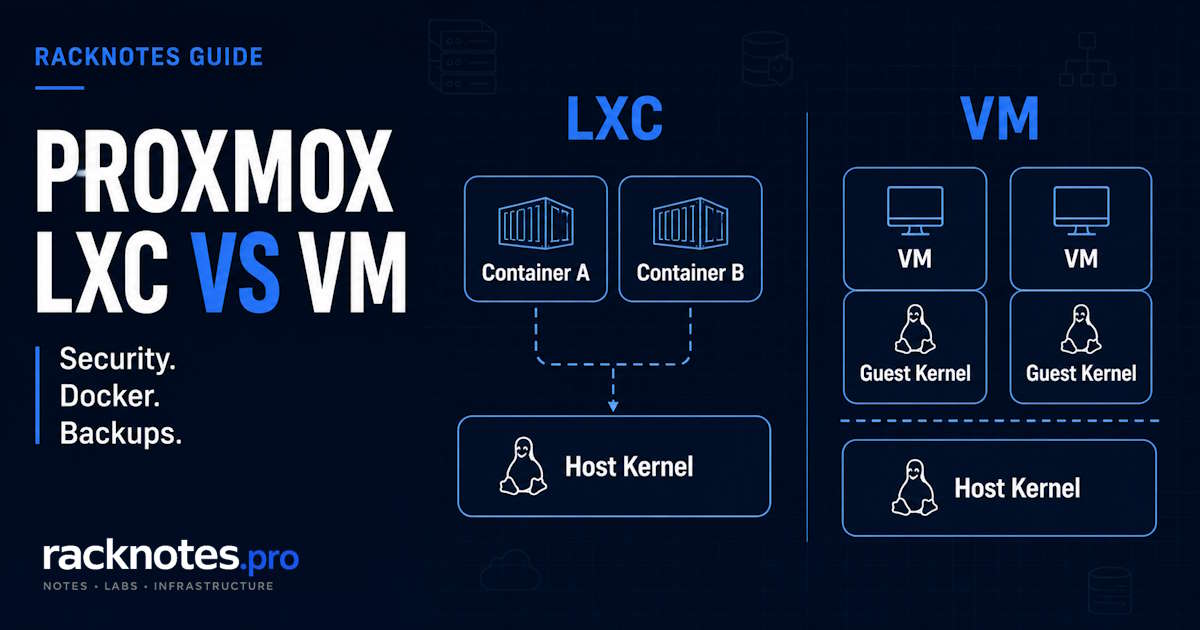
Proxmox LXC vs VM is one of the first architecture decisions most operators face after initial setup, and it comes down to one fact with wide-reaching consequences: an LXC container shares the host’s Linux kernel, while a VM runs its own. Whether framed as Proxmox LXC vs VM or Proxmox VM vs LXC, the decision is the same, and it isn’t simply “containers are faster.” This guide explains what that shared-kernel distinction changes in practice – performance, isolation, migration, hardware access, and Docker behavior – and ends with workload-level recommendations.
Use an unprivileged LXC container for a trusted, single-purpose Linux service when low overhead and fast startup matter more than maximum isolation. Use a VM when the workload needs Windows or another non-Linux OS, its own kernel, stronger tenant isolation, true live migration, Kubernetes, conventional Docker behavior, or exclusive PCI passthrough. Most Proxmox hosts end up running both, not one exclusively.
Proxmox LXC vs VM Comparison Table
Bridge and VLAN design uses the same high-level Proxmox networking model for both guest types – covered in the Proxmox networking guide – so it usually isn’t a deciding factor here.
| Factor | LXC | VM |
|---|---|---|
| Architecture | System container, shares host kernel | QEMU/KVM virtual machine, own kernel |
| Guest OS | Linux only | Linux, Windows, other supported OSes |
| Kernel | Host kernel; cannot run an independent guest kernel or independently load/manage its own kernel modules | Independent guest kernel and modules |
| CPU overhead | Low | Small on modern KVM, but nonzero |
| Idle RAM footprint | Lower | Higher |
| Disk footprint | Typically lighter | Typically heavier |
| Boot time | Seconds | Slower – boots a full kernel/OS stack |
| Isolation boundary | Namespaces and cgroups | Hypervisor boundary, separate kernel |
| Live migration | Not supported (restart migration only) | Supported when migration prerequisites are met |
| Hardware access | Simple for shared devices (iGPU) | Exclusive PCI/VFIO passthrough |
| Docker | Works, with nesting/host-kernel caveats | Standard, conventional behavior |
| Kubernetes | Possible, but adds host-kernel complexity | Preferred deployment model |
| Best-fit workloads | Trusted, single-purpose Linux services | Windows, isolation-sensitive, migratable |
No single row decides the outcome. The right choice depends on what the workload actually needs.
The Core Difference: Shared Kernel vs Separate Kernel
A container is a fenced-off view of the same kernel everyone else is using. A VM is a separate machine that happens to live on your hardware. That single distinction is the entire Proxmox LXC vs VM decision – everything else is a downstream consequence of it.
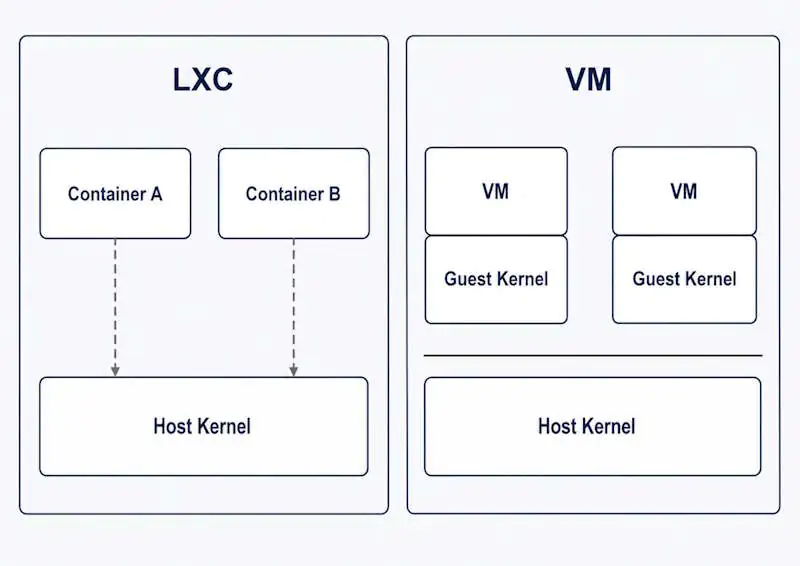
LXC is a system container: it shares the Proxmox host’s Linux kernel directly, and namespaces, cgroups, and syscall restrictions isolate its userspace rather than hardware emulation. Per the official Proxmox Linux Container documentation, this is what makes LXC lightweight and fast to start, and what makes Windows, custom kernel modules, and true live migration impossible for a container – all three need a kernel independent from the host’s.
VM is a QEMU/KVM virtual machine with emulated hardware, booting its own kernel. That independence makes live migration, non-Linux guests, and a stronger isolation boundary possible, and also makes a VM heavier at idle than an equivalent LXC container.
Many of the most important LXC limitations trace back to this shared-kernel model: guest OS choice, kernel independence, live migration, and parts of device and container-runtime behavior. Not every restriction does – some come from Proxmox/LXC security policy, device handling, or mount behavior instead – but the shared-kernel line explains the biggest ones.
Proxmox LXC vs VM Performance and Resource Overhead
Performance is one of the most oversimplified parts of the Proxmox LXC vs VM comparison. There is no fixed, universal percentage advantage for either guest type; the meaningful differences are more specific and often smaller than forum comparisons imply.
CPU. Modern KVM CPU overhead is usually small enough not to matter for typical homelab and SMB workloads once virtio drivers are configured correctly. CPU-bound work rarely swings a decision on its own.
Memory. LXC generally has lower idle memory overhead, because a container doesn’t need to boot and maintain a separate guest kernel and OS image in RAM. A VM’s memory floor includes the guest OS itself, not just the workload running inside it.
Disk footprint. Containers are commonly lighter on disk for the same reason – no separate guest OS image to store and maintain, just the application layer on top of the shared kernel.
Startup time. LXC containers usually start faster because they do not boot a separate guest kernel and virtual hardware stack. A VM has to boot a complete kernel and OS stack before the workload inside it is even reachable.
Practical conclusion. Performance alone should rarely decide this unless host density is a real constraint. A homelab node with a handful of guests gains little from choosing LXC purely for overhead savings if the workload’s other requirements point toward a VM. Storage benchmark numbers vary heavily with cache mode, storage backend, and virtio configuration, so treat any specific figure as a starting point for your own testing, not a universal constant. See the RAM sizing guide for planning host memory budget across a mixed LXC/VM fleet.
Security and Isolation
Proxmox creates unprivileged LXC containers by default, and that default is correct for nearly every use case. In an unprivileged container, the container’s root user is remapped to an unprivileged host user ID through Linux user namespaces – so a process that somehow gains root inside the container does not gain root on the host.
A privileged container skips that remapping: container root is host root, with the remaining protection coming from dropped capabilities, AppArmor confinement, and seccomp filtering rather than a UID boundary. The upstream LXC security documentation is direct about this – a privileged container isn’t treated as a hard security boundary the way an unprivileged one, or a VM’s hypervisor boundary, is.
Neither extreme should be stated in absolute terms. Unprivileged containers with a default configuration are appropriately secure for most single-tenant workloads – LXC is not inherently insecure. A VM’s stronger architectural boundary isn’t a guarantee of perfect isolation either. What actually erodes an LXC container’s boundary is manual loosening: going privileged without a reason, disabling AppArmor, adding capabilities like mac_admin, or bind-mounting sensitive host paths in – each a deliberate configuration choice, not an automatic consequence of the container model.
For multi-tenant or exposed hosts, the hypervisor boundary is generally worth the overhead. Either way, the guest boundary is only one layer – the Proxmox firewall guide covers the zone-level rules that belong in front of any exposed guest regardless of type.
When LXC Is the Better Choice
- Small, trusted internal Linux services – DNS resolvers, monitoring agents, reverse proxies – where low overhead and fast recovery matter more than isolation depth
- Databases where isolation isn’t the primary concern – PostgreSQL, MySQL, Redis for internal workloads with normal backup discipline
- Media workloads sharing one iGPU – Jellyfin/Plex-style transcoding where shared device access across the host and several containers matters more than exclusive hardware isolation
- Fast clone-and-test environments – LXC starts and clones quickly, which is genuinely useful for throwaway or short-lived test guests
A recurring pattern in homelab deployments: operators start with LXC for everything, then move specific workloads to VMs one at a time as isolation or lifecycle requirements surface.
When a VM Is the Better Choice
- Windows or any non-Linux guest – LXC is Linux-only by design
- Microsoft AD DS domain controllers – requires Windows, so only a VM is supported. Samba AD DC can technically run in a container, but a VM stays the conservative default for isolation and lifecycle reasons
- Anything needing true live migration – only a VM moves between nodes without a stop/start cycle
- Kubernetes and k3s – generally easier to operate in VMs, since nodes often depend on kernel modules, cgroup behavior, networking features, and storage/network plugins that are more straightforward to support with an independent guest kernel
- Exclusive GPU or PCI passthrough – VFIO passthrough hands an entire device to one guest, the strongest hardware isolation Proxmox offers
- Multi-tenant or exposed hosts – where the hypervisor boundary is worth the extra overhead
A common assumption is that “VM” always means more ongoing maintenance. Once a workload is set up, however, independence from the host kernel can simplify lifecycle management by decoupling the guest’s update schedule from the host’s. Cloning a VM from a template also closes much of the setup-speed gap that used to favor LXC.
Docker on Proxmox: LXC or VM?
Docker can run inside an LXC container, but nested containerization adds dependencies on the Proxmox host kernel and LXC security features that a Docker VM does not have. Proxmox exposes container features such as keyctl and nesting specifically for these cases, and the guest still shares the host kernel underneath them.
Proxmox VE 9.2 can also pull OCI images and create LXC-backed application containers directly, documented in the Proxmox Container Toolkit documentation. This feature is currently a technology preview, so it’s useful for simple application deployments but shouldn’t be treated as a mature replacement for a conventional Docker or Kubernetes stack. It doesn’t replace Docker Compose-style orchestration.
For a production Docker host, a small Linux VM remains the conservative default when conventional Docker behavior, stronger isolation, or live migration matters. A VM provides a conventional Linux environment for Docker and Docker Compose without relying on LXC nesting features. Reserve Docker-in-LXC for disposable or low-stakes workloads where an occasional rebuild is an acceptable cost. For the full setup workflow and troubleshooting, see Docker on Proxmox.
Storage, Backups, and Host Coupling
LXC can integrate host storage very flexibly – Proxmox-managed mpX volumes, host-path bind mounts, and raw lxc.mount.entry lines all behave differently for backup purposes, and host-path designs increase coupling to the specific Proxmox host. Unprivileged containers add UID/GID mapping considerations; recent Proxmox VE releases support per-mount-point idmap configuration to make that mapping explicit rather than a manual workaround.
A VM’s disk, by contrast, is a disk image or block device managed entirely by Proxmox storage, with no host-filesystem bind-mount ambiguity to reason about – one of the more underrated reasons VMs are the safer default for anything where a clean restore matters more than saving RAM.
Neither guest type eliminates the need for tested restores – a container backup cannot be restored as a VM, and a backup job completing without errors doesn’t prove the data is actually recoverable. See Proxmox LXC Bind Mounts for the full mapping and backup-implication workflow.
Migration and High Availability
“Live migration” and “failover” are often used interchangeably, but they describe different mechanisms and imply different availability guarantees.
Live migration is a planned, operator-initiated move of a running guest between nodes with minimal guest-visible downtime. Only VMs support this on Proxmox. LXC uses restart migration instead: the container stops, its data moves, and it starts again on the target node – a real stop/start cycle, not a live move.
HA (High Availability) restart behavior is a separate mechanism from live migration for both guest types: when a node fails, the cluster’s HA manager fences it and restarts affected guests elsewhere – a restart, not an instant handoff, for LXC and VMs alike. For the quorum and fencing mechanics behind that restart, see Proxmox HA Explained rather than treating it as a one-sentence summary here.
Where the choice matters for availability: a VM can use live migration to avoid guest downtime during planned maintenance when migration prerequisites are met. If a restart after node failure is acceptable, both guest types can work as HA resources.
Hardware and GPU Access
LXC is useful when selected host device nodes, such as /dev/dri/renderD128 for an iGPU, can be shared across the host and multiple containers simultaneously – genuinely useful for shared transcoding workloads.
VM is the pattern when the guest needs exclusive PCI/VFIO ownership: the entire device is handed to one guest, with the host and every other guest losing access to it while the VM runs.
Granting device access properly means group membership (video/render groups) and explicit UID/GID mapping for unprivileged containers, not loosening device permissions globally. See the GPU passthrough guide for the VFIO implementation details.
Proxmox LXC vs VM by Workload
| Workload | Default choice | Why | Main caveat |
|---|---|---|---|
| Windows Server / desktop | VM | LXC is Linux-only | None – hard requirement |
| Microsoft AD DS | VM | Requires Windows | No LXC path exists |
| Small Linux service (DNS, monitoring) | LXC | Low overhead, fast recovery, trusted | Still needs a backup plan tested by restore |
| Docker (production) | VM | Avoids LXC nesting and shared host-kernel dependencies | Costs RAM for a second kernel |
| Kubernetes / k3s | VM | Kernel, cgroup, networking, and storage-plugin requirements are easier to support in a full guest | LXC can be made to work, but adds host-kernel and nesting complexity |
| PostgreSQL / MySQL | Either | Overhead difference is workload-specific | Isolation/backup needs decide it, not raw performance |
| Plex / Jellyfin | Depends on GPU sharing | LXC shares one iGPU across containers cheaply | VM preferred if isolation or exclusive GPU access matters more |
| Home Assistant OS | VM | HAOS is a full appliance OS with its own Supervisor | Installing components manually inside a generic Linux guest is a different, non-HAOS deployment model |
| Immich | Either | Commonly deployed with containers; guest choice follows how the Docker/app stack is hosted, plus storage and GPU needs | Storage/backup design matters more than guest type here |
| Nextcloud | Either | Can run directly on Linux or in containers; isolation, storage layout, and lifecycle needs matter more than the app name | Bind-mount and backup design still needs verification |
| NAS / storage appliance | Depends on architecture | VM with HBA passthrough is one valid pattern | Letting Proxmox own the pool and share to guests is a legitimate alternative |
| Public-facing web app | Risk-based | Unprivileged LXC can be reasonable single-tenant with hardening | VM preferred if the host is multi-tenant |
| Multi-tenant workload | VM | Hypervisor boundary is worth the overhead here | None significant |
Plex specifically deserves more than a table row because proxmox plex lxc vs vm comes up often. LXC is attractive for Plex/Jellyfin when low footprint and shared iGPU access are priorities. Prefer a VM when you need a stronger isolation boundary, an independent kernel/driver lifecycle, or exclusive PCI/GPU passthrough.
Home Assistant OS (HAOS) is a complete appliance with its own Supervisor and add-on system, expecting a VM-style deployment. Installing Home Assistant Core or Container manually inside a generic Linux guest is a different model and can run in either guest type – the “always needs a VM” rule applies specifically to HAOS, not Home Assistant in general.
Immich and Nextcloud don’t need unique LXC-vs-VM rules. Apply the same framework used elsewhere in this guide: container-runtime model, isolation requirements, storage design, backup strategy, and hardware access should drive the guest choice, not the application name itself.
A Simple Proxmox LXC vs VM Decision Tree
- Non-Linux guest (Windows, BSD)? → VM
- Needs its own kernel or kernel modules? → VM
- Needs true live migration? → VM
- Needs strong tenant isolation? → VM
- Needs exclusive PCI/GPU passthrough? → VM
- Kubernetes node? → VM
- Production Docker with no specific reason for nesting? → VM
- Trusted, single-purpose Linux service where low footprint matters? → LXC
- Still unsure? → VM is the conservative default; LXC is the efficiency choice once its shared-kernel tradeoffs are acceptable
Final Recommendation
Use LXC deliberately for lightweight, trusted Linux services where the shared-kernel model is an advantage rather than a limitation. Use VMs where kernel independence, isolation, migration, OS flexibility, or conventional container-runtime behavior matters. A well-designed Proxmox host normally uses both, tied to what each specific workload actually requires rather than a single default applied everywhere.
FAQ
Is Proxmox LXC faster than a VM?
For CPU-bound work, the practical difference is usually small on modern hardware with virtio drivers configured correctly. The more consistent difference is idle RAM and disk footprint, where LXC is typically lighter, and boot time, where LXC starts almost instantly. Treat any specific benchmark number as a starting point for your own testing, not a universal constant.
Does Proxmox LXC use less RAM than a VM?
Generally yes at idle, because a container doesn’t boot and maintain a separate guest kernel and OS image. The gap narrows for workloads that are memory-hungry regardless of guest type – the RAM savings come from the guest OS overhead LXC avoids, not from the application itself needing less memory.
Is LXC less secure than a VM on Proxmox?
LXC’s isolation model – namespaces and cgroups on a shared kernel – is architecturally different from a VM’s hypervisor boundary, not simply weaker across the board. Unprivileged containers, Proxmox’s default, remap container root away from host root and are appropriately secure for most single-tenant workloads. A VM provides a stronger architectural boundary, which matters more for multi-tenant or untrusted workloads, but it isn’t a guarantee of perfect isolation either.
Should Docker run in LXC or a VM on Proxmox?
A small Linux VM is the conservative default. Docker-in-LXC works with the right features enabled, but it’s more exposed to host kernel and security-policy changes across updates – see the Docker on Proxmox guide above for setup details.
Can Proxmox LXC live migrate?
No. LXC uses restart migration – stop, move, start – rather than a live, zero-downtime move. Only VMs support true live migration on Proxmox.
Can an LXC container run Windows?
No. LXC shares the host’s Linux kernel, so it can only run Linux distributions. Any Windows workload needs a VM.
Is Plex better in LXC or a VM on Proxmox?
LXC is attractive for Plex/Jellyfin when low footprint and shared iGPU access are priorities. Prefer a VM when you need a stronger isolation boundary, an independent kernel/driver lifecycle, or exclusive PCI/GPU passthrough.
What is the simplest rule for choosing Proxmox LXC vs VM?
Use LXC for trusted, single-purpose Linux services where low overhead matters. Use a VM for Windows, custom kernels, live migration, Kubernetes, production Docker, or workloads that need a stronger isolation boundary. Most Proxmox nodes end up running both.
Proxmox VE Series
28 articles – Installation · Storage · Networking · HA · Recovery