
Most Proxmox clusters run for months without touching the HA configuration. The problem is that “never needed it” and “correctly configured” are not the same thing. The difference only shows up once a node actually fails.
Proxmox high availability is not one feature. It’s three systems working together: Corosync tracks which nodes are alive, a watchdog guarantees a failed node actually stops, and the HA manager restarts protected guests on a surviving node. Each layer has to work for automatic recovery to happen. If one fails silently, the cluster can look healthy right up until a node goes down.
- Shared storage is the common HA storage model, but Proxmox also supports HA combined with local ZFS storage replication – asynchronous, with a non-zero RPO
- Fencing is watchdog-based self-fencing by default; it happens before failover, not after, by design
- Failover is stop-and-restart, not live migration – typical documented recovery is around 2 minutes, not a fixed guarantee
- Protected guests must be explicitly added to HA; nothing is protected automatically
- Legacy HA groups are deprecated since Proxmox VE 9.0 in favor of HA rules (node affinity, resource affinity)
What Proxmox HA Actually Does
Proxmox HA means: if a cluster node becomes unreachable, the guests that were running on it restart automatically on a surviving node, without operator intervention. The full mechanics are documented in the Proxmox VE High Availability documentation.
The scope is deliberately narrow. HA protects against node-level failure: hardware crash, kernel panic, power loss, or an unresponsive host. It does not detect guest OS problems, storage corruption inside the guest, or application-level failures running on top of a guest that the cluster still sees as healthy.
Two daemons run on every cluster node to make this work: pve-ha-crm (Cluster Resource Manager), active on one node at a time, which tracks HA resource state and decides where to recover them, and pve-ha-lrm (Local Resource Manager), running on every node, which executes start/stop commands locally and feeds the node’s watchdog. If the active CRM node fails, another node takes over the role automatically – there’s no single point of failure in the manager layer itself.
For cluster topology decisions – minimum node count, 2-node versus 3-node design, capacity planning – see Proxmox HA cluster requirements. This page covers how HA actually operates once that design is in place.
How Proxmox HA Works
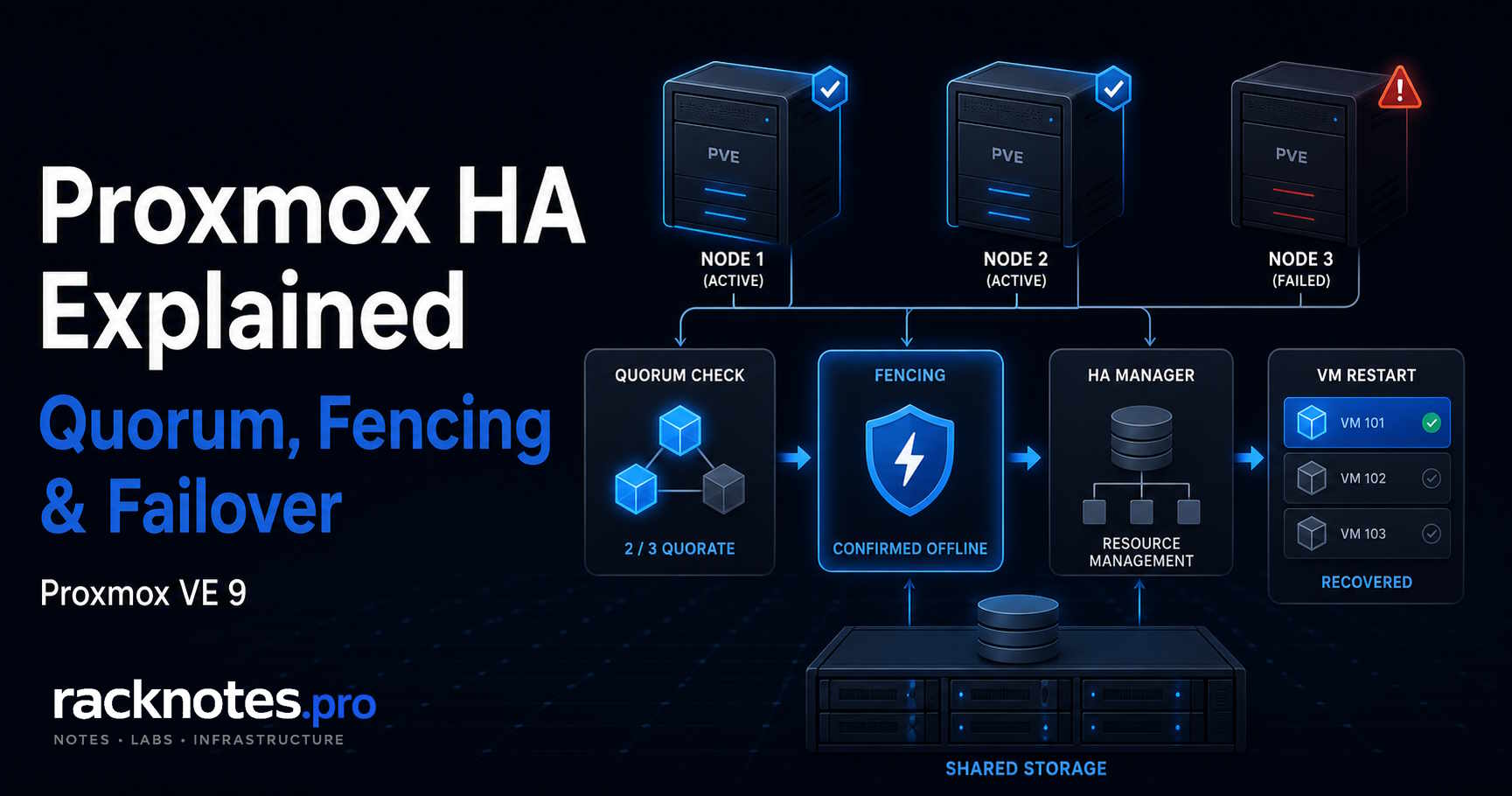
When a cluster node becomes unreachable, the sequence is:
- Corosync stops receiving heartbeats and, after the configured timeout, marks the node lost.
- The cluster recalculates quorum. If the surviving nodes still hold a majority, recovery can proceed; if not, everything stops here.
- The CRM waits for fencing confirmation – the failed node’s watchdog must actually expire and reboot it.
- Once fencing is confirmed, the CRM selects a recovery target from the eligible nodes, honoring any affinity rules.
- The LRM on the target node starts the guest cold, from its last disk state – whatever was in RAM is gone.
Proxmox’s own documentation describes typical error-detection-plus-failover time as roughly 2 minutes for a well-behaved cluster – that’s documented, general behavior, not a per-incident guarantee. Actual duration depends on detection timeout, watchdog delay, quorum state, target-node availability, guest boot time, and storage availability, so treat any specific number as a rough expectation, not an SLA.
Proxmox HA Manager: CRM and LRM
The CRM makes cluster-wide decisions: it enforces each resource’s requested state, decides where a resource recovers after a fencing event, and hands the actual start/stop work to the appropriate node’s LRM. The LRM works locally: it holds an exclusive lock while active, executes CRM requests on its own node, and keeps the local watchdog fed.
To see which node currently holds the active CRM role, and the state of every managed resource:
ha-manager statusThe output lists the quorum state, the active master node, each node’s LRM state, and every managed resource with its current state and location. This is the first command to run when something about HA looks wrong.
Proxmox HA States and Error Recovery
A resource’s requested state (what you asked for) and its current state (what the CRM actually observes) are different things. Confusing the two is a common source of misunderstanding when reading HA status.
Normal and transitional states cover started, stopped, starting, stopping, request_stop, and migrate. queued means the resource was newly added and hasn’t been processed by the CRM yet.
Failure and recovery states need more attention: fence means the resource’s node is waiting to be fenced, recovery means the CRM is searching for a new eligible node once fencing confirms, freeze is used during reboots and package updates so the resource isn’t touched mid-restart, ignored removes a resource from HA tracking without deleting its configuration, disabled means the resource is stopped and explicitly marked disabled, and error requires operator attention.
An HA resource in error state has exhausted its configured restart and relocate attempts, or hit a condition the HA manager can’t resolve on its own. It won’t be touched again until an operator intervenes: bring the resource to a safe state, disable it to clear the error flag, fix whatever caused the failure, then request started again. Two settings control how many attempts happen before that: max_restart (retries on the same node) and max_relocate (attempts to move to a different node), both defaulting to one.
Quorum and Why HA Stops Without It
Quorum exists to prevent split-brain. If a network partition splits a cluster in two and both halves keep acting independently, each side could start the same guest against the same disk at the same time. That can corrupt shared storage. Corosync requires a strict majority of configured nodes to be visible before the cluster will act at all. In a 3-node cluster, losing one node still leaves 2 of 3 – quorum holds. Losing two leaves 1 of 3 – quorum is gone, and the cluster stops making decisions rather than risk a bad one. Without quorum, /etc/pve becomes read-only, and HA will not attempt any recovery.
Check quorum state directly:
pvecm statusThe output shows Quorate: Yes or No, current votes, and expected votes. For 2-node topology, QDevice design, and quorum recovery procedures, see the Proxmox cluster quorum guide – this page only covers why quorum gates HA decisions, not how to design or recover it.
Proxmox HA Fencing and the Watchdog
Fencing exists to guarantee a failed node is actually stopped before its guests start elsewhere. Without that guarantee, a node that is unreachable on the cluster network but still alive and writing to shared storage could keep running the same guest that has just restarted on another node. Fencing must complete before recovery begins; that ordering isn’t configurable.
Proxmox’s default and primary fencing mechanism is watchdog-based self-fencing, not external power control. The LRM continuously resets a countdown timer on /dev/watchdog as long as it’s healthy and the node has quorum. If the node loses quorum – network isolation, kernel panic, LRM crash – it stops resetting the timer, the timer expires after 60 seconds by default, and the resulting reboot is the fencing confirmation the CRM needed.
lsmod | grep -i watchdogha-manager status is the better first HA-level check, since it reports CRM and LRM watchdog state directly (armed, standby, disarming, disarmed); use lsmod when you need to verify which kernel watchdog module is actually loaded. The default module is softdog, a pure software implementation requiring no additional hardware. A supported hardware watchdog can be configured instead by setting WATCHDOG_MODULE in /etc/default/pve-ha-manager, which the watchdog-mux service reads at startup – hardware watchdogs are disabled by default for safety and need this explicit opt-in.
Watchdog unavailable or misconfigured. Proxmox HA depends on a working watchdog path for safe fencing. If the expected watchdog is unavailable after a kernel or configuration change, verify the active watchdog state before relying on HA. Check the configured module and confirm the HA watchdog state with ha-manager status; if the intended software watchdog is missing, verify the host’s watchdog configuration before restoring HA operation.
For cluster-wide maintenance that may temporarily disrupt quorum or Corosync, such as reconfiguring cluster networking, current Proxmox versions can disarm the HA stack and release CRM/LRM watchdogs in a controlled way. The command requires a resource mode: ha-manager crm-command disarm-ha freeze keeps HA-managed resources in their current state while new HA requests are paused, while ha-manager crm-command disarm-ha ignore removes them temporarily from HA tracking. Re-arm the stack afterward with ha-manager crm-command arm-ha. While HA is disarmed, automatic fencing, failover, and recovery are disabled, so keep the maintenance window as short as possible.
How to Enable Proxmox HA for a VM or Container
HA protection is not automatic. Every VM or container must be explicitly added as an HA-managed resource before HA manages it.
- Confirm the cluster is quorate and the guest’s storage is reachable from the nodes it should run on.
- Add the resource:
ha-manager add vm:100 --state started(containers usect:instead ofvm:). - Apply a node affinity or resource affinity rule if the guest needs to be restricted to specific nodes.
- Verify with
ha-manager status– the resource should show asstartedon its current node.
Existing VM and CT management commands forward to the HA stack automatically once a resource is HA-managed – qm stop 100 simply sets its requested state to stopped rather than acting immediately, since the HA stack works asynchronously and needs a few seconds to reflect the change.
HA Rules, Node Affinity, and Placement
Legacy HA groups are deprecated in favor of HA rules as of Proxmox VE 9.0. Older clusters may still have groups configured, and they continue to work, but new placement constraints should use rules instead.
A node affinity rule ties one or more resources to one or more nodes, either as a soft preference or, with strict set, as a hard requirement that prevents the resource from running elsewhere. Priorities work the same way groups used to: nodes can be ranked, and the CRM prefers the highest-priority nodes that are actually available. A resource affinity rule instead constrains resources relative to each other: a positive rule keeps selected resources together on the same node (useful for chatty services), while a negative rule keeps them on separate nodes (useful for guests that shouldn’t share a failure domain). Each managed resource also carries a failback property (enabled by default) controlling whether it automatically migrates back once its preferred node returns – useful to disable temporarily during investigation of a fenced node, so a resource doesn’t jump straight back onto hardware you’re still checking.
Proxmox HA Maintenance Mode
For planned work where HA resources should be evacuated from a node before maintenance, use manual maintenance mode instead of relying on the normal shutdown policy:
ha-manager crm-command node-maintenance enable NODENAMEThe node’s LRM marks itself unavailable for new placements while continuing to process the migrations required to move its HA resources away. Under normal operation, this evacuates the node without invoking failure recovery. Once the resources have moved and the maintenance work is complete, disable maintenance mode:
ha-manager crm-command node-maintenance disable NODENAMEResources are moved back automatically once maintenance mode is disabled and the node is back online, unless they were manually relocated in the meantime.
Separately, Proxmox’s shutdown policy (Datacenter → Options → HA Settings) governs what happens on an ordinary shutdown or reboot even without maintenance mode: the default Conditional policy stops and later restarts resources elsewhere on a plain shutdown, but freezes them in place through a reboot so they come back on the same node rather than migrating unnecessarily. Migrate and Failover policies are also available depending on whether you want guests moved live or simply recovered afterward.
Storage Requirements for Proxmox HA
The recovery node needs access to everything the guest depends on, most importantly its disks. Two architectures satisfy that requirement:
Shared storage – Ceph, NFS, iSCSI, or another supported shared backend – is the common and most direct model, since the target node already has access to the same guest disks with nothing to synchronize first. Proxmox storage covers backend selection generally, and Proxmox shared storage covers NFS, iSCSI, and Ceph specifically as shared architectures.
Local ZFS with storage replication is a separate, supported alternative. Proxmox’s own storage replication documentation confirms HA is allowed in combination with replication, with one caveat that matters operationally: replication is asynchronous, so a node failure can lose any guest writes made after the last completed sync. Shared storage and ZFS replication are different HA storage architectures with different RPO characteristics, not interchangeable labels for the same guarantee. Detailed replication scheduling is a separate topic from this page.
HA vs Live Migration vs Storage Replication
These mechanisms solve different problems:
| Mechanism | Primary purpose |
|---|---|
| HA | Automatic guest recovery after an unplanned node failure |
| Live migration | Planned workload movement while source and target are both healthy |
| Storage replication | Asynchronous copy of eligible guest volumes between nodes |
| Backup and restore | Independent, historical recovery copy |
HA and storage replication can be combined, as covered above. Replication is not just a DR feature either – it also reduces the data that has to move during a manual migration to a node that already holds a recent copy. Backup remains a separate protection layer regardless of which of the others are in use; see Proxmox backup strategy for how that fits into the bigger picture.
Proxmox HA Prerequisites
Before adding any HA resources, confirm:
- The cluster is quorate:
pvecm status - HA daemons are running on every node:
systemctl status pve-ha-crm pve-ha-lrm - A watchdog is active:
lsmod | grep watchdog - The guest’s required storage – shared backend or replication target – is actually reachable from every eligible node
- Eligible target nodes have spare capacity to absorb the guest if the current node fails
- Network interfaces and any device passthrough the guest depends on exist on every eligible node, not just its current one
- Time is synchronized across nodes – Corosync is sensitive to clock drift
- Cluster and fencing traffic is permitted between nodes; the Proxmox firewall guide covers the specific ports an HA-enabled cluster needs open
How to Test Proxmox HA Safely
Configuring HA and assuming it works risks discovering misconfigurations during a real outage instead of before one.
- Confirm the watchdog is loaded:
lsmod | grep watchdog - Confirm HA services are active on every node:
systemctl status pve-ha-crm pve-ha-lrm - Confirm the guest’s storage is visible everywhere it needs to be:
pvesm status - Confirm the resource shows
started:ha-manager status - Confirm quorum is healthy:
pvecm status - Test failover on a disposable, non-critical guest only, in a controlled and documented window – not as a casual production test
- Review both logs afterward:
journalctl -u pve-ha-crmandjournalctl -u pve-ha-lrm
Run a real fencing test only after verifying the target node’s eligibility, confirming quorum will survive the test, and ensuring the guest is genuinely disposable. Document the actual observed recovery behavior rather than assuming it matches what the docs describe.
For log analysis during an HA event, the Proxmox logs guide covers what to look for in Corosync and HA daemon output specifically.
Common Proxmox HA Failure Patterns
Guest storage unreachable from every eligible recovery node. The CRM attempts a restart, fails because no eligible node can reach the required volume, and marks the resource error. This happens when a guest ends up on storage that isn’t actually shared, or when no supported replication path covers that volume – not only with local-only storage in the strict sense.
Quorum lost before fencing completes. A cluster without enough surviving votes cannot fence or recover anything until quorum returns – see the quorum section above for the recovery-procedure handoff.
All nodes updated at the same time. Version mismatches during simultaneous updates can destabilize Corosync. Update one node at a time and validate cluster health after each, as covered in the Proxmox update guide.
Guest won’t start after failover. This is usually a storage or configuration problem on the receiving node rather than an HA problem itself. Check ha-manager status for error, then journalctl -u pve-ha-lrm on the target node; the VM won’t start diagnostic guide covers individual startup failure modes in detail.
What Proxmox HA Does Not Protect Against
HA manages guest availability at the virtualization-cluster layer. It is not a data-protection feature.
Guest OS or application failures are a different failure domain. If the guest’s operating system freezes, the host is fine, quorum is intact, and HA sees a running guest with nothing to act on.
Storage failure affects every node that depends on that storage, so HA can’t route around it by definition – restarting the guest elsewhere doesn’t help if the new node can’t reach the data either. For actual storage recovery, see Proxmox Backup Server restore.
Single-node Proxmox has no HA at all – it’s a cluster feature by definition, regardless of any resource configuration.
Workloads that genuinely can’t tolerate a stop-and-restart cycle need application-level clustering – database replication, load-balanced services, active-active design – in addition to Proxmox HA, not instead of it.
FAQ
What is Proxmox HA?
Proxmox high availability is a cluster feature that automatically restarts protected VMs and containers on a surviving node when their original node becomes unreachable, coordinated by the CRM and LRM daemons with quorum and fencing as safety gates.
How do I enable HA in Proxmox?
Add the guest as a managed resource – ha-manager add vm:100 --state started – after confirming the cluster is quorate and the guest’s storage is reachable from its eligible nodes. Nothing is protected until it’s explicitly added.
What does ha-manager status show?
Cluster quorum state, which node holds the active CRM role, each node’s LRM state, and every managed resource with its current state and location – the standard first check for any HA question.
Does Proxmox HA require shared storage?
Not universally. Shared storage is the common model, but Proxmox also supports HA combined with local ZFS storage replication for eligible volumes. Because that replication is asynchronous, it introduces a non-zero RPO rather than the immediate access shared storage provides.
What happens when an HA resource enters error state?
It has exhausted its configured restart and relocate attempts and won’t be touched again automatically. Bring it to a safe state, disable it to clear the error flag, fix the underlying cause, then request started again.
Does Proxmox HA use live migration during a node failure?
No. Failover is a cold stop-and-restart on a surviving node – whatever was in RAM is lost. Live migration requires both nodes healthy and communicating, which isn’t true during an unplanned failure; use live migration for planned maintenance instead.
Can LXC containers use Proxmox HA?
Yes, with the same mechanism as VMs – ha-manager add ct:101 --state started – and the same underlying requirement that the container’s storage be reachable from its eligible recovery nodes.
Does Proxmox HA require Ceph specifically?
No. Any supported shared storage works – NFS, iSCSI, Ceph RBD, FC – or supported local ZFS replication as the alternative architecture. Ceph has no external single point of failure, which is why it’s often recommended for new builds, but it isn’t a requirement.
What happens if the node running CRM fails?
Another node’s standby CRM detects the loss and takes over the active role automatically. There’s no single point of failure in the manager layer, and recovery of the failed node’s own resources continues under the new CRM.
Final Thoughts
Proxmox HA is reliable once the prerequisites are in place: reachable storage for every protected guest, working fencing, and a cluster that holds quorum. The configuration itself isn’t complicated. What catches operators is structural: a guest quietly ends up on storage that isn’t reachable from its recovery nodes, a watchdog module goes missing after a kernel update, or a node was never really eligible for a resource in the first place.
A quick sanity check is worth running on a schedule rather than only once at setup:
ha-manager status
pvecm status
If both come back clean and every HA-protected guest’s storage checks out on the nodes it needs to run on, the cluster will behave the way you expect the next time a node actually fails.
Proxmox VE Series
28 articles – Installation · Storage · Networking · HA · Recovery