
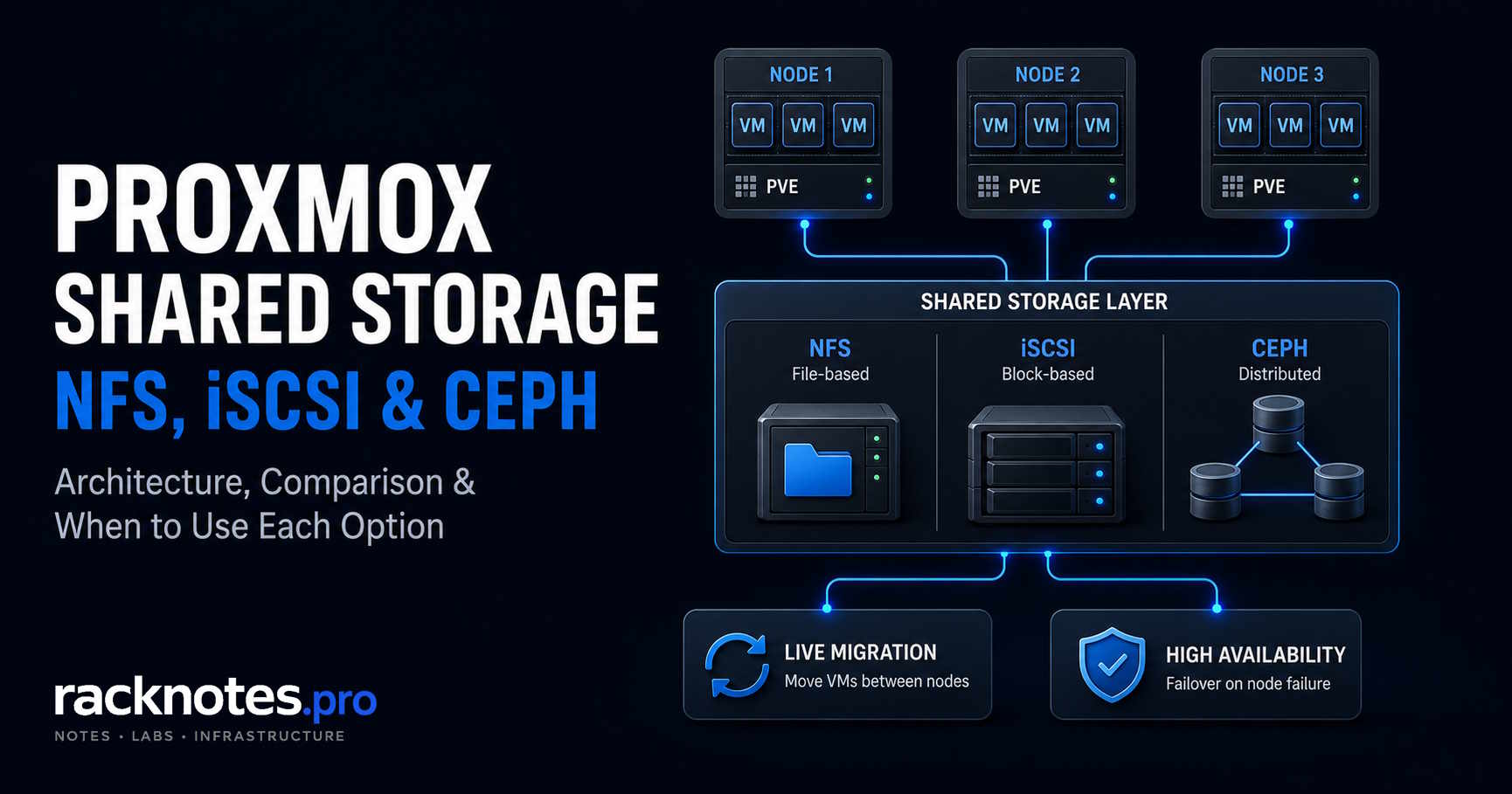
NFS if a reliable NAS already exists and simplicity matters most. iSCSI if a SAN with redundant paths is already in place. Ceph if the cluster itself needs to provide distributed storage and you can run three or more nodes with dedicated Ceph networking. Don’t add shared storage just because a cluster exists. Match it to what the VMs on it actually need.
- The
Sharedflag marks a storage as already shared – it doesn’t create sharing - Shared NFS or iSCSI solves data access for a 2-node cluster, not Corosync quorum
- Local ZFS with Proxmox storage replication is a separate, non-shared HA architecture, not shared storage by another name
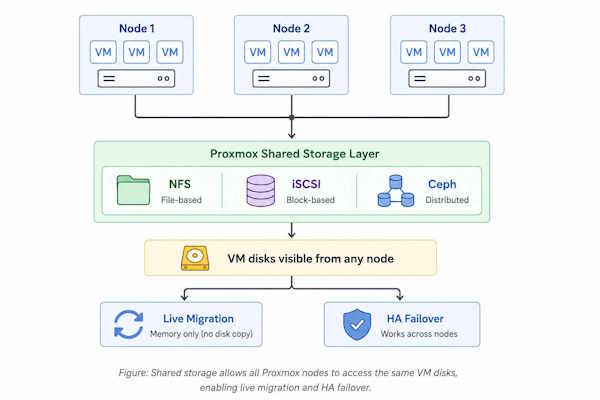
Proxmox shared storage means the same guest disk data is reachable from every cluster node that needs it – not just an identical config entry sitting in every node’s /etc/pve/storage.cfg. NFS, iSCSI, and Ceph solve that differently: file, block, and distributed block. The real question isn’t whether to use shared storage, but which option matches the infrastructure and failure tolerance already in place. Local ZFS with Proxmox storage replication is a separate, non-shared architecture worth knowing about before picking one of these three.
Proxmox Shared Storage: Quick Decision Table
| Factor | NFS | iSCSI / SAN | Ceph RBD |
|---|---|---|---|
| Storage model | File | Block | Distributed block |
| Shared between nodes | Yes | Yes (with LVM) | Yes |
| External storage system required | Yes | Yes | No (hyper-converged) |
| Setup complexity | Low | Medium | High |
| Failure domain | NAS / network | SAN / network paths | Distributed across cluster |
| Multipath consideration | Not applicable | Important for path redundancy | Different redundancy model |
| VM snapshots in Proxmox | qcow2 VM snapshots; backend/NAS snapshots depend on the NAS | PVE 9+ LVM volume-chain snapshots for VMs | Native RBD snapshots |
| Good fit | Small/medium cluster with existing NAS | Existing SAN/block infrastructure | Genuine distributed-storage requirement |
| Poor fit | NAS as unacceptable SPOF | Single-path, ad-hoc deployments | Small cluster without dedicated networking or ops capacity |
This comparison stays focused on shared storage; broader local-storage selection is a separate topic.
What Is Shared Storage in Proxmox?
Proxmox replicates /etc/pve/storage.cfg to every cluster node automatically through pmxcfs. Every node sees the same storage definitions the moment one node writes them. That’s shared configuration, which is easy to mistake for shared data.
Why operators get this wrong: two nodes can each have a directory storage entry named identically, pointing at /mnt/data, with the exact same storage.cfg syntax on both – while each node’s /mnt/data is a completely different physical disk. Proxmox has no way to know the difference until a migration or an HA failover actually tries to use it.
A storage definition marked shared tells Proxmox that an external mechanism – an NFS export, an iSCSI target, a Ceph pool – already guarantees the same content is reachable from every listed node. If that assumption is wrong, Proxmox may treat separate local data as if it were shared.
Failure Domains: Where Each Option Moves the Risk
Every Proxmox shared storage backend relocates the failure domain rather than removing it.
| Storage | Failure domain | What fails when it goes down |
|---|---|---|
| NFS | NFS server | VMs on that share freeze; HA can’t restart them elsewhere |
| iSCSI | SAN + each network path | Single-path loss hangs I/O; SAN failure drops every connected VM |
| Ceph | Distributed across the cluster | A node or disk is tolerated; a cluster-wide network failure is not |
What the Proxmox “Shared” Checkbox Actually Does
The shared property in storage.cfg – and the matching checkbox in Datacenter → Storage – is a marker, not a mechanism. Proxmox’s own storage documentation is explicit about it: the flag indicates a storage already has the same contents on all listed nodes, and checking it does not make a local storage’s contents automatically accessible to other nodes.
Do not mark independent local storage as shared. The flag tells Proxmox that the same underlying data is already available on the relevant nodes. If that assumption is false, migration or recovery operations can reference storage that’s missing or different on the target node.
Use shared only on backends where the sharing already exists at the storage layer – NFS, CIFS, iSCSI or FC with LVM on top, Ceph RBD, or CephFS. Local ZFS, plain local directories, and LVM-thin don’t become shared storage by marking them so; the underlying access has to exist first.
NFS: Proxmox Shared Storage Over a File Protocol
NFS mounts an exported directory from a NAS onto every node that needs it, at /mnt/pve/<ID>. Add it under Datacenter → Storage → Add → NFS with the server IP, export path, and a storage ID – Proxmox handles the mount and replicates the config to every node automatically. Use the server’s IP address rather than its hostname; a slow or unavailable DNS lookup at boot is one more way a mount can fail for no operational reason.
If the NAS itself is still being selected or built, this practical NAS guide covers prebuilt and DIY systems, storage platforms, and common NAS operating systems.
nfs: nfs-store
    server 192.168.1.100
    export /export/pve
    path /mnt/pve/nfs-store
    content images,iso,backup
The practical setup is straightforward: export the share on the NAS, add it under Datacenter → Storage, choose the content types it should hold, restrict it to specific nodes if needed, then confirm the mount from every node that’s supposed to use it.
NFS works well for shared ISO/template libraries, ordinary PVE backup files, and VM storage when the NAS and network meet the workload and availability requirements. For latency-sensitive or write-heavy databases, validate NFS against the actual NAS, network, NFS version, caching policy, and workload before choosing it for VM disks – the limiting factor may be the storage appliance or network rather than NFS itself.
# Storage active on all nodes
pvesm status

# Mount is live
df -h | grep /mnt/pve/nfs-store

# Verify export is visible from this node
showmount -e 192.168.1.100

# Check latency - nfs-utils package required
nfsiostat 1 5
Establish a latency baseline for the actual workload with nfsiostat rather than trusting a fixed millisecond number pulled from someone else’s environment. Investigate sustained latency or retransmits that correlate with guest I/O stalls, not a specific threshold. Making NFS itself highly available needs redundancy on the NAS side – clustered NAS, ZFS replication with an automatic-failover VIP, or equivalent. Proxmox alerts on an unreachable share, but it can’t restart VMs elsewhere if the storage itself is what failed.
iSCSI: Block-Level Proxmox Shared Storage
iSCSI presents a LUN over IP. Proxmox can expose iSCSI LUNs directly, but iSCSI itself provides no space-allocation interface. A common Proxmox design is therefore to present a larger shared LUN and place shared LVM on top so Proxmox can allocate guest volumes itself – every node that connects to the same target and sees the same LUN also sees the same volume group, which satisfies the shared-storage requirement at the block layer.
iscsi: my-iscsi
    portal 192.168.1.200
    target iqn.2006-01.org.freenas.ctl:mytarget
    content none

lvm: iscsi-vms
    vgname vg-iscsi
    base my-iscsi:0.0.0.0.0.0.0.0.1
    content images
    shared 1
content none on the iSCSI entry keeps Proxmox from writing anything directly onto the raw LUN – the LVM layer is where VM disks actually live. Since Proxmox VE 9, LVM storage also supports snapshots as a volume chain, which narrows one of the older gaps against file-based backends, though it’s still not equivalent to native RBD snapshots on Ceph.
A single network path to the target is a single point of failure for every VM on that LUN. If the path fails, I/O can stall until the session reconnects. Proxmox’s multipath guide covers configuring multipath-tools to maintain two or more independent paths, which turns a path failure into a failover instead of an outage. Check with multipath -ll and confirm more than one path shows active ready before trusting the setup.
# Verify multipath paths
multipath -ll

# Expected: multiple paths, both active ready
# 360014050a35f9e6b1234abcd
#   8:0:0:1  sdb 8:16  active ready running
#   9:0:0:1  sdc 8:32  active ready running
Whether iSCSI outperforms NFS depends on the SAN, the network, the queue depth, and the workload – not on the protocol alone. Block access removes file-layer translation overhead, which matters most under random I/O and write-heavy database loads, and matters much less for sequential access like ISO storage. Treat it as a workload-dependent tradeoff, not a fixed ranking.
Ceph RBD: Distributed Proxmox Shared Storage
Ceph doesn’t present a share or a LUN from an external box. It distributes data across disks on multiple Proxmox nodes simultaneously. In a typical replicated Ceph pool, data is stored across multiple replicas placed according to the configured CRUSH failure domains – with replica size and placement configured appropriately, the cluster tolerates defined disk or node failures without losing data. Proxmox ships Ceph installation and management tooling natively, so a hyper-converged deployment runs compute and storage on the same hardware.
That architecture differs fundamentally from NFS and iSCSI: there is no external NAS or SAN, RBD provides native snapshots and clones, and Ceph can rebalance data after an OSD failure. It is also the most operationally complex option here, with OSDs, monitor daemons, placement groups, and recovery behavior to manage.
Proxmox’s hyper-converged Ceph guidance calls for at least three identical servers, and monitor quorum needs a majority of monitors available – at least three are recommended so a single monitor loss doesn’t stop the cluster from agreeing on state. Proxmox also recommends at least 10 Gbps of network bandwidth dedicated to Ceph traffic; actual bandwidth needs grow with OSD count and disk speed, especially during recovery.
ceph -sA HEALTH_WARN state deserves investigation before adding more workload to the cluster, but it isn’t automatically an unsafe cluster – the same command shows the specific cause, and an OSD rebalancing after a planned disk swap looks very different from a monitor quorum problem.
Ceph earns its complexity when the cluster has three or more nodes, dedicated 10 Gbps-plus networking, and a team prepared to operate a distributed storage system. It’s the wrong call for a 2-node homelab, for a cluster without dedicated Ceph networking, or for anyone who values operational simplicity over storage-layer HA.
Best Shared Storage for Proxmox by Environment
| Scenario | Recommendation | Why |
|---|---|---|
| Single node | Local ZFS or LVM-thin | No second node to migrate to – shared storage adds complexity without benefit; see choose the right Proxmox storage backend |
| 2 nodes, existing NAS | NFS | Simplest shared access when an existing NAS is available; the NAS remains a storage failure domain unless it’s independently redundant |
| 2 nodes, existing SAN | iSCSI + LVM + multipath | Uses existing shared-block infrastructure and supports redundant SAN paths; validate performance against the actual workload |
| 3+ nodes, distributed-storage requirement | Ceph | Fits when hardware, network, and operations model can support it |
| Small cluster, local ZFS only | Not shared storage | Local ZFS stays node-local regardless of naming – HA or fast migration without a shared backend is a separate replicated-storage architecture, out of scope here |
Node count and storage availability are separate design concerns. Adding NFS or iSCSI to a 2-node cluster doesn’t by itself make that cluster safe for HA – quorum still needs its own answer, covered next.
Proxmox 2-Node Shared Storage: What It Solves – and What It Doesn’t
Shared NFS or iSCSI storage makes a VM’s disk reachable from either of two nodes. It does not solve Corosync quorum, fencing, witness/QDevice design, spare compute capacity, or the storage system’s own availability. In a normal two-node cluster, losing one node leaves the survivor with only one of two expected votes, which isn’t a majority – shared storage doesn’t change that quorum math. A QDevice or other supported quorum design is a separate requirement.
For the quorum side of a 2-node setup, see two-node Proxmox quorum and QDevice. Shared storage and quorum are separate requirements that both need to be addressed before a 2-node cluster is HA-ready.
Shared Storage for Live Migration
With shared storage, the target node already has access to the guest’s disks, so migration doesn’t need to copy those disk volumes to the target – that usually means less data moves compared with a migration that must also transfer local guest storage. Guests on local-only storage aren’t locked out of migration entirely: Proxmox can migrate them by transferring the storage as part of the migration process, which generally means more data movement and a longer migration. Live migration and shared storage are related, but shared storage is not a universal requirement.
Shared Storage for Proxmox HA
Proxmox HA restarts a VM on a surviving node after a failure, and that only works if the surviving node can actually reach the VM’s required disks. Shared storage is the usual way to guarantee that immediately. It isn’t the only supported way: eligible local ZFS storage can use Proxmox’s built-in storage replication instead, syncing snapshots to another node on a configurable schedule as short as one minute.
Proxmox documentation confirms that HA can be used with storage replication, with one important caveat: replication is asynchronous, so a node failure can lose any changes made after the last successful sync. Shared storage and ZFS replication are different HA storage architectures with different RPO characteristics.
If a single NAS or SAN is itself unavailable, compute HA cannot restart a guest whose disks depend on that storage. Compute-node redundancy and storage-system redundancy therefore need to be designed independently.
For HA cluster requirements and design, see Proxmox HA cluster requirements. For the failover mechanics themselves, see how Proxmox HA failover works. Replication scheduling and RPO tuning for the local-ZFS alternative are their own topic, out of scope here.
How to Validate Proxmox Shared Storage Between Nodes
- Storage state –
pvesm statusconfirms the storage showsactiveon every node meant to use it. - Node reachability – confirm the backend answers from each intended node with a backend-appropriate check (
showmount -e,iscsiadm -m session,ceph -s), not one universal command. - Same underlying data – confirm nodes are reading the same backend content, not identically-named independent local paths.
- Guest disk placement – verify the specific VM/CT disk that needs mobility or HA is actually stored on the shared backend, not on local storage under the same VM.
- Test migration – run a controlled migration between the nodes meant to share the storage and confirm that disks located on the shared backend don’t require a storage copy to the target node.
- Failure-domain test – validate the failure modes appropriate to the architecture using a lab/non-production environment or a documented maintenance procedure: a redundant storage-network path failure, a planned node reboot, or a controlled Ceph component-maintenance test.
- Monitoring – alert on storage availability, capacity, and latency; add network retransmit checks, Ceph health, and multipath path-state where relevant.
Shared Storage Best Practices
- Separate storage traffic from guest/management traffic once workload or scale justifies it
- Build in redundant paths where the availability requirement justifies the cost
- Never mark a plain local filesystem
sharedjust to silence a migration warning - Restrict storage to the nodes that actually need it with the
nodesoption - Monitor capacity – a storage that fills up produces guest I/O errors, not a clean failure
- Validate recovery behavior during a planned test, not just connectivity
- Keep backup design independent of storage HA: shared storage is not a backup, and a redundant SAN doesn’t replace a real backup strategy
FAQ
What is the best shared storage for Proxmox?
It depends on the environment. NFS fits simplicity or an existing NAS, iSCSI fits existing shared block/SAN infrastructure, and Ceph fits distributed storage when the cluster scale and operational capacity justify it. There is no universal winner.
Does Proxmox require shared storage for live migration?
Not universally. With shared storage, the target node already has access to the guest disks, so migration doesn’t need to copy them, which reduces the data transferred. Local-storage migration is also supported; Proxmox transfers the disk data as part of the process, which generally takes longer for large disks.
Does Proxmox HA require shared storage?
Not strictly. Shared storage is the usual design, but supported Proxmox storage replication with eligible local ZFS can also serve HA. Replication is asynchronous, so a node failure can lose data created since the last successful sync.
Can a 2-node Proxmox cluster use shared storage?
Yes – shared NFS or iSCSI storage can be reachable from both nodes. That alone doesn’t solve Corosync quorum or QDevice design; those need their own answer for a 2-node cluster to be HA-ready.
What does the Shared checkbox do in Proxmox?
It marks a storage definition as already shared at the storage layer. It does not make local storage shared – the underlying access has to exist first.
Is NFS or iSCSI better for Proxmox VM storage?
Neither is universally better. Compare operational simplicity, existing infrastructure, failure domains, path redundancy, and the actual workload before choosing one.
Is Ceph shared storage in Proxmox?
Yes. Ceph RBD is a distributed, shared block-storage backend – architecturally different from an external NAS or SAN, since the Proxmox nodes themselves are the storage.
Final Thoughts
NFS is the simplest shared VM storage when a suitable NAS already exists and the setup can tolerate it as a single storage-side dependency.
iSCSI fits environments where SAN infrastructure and redundant paths already exist and shared block access is required. Configure multipath correctly from the start; retrofitting it into a running deployment is messier than doing it right the first time.
Ceph fits when distributed storage without an external dependency is a genuine requirement and the hardware can support it: three or more nodes, dedicated networking, and a team prepared to operate a distributed system.
If the goal is HA or faster migration while keeping VM disks on local ZFS, use the separate shared-nothing architecture built around Proxmox storage replication rather than treating local ZFS as shared storage.
Proxmox VE Series
28 articles – Installation · Storage · Networking · HA · Recovery