
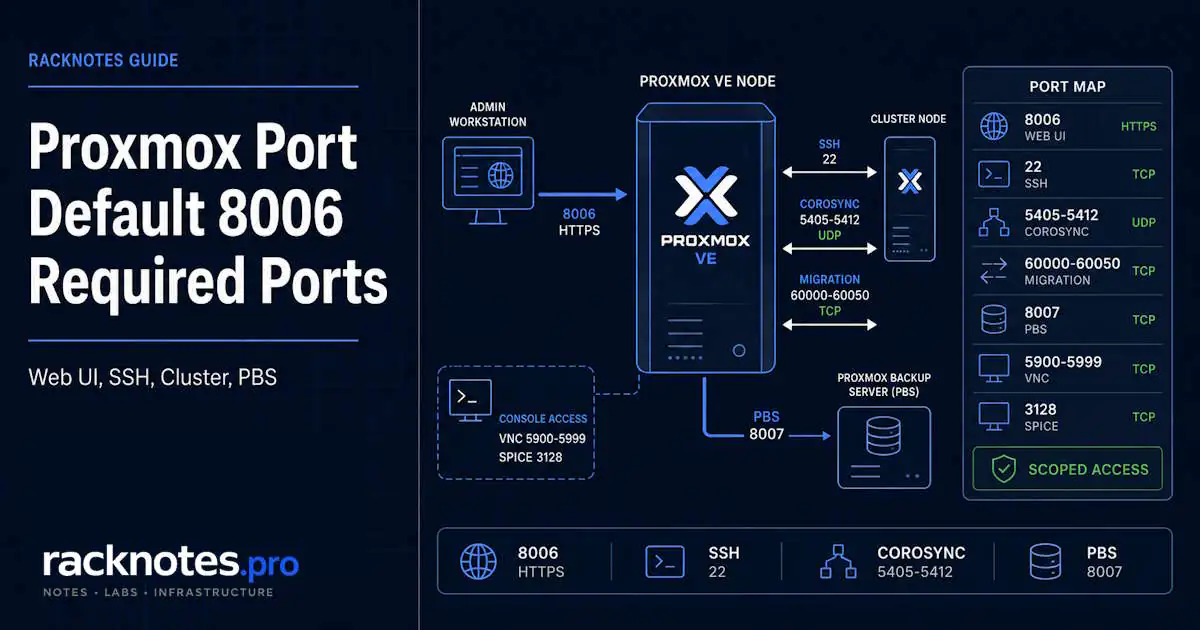
The default Proxmox port is TCP 8006, used by the HTTPS web interface and external REST API through pveproxy. Open https://SERVER-IP:8006/ to reach the Proxmox management interface.
Port 8006 is the main management endpoint, but Proxmox VE can also use additional ports for SSH, Corosync, live migration, VNC/SPICE consoles, and any storage or backup services you deploy. This guide covers the main Proxmox VE service ports administrators need to account for, which ones apply only to clusters or optional services, and how to scope firewall rules correctly instead of opening everything at once. A standalone host and a multi-node cluster do not need the same ports open.
If you’re new to the platform itself, see What Is Proxmox VE?
- Default Proxmox web/UI port: TCP 8006
- External Proxmox API port: TCP 8006 (same service,
pveproxy) - SSH / cluster actions: TCP 22
- VNC web console: TCP 5900-5999
- SPICE proxy: TCP 3128
- Corosync: UDP 5405-5412
- Live migration: TCP 60000-60050
- Proxmox Backup Server UI/API: TCP 8007, if PBS is used
Do not open every listed port to every network. Allow only the source/destination paths that actually need each service, as covered in the firewall-scoping section below.
What Is the Default Proxmox Port?
TCP 8006. Proxmox VE’s web interface and external API are both served over HTTPS at https://IP-or-hostname:8006/, handled by the pveproxy service. On a fresh install, your browser will likely warn about an untrusted certificate the first time you connect – that’s expected until you install a valid certificate, and it’s a separate topic from the port itself.
Proxmox VE Ports Reference
| Port | Protocol | Service | Who normally needs access | Required? |
|---|---|---|---|---|
| 8006 | TCP | Proxmox VE web UI + external API | Admin/management clients | Yes, for remote management |
| 22 | TCP | SSH / cluster actions | Admins and cluster nodes | Cluster/admin dependent |
| 5900-5999 | TCP | VNC web console | Proxmox console proxy / relevant management path | Console dependent |
| 3128 | TCP | SPICE proxy | SPICE clients | Only if SPICE is used |
| 5405-5412 | UDP | Corosync cluster traffic | Cluster nodes only | Cluster only |
| 60000-60050 | TCP | Live migration | Cluster nodes / migration network | Migration only |
| 8007 | TCP | Proxmox Backup Server web/API/backup service | PVE/PBS clients as needed | PBS only |
This table reflects the current official Proxmox VE firewall documentation. “Used by Proxmox” does not mean “open globally.” Each row has a specific traffic path, such as admin workstation to node, node to node, a dedicated migration network, or an optional service path. Scope each firewall rule to the path that actually needs it.
A useful distinction before going further: a listening port means a service is bound locally on the host. A firewall rule determines which sources are allowed to reach that service. Port forwarding is different: it translates traffic arriving on one address or port to another destination, such as a VM. This article covers the first two; port forwarding is a separate topic.
Proxmox’s documentation also lists a few service-specific entries that aren’t general firewall requirements: rpcbind on UDP 111, and outgoing sendmail traffic on TCP 25. These matter only in specific contexts (certain NFS setups, outbound mail notifications) and shouldn’t be treated as ports every installation needs to open.
Proxmox Web Interface and API Port 8006
TCP 8006 is TLS/HTTPS, not plain HTTP. The web UI is built on the Proxmox API, and external API requests use the same TCP 8006 endpoint, served by pveproxy per its service documentation.
There’s a related internal port worth knowing about if you’re inspecting running processes: pvedaemon, the privileged backend service, listens only on 127.0.0.1:85 – localhost, not externally reachable. That’s not the port administrators connect to, and it should never be exposed remotely. If you notice port 85 while checking ss output, that’s what it is.
Proxmox Console Ports: VNC and SPICE
VNC Web Console Ports 5900-5999
The browser-based console (noVNC) that opens when you click “Console” on a VM uses a port somewhere in the TCP 5900-5999 range, allocated per session rather than fixed per VM. If the main web GUI loads over 8006 but console windows fail to connect, this range may be blocked on the relevant management path. The two failures involve different ports.
SPICE Proxy Port 3128
TCP 3128 is only relevant if you actually use SPICE consoles (via remote-viewer or a similar SPICE client) instead of the default noVNC console. If you never use SPICE, this port isn’t part of your firewall scope at all.
Proxmox Cluster Ports
Corosync and live-migration ports apply only to clustered hosts. TCP 22 is also used for normal SSH administration on standalone nodes, but Proxmox clusters additionally require SSH connectivity between nodes.
SSH Port 22
Used for admin access on any node, standalone or clustered, and for certain cluster-to-cluster actions Proxmox performs between nodes. Restrict it to trusted admin networks and cluster node IPs rather than leaving it open broadly.
Corosync Ports 5405-5412 UDP
Cluster nodes need bidirectional UDP reachability on 5405-5412 for Corosync, the underlying cluster communication layer. Do not expose these ports to arbitrary client networks. Corosync is node-to-node traffic, and reliable, low-latency connectivity between nodes matters more than simply having the ports unblocked. Corosync design, quorum, and redundant links are covered in Proxmox HA Cluster and Proxmox HA Explained – this page only covers which port needs to be open.
Live Migration Ports 60000-60050 TCP
Live migration transfers a running VM’s memory and, depending on storage configuration, local disk data between nodes over TCP 60000-60050. This needs to be reachable on whichever network path is actually configured for migration traffic – if you’ve set up a dedicated migration network, scope the firewall rule to that network specifically, not to every interface on the node.
Proxmox Backup Server Port
Proxmox Backup Server (PBS) is a separate product from Proxmox VE, with its own web interface, API, and backup protocol all served over TCP 8007 by default. Only environments running PBS need this port open, and it should be scoped between the specific PVE and PBS endpoints that need to communicate. See Proxmox Backup Strategy for PBS architecture and retention design beyond the port itself.
Which Proxmox Ports Should You Open in a Firewall?
Scope depends on whether the host is standalone, clustered, or running optional services – not on the full table above.
Single standalone Proxmox host. Typically just TCP 8006 from your trusted admin network, TCP 22 if you need SSH access, and console-related ports only when required by the console and access topology you actually use. No Corosync or migration range applies – those are cluster-only, and a standalone host never needs them regardless of what a generic port list suggests.
Proxmox cluster. Add UDP 5405-5412 for Corosync and TCP 60000-60050 where live migration is used, scoped to the required node-to-node paths. TCP 22 must also be reachable between cluster nodes, and may separately be allowed from trusted administrative networks when SSH management is required – it isn’t exclusively node-to-node the way Corosync and migration traffic are.
PBS environment. Add TCP 8007, scoped specifically between the PVE and PBS endpoints that need it – not broadly to every host on the network.
The underlying principle is to open ports by traffic path, not by copying the whole Proxmox port list into one allow-any rule. A port being “used by Proxmox” tells you what to scope, not where to expose it.
How to Check Which Ports Proxmox Is Listening On
ss -lntupNarrower, for the common management and console ports:
ss -lntup | grep -E ':(22|3128|8006|8007|590[0-9]|59[1-9][0-9])\b'For the primary management service specifically:
ss -lntp | grep ':8006'
systemctl status pveproxy
To confirm the endpoint responds locally:
curl -k https://127.0.0.1:8006/api2/json/versionA valid HTTP response confirms the HTTPS/API endpoint is reachable locally – this checks reachability, not full authenticated API access. -k skips certificate verification, which is fine for a local diagnostic against a certificate you haven’t yet replaced, not something to rely on for anything beyond that.
Proxmox Port 8006 Not Reachable
Work through this in order:
- Confirm the host’s management IP:
ip -br addr - Confirm
pveproxyis running:systemctl status pveproxy - Confirm port 8006 is actually listening:
ss -lntp | grep ':8006' - Test locally on the host:
curl -k https://127.0.0.1:8006/ - Test from another management machine:
nc -vz PROXMOX-IP 8006 - If steps 1-4 succeed but step 5 fails, the problem is routing or firewall between the client and host, not Proxmox itself
For network-level troubleshooting beyond this point – bridge configuration, VLAN tagging, routing – see Proxmox Networking.
Should You Change the Proxmox Port 8006?
Usually not. Changing the port is not a substitute for access control. A different port number does not stop a targeted scan; it only changes what the scanner has to find.
Prefer, in order of preference: firewall policy restricting 8006 to trusted source addresses, a dedicated management VLAN, and VPN or jump-host access for anyone managing the cluster remotely. A reverse proxy in front of 8006 can be appropriate in some environments, but that is a deliberate architecture decision, not a quick port change. Older forum guides describing edits to Proxmox’s Perl service files or hard-coded proxy configuration are not a supported approach, and this article won’t reproduce them – if current Proxmox documentation doesn’t describe a supported method for relocating 8006, that’s the honest answer, not a workaround.
Proxmox Ports You Should Not Confuse With Port Forwarding
Opening TCP 8006 for the Proxmox management interface and forwarding an internet-facing port to a VM are different tasks, even though both are often described as “opening a port.” This article covers the ports Proxmox VE’s own services use on the host – the management interface, consoles, cluster communication, backup. Port forwarding – NAT/DNAT from a public address and port to a VM or container’s private IP – is a separate networking task with its own configuration and its own failure modes, covered in a dedicated guide rather than here.
FAQ
What is the default Proxmox port?
TCP 8006, for the Proxmox VE HTTPS web interface and externally exposed API.
What port is the Proxmox web interface?
TCP 8006.
Does the Proxmox API use port 8006?
Yes. The external API is exposed through pveproxy on TCP 8006, the same port as the web GUI. The privileged backend pvedaemon listens only locally on 127.0.0.1:85.
What ports does a Proxmox cluster need?
TCP 22 for SSH and cluster actions, UDP 5405-5412 for Corosync, and TCP 60000-60050 for live migration when it’s used. Additional storage or service ports depend on your specific architecture.
What port does Proxmox Backup Server use?
TCP 8007 by default.
Is Proxmox port 8006 HTTP or HTTPS?
HTTPS/TLS.
Do I need to open Proxmox port 8006 to the internet?
No. Remote management should normally be restricted to trusted administrative paths – a management network, VPN, firewall allowlist, or controlled jump host – rather than exposed directly.
Is port forwarding the same as opening a Proxmox port?
No. Port forwarding is NAT/routing traffic to another destination, such as a VM. This article covers the ports Proxmox VE’s own services use, which is a different task.
Proxmox VE Series
28 articles – Installation · Storage · Networking · HA · Recovery